2. What one GPU means
So far our pods have asked for nvidia.com/gpu: 1 as if a GPU were a single, indivisible
thing. In this chapter, we will open that unit up. We will first look at what a GPU is
made of and measure the one in our cluster, then see exactly what Kubernetes gives a pod
when it grants one unit. Then we will go through the ways a GPU can be shared or divided:
time-slicing, the Multi-Process Service, Multi-Instance GPU, virtual GPUs, and Dynamic
Resource Allocation. We will try time-slicing on our own cluster and measure what it
does.
This chapter covers
- streaming multiprocessors, warps, and the levels of GPU memory
- the properties of the GPU in our cluster, read with a CUDA program
- what a pod receives with one
nvidia.com/gpuunit - time-slicing, measured with three pods on one GPU
- MPS, MIG, vGPU, and Dynamic Resource Allocation
- which method suits which kind of workload
The programs in this chapter
We use four programs, two that run on the GPU and two that look at the cluster.
gpu_info and gpu_load are CUDA programs in code/gpu-sharing. We compile them on the
host with nvcc, the CUDA compiler, for the compute capability of our GPU, and link the
CUDA runtime library into each binary. Each binary then needs only the driver library,
libcuda, at run time, and that library is one of the files the NVIDIA container runtime
mounts into a GPU container (Appendix A). We copy both binaries into one image,
gpu-sharing:1, and run them in pods that request nvidia.com/gpu. When such a pod
starts, the device plugin tells the kubelet to set NVIDIA_VISIBLE_DEVICES in the
container, the NVIDIA runtime adds the GPU’s device files and libcuda, and the CUDA
calls in our programs reach the GPU through them.
gpu_infoasks the CUDA runtime for the properties of the GPU it sees and prints them, one per line. It shows what onenvidia.com/gpuunit contains.gpu_loadlaunches a compute-heavy kernel ten times, waits for all ten to finish, and prints the elapsed time. Several copies running at once show how much GPU time each one receives.
gpuusage is written in Go (code/go/gpuusage) and in Rust (code/rust/gpuusage). It is
an ordinary Kubernetes client that runs on our workstation. It lists every node and every
pod through the API server, adds up the nvidia.com/gpu units that running pods hold on
each node, and prints them next to the node’s capacity. It shows the scheduler’s view of
the GPU: how many units exist and who holds them. We run it in a second terminal, from
code/go with go run ./gpuusage or from code/rust with cargo run -p gpuusage, while
the pods from code/gpu-sharing run.
What a GPU is made of
A GPU is a large number of simple processors grouped into streaming multiprocessors (SMs). Each SM contains arithmetic units (the CUDA cores for ordinary floating-point and integer work, and Tensor Cores for matrix multiplication), a large register file, schedulers, and a block of fast on-chip memory that is used as shared memory and L1 cache. A CUDA program launches a kernel, a function that runs on the GPU, as a grid of thread blocks. The GPU assigns each block to an SM, and the SM runs its threads in groups of 32, called warps. An SM keeps many warps resident at once and switches between them whenever one waits for memory, which is how a GPU hides memory latency: by having other work ready, where a CPU would rely on large caches.
Memory is arranged in levels, from fastest and smallest to slowest and largest:
- registers, private to each thread;
- shared memory and L1 cache, one block per SM;
- the L2 cache, shared by all SMs;
- device memory: HBM on data center GPUs, GDDR on graphics cards, and, on integrated GPUs such as the Jetson’s, the same LPDDR memory that the CPU uses.
Next to the SMs sit fixed-function engines. Copy engines move data between host memory and device memory while kernels run, so transfers and computation can overlap. Video decoders and encoders (NVDEC and NVENC) and JPEG decoders handle media without using the SMs.
A discrete GPU is a separate card with its own memory, attached over PCIe or a dedicated interconnect; a program copies data into that memory before a kernel can use it. An integrated GPU sits on the same chip as the CPU and shares the system’s memory with it.
Measuring our GPU
The CUDA runtime reports most of these properties through cudaGetDeviceProperties.
This program prints them, along with the current free and total device memory:
Listing 2.1 Reading the GPU's properties. code/gpu-sharing/gpu_info.cu
// gpu_info prints what one Kubernetes nvidia.com/gpu unit contains on the
// machine it runs on: the GPU's compute units, memory, caches, and engines.
//
// How it runs, end to end:
//   1. nvcc compiles this file on the host for the Orin's GPU (-arch=sm_87) and
//      links the CUDA runtime library statically (-cudart static), so the
//      binary needs only the CUDA driver library, libcuda, at run time.
//   2. The binary is copied into the gpu-sharing:1 image and run in a pod that
//      requests nvidia.com/gpu: 1.
//   3. The device plugin's Allocate answer sets NVIDIA_VISIBLE_DEVICES in the
//      container, and the NVIDIA container runtime mounts the GPU's device
//      files and libcuda into it.
//   4. The CUDA runtime calls below load libcuda, which opens the device files
//      and asks the kernel driver for the device's properties.
//
// Build: nvcc -O2 -arch=sm_87 -cudart static -o gpu_info gpu_info.cu
#include <cstdio>
#include <cuda_runtime.h>

// kGiB is the number of bytes in one gibibyte, for printing memory sizes.
constexpr double kGiB = 1024.0 * 1024.0 * 1024.0;

// main queries device 0 and prints one property per line. It exits with
// status 1 when no CUDA device is visible, for example in a container that
// was not given a GPU.
int main() {
    cudaDeviceProp p;
    if (cudaGetDeviceProperties(&p, 0) != cudaSuccess) {
        std::printf("no CUDA device visible\n");
        return 1;
    }

    // cudaMemGetInfo reports the memory that the driver can still allocate and
    // the total. On an integrated GPU both come from the system's shared RAM.
    size_t free_bytes = 0, total_bytes = 0;
    cudaMemGetInfo(&free_bytes, &total_bytes);

    std::printf("device                      %s\n", p.name);
    std::printf("compute capability          %d.%d\n", p.major, p.minor);
    std::printf("integrated with the CPU     %s\n", p.integrated ? "yes" : "no");
    std::printf("streaming multiprocessors   %d\n", p.multiProcessorCount);
    std::printf("max resident threads/SM     %d\n", p.maxThreadsPerMultiProcessor);
    std::printf("registers per SM            %d\n", p.regsPerMultiprocessor);
    std::printf("shared memory per SM        %zu KiB\n", p.sharedMemPerMultiprocessor / 1024);
    std::printf("L2 cache                    %d KiB\n", p.l2CacheSize / 1024);
    std::printf("device memory (total)       %.1f GiB\n", total_bytes / kGiB);
    std::printf("device memory (free now)    %.1f GiB\n", free_bytes / kGiB);
    std::printf("copy engines                %d\n", p.asyncEngineCount);
    std::printf("concurrent kernels          %s\n", p.concurrentKernels ? "yes" : "no");
    std::printf("managed memory              %s\n", p.managedMemory ? "yes" : "no");
    return 0;
}
The image for this chapter holds gpu_info and a second program, gpu_load, which we
use later:
Listing 2.2 The image that holds both CUDA programs. code/gpu-sharing/Dockerfile
FROM ubuntu:22.04
COPY gpu_info gpu_load /usr/local/bin/
CMD ["gpu_info"]
$ cd code/gpu-sharing
$ /usr/local/cuda/bin/nvcc -O2 -arch=sm_87 -cudart static -o gpu_info gpu_info.cu
$ /usr/local/cuda/bin/nvcc -O2 -arch=sm_87 -cudart static -o gpu_load gpu_load.cu
$ docker build -t gpu-sharing:1 .
$ kind load docker-image gpu-sharing:1 --name gpu-lab
We run it in a pod that asks for one GPU:
Listing 2.3 A pod that runs `gpu_info` with one GPU. code/gpu-sharing/gpu-info-pod.yaml
apiVersion: v1
kind: Pod
metadata:
  name: gpu-info
spec:
  restartPolicy: Never
  containers:
    - name: info
      image: gpu-sharing:1
      imagePullPolicy: Never
      command: ["gpu_info"]
      resources:
        limits:
          nvidia.com/gpu: 1
$ kubectl apply -f gpu-info-pod.yaml
$ kubectl logs gpu-info
device                      Orin
compute capability          8.7
integrated with the CPU     yes
streaming multiprocessors   8
max resident threads/SM     1536
registers per SM            65536
shared memory per SM        164 KiB
L2 cache                    2048 KiB
device memory (total)       15.3 GiB
device memory (free now)    1.8 GiB
copy engines                2
concurrent kernels          yes
managed memory              yes
The GPU in our cluster has 8 SMs. An Ampere SM of this generation has 128 CUDA cores, which gives the 1,024 cores in NVIDIA’s specification for the Orin NX, and each SM can hold 1,536 threads at once, 12,288 for the whole GPU. All SMs share a 2 MiB L2 cache, and two copy engines move data. For comparison, a data center H100 SXM5 has 132 SMs and 80 GB of HBM3 memory.
Figure 2.1 draws those numbers as one picture.
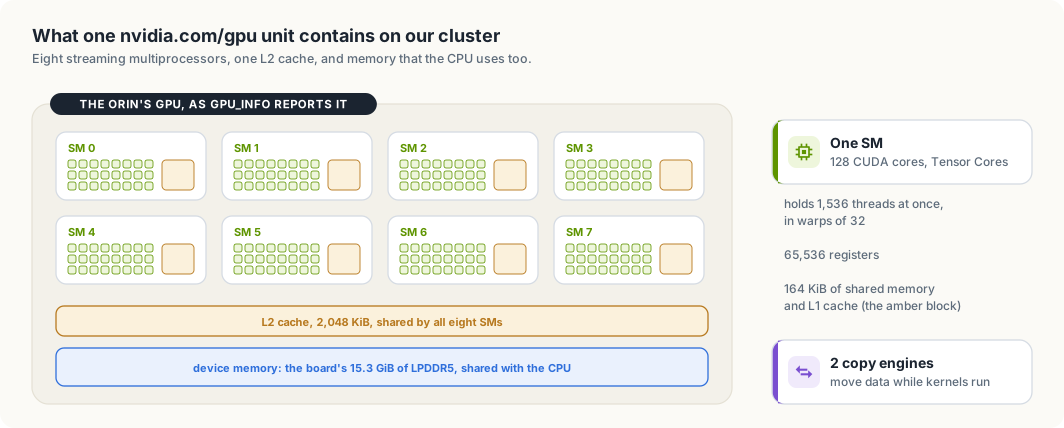
gpu_info. One nvidia.com/gpu unit is all of it.The memory lines show what “integrated” means in practice. The GPU’s device memory is the board’s 15.3 GiB of LPDDR5, the same memory the operating system and every CPU program use. Only 1.8 GiB was free when the pod ran, because other programs on the board were using the rest. On a discrete GPU, device memory belongs to the GPU alone; on an integrated GPU, the amount available to a kernel depends on everything else running on the machine.
The same measurement on a Thor
We also have a Jetson AGX Thor developer kit on the network. It runs Jetson Linux R39.2.1
with CUDA 13.2 and has no Kubernetes on it, so we compile gpu_info on the board and run
it directly:
$ /usr/local/cuda/bin/nvcc -O2 -cudart static -o gpu_info gpu_info.cu
$ ./gpu_info
device                      NVIDIA Thor
compute capability          11.0
integrated with the CPU     yes
streaming multiprocessors   20
max resident threads/SM     1536
registers per SM            65536
shared memory per SM        228 KiB
L2 cache                    32768 KiB
device memory (total)       122.8 GiB
device memory (free now)    44.8 GiB
copy engines                2
concurrent kernels          yes
managed memory              yes
The program is the same source file, and the two boards answer differently in four lines:
| Jetson Orin NX | Jetson AGX Thor | |
|---|---|---|
| compute capability | 8.7 | 11.0 |
| streaming multiprocessors | 8 | 20 |
| shared memory per SM | 164 KiB | 228 KiB |
| L2 cache | 2,048 KiB | 32,768 KiB |
| device memory | 15.3 GiB | 122.8 GiB |
Twenty SMs with 128 CUDA cores each give the 2,560 cores in NVIDIA’s specification for the Thor. The L2 cache is sixteen times as large, and the device memory is eight times as large. It is again the board’s own memory: 44.8 GiB were free when we ran the program, because two other programs on the Thor, a model server among them, held 24 GiB and 39 GiB at the time.
Both boards would advertise the same thing to a Kubernetes scheduler: nvidia.com/gpu: 1.
A job that needs 60 GiB of device memory fits on one of them, and the count alone does
not say which. Chapter 5 returns to this with node labels.
What one unit gives a pod
By default, the device plugin advertises one nvidia.com/gpu unit for each physical
GPU, and a pod that is granted a unit receives the whole device: every SM, all of its
memory, and all of its engines. Kubernetes counts extended resources as integers. A pod
cannot ask for half a GPU, and the node never hands out more units than it advertises.
gpuusage shows the same accounting that the scheduler does. It sums the GPU limits of
every pod that is bound to a node and has not finished, and compares the sum with the
node’s allocatable units. The Go version uses client-go’s typed clientset, and the Rust version uses kube-rs.
Low-level design: gpuusage
| Part | Does | Rule it keeps |
|---|---|---|
| counting one pod | adds up the nvidia.com/gpu limits of the pod’s containers | a pod counts from the moment it is bound to a node until it succeeds or fails |
| the report | lists nodes and pods with one request each, groups the pods that hold GPUs by node, and prints one row per node | in use plus free equals allocatable |
The first part decides what one pod holds.
Listing 2.4 What one pod holds, in Go. code/go/gpuusage/main.go
// gpu is the extended resource that the NVIDIA device plugin advertises.
const gpu corev1.ResourceName = "nvidia.com/gpu"

// holder is a pod that holds GPU units on a node.
type holder struct {
	// pod is the pod's namespace and name, as "namespace/name".
	pod string
	// units is the number of nvidia.com/gpu units the pod holds.
	units int64
}

// podGPUs returns the number of GPU units a pod requests: the sum of the
// nvidia.com/gpu limits of its containers.
func podGPUs(pod *corev1.Pod) int64 {
	var units int64

	for _, c := range pod.Spec.Containers {
		if q, ok := c.Resources.Limits[gpu]; ok {
			units += q.Value()
		}
	}

	return units
}

// holdsResources reports whether a pod currently holds its resources on a
// node. A pod holds them from the moment it is bound to a node until it
// finishes; a pod that has succeeded or failed gives them back.
func holdsResources(pod *corev1.Pod) bool {
	finished := pod.Status.Phase == corev1.PodSucceeded || pod.Status.Phase == corev1.PodFailed

	return pod.Spec.NodeName != "" && !finished
}
Listing 2.5 What one pod holds, in Rust. code/rust/gpuusage/src/main.rs
/// The extended resource that the NVIDIA device plugin advertises.
const GPU: &str = "nvidia.com/gpu";

/// A pod that holds GPU units on a node.
struct Holder {
    /// The pod's namespace and name, as `namespace/name`.
    pod: String,
    /// The number of `nvidia.com/gpu` units the pod holds.
    units: i64,
}

/// Returns the number of GPU units a pod requests: the sum of the
/// `nvidia.com/gpu` limits of its containers.
fn pod_gpus(pod: &Pod) -> i64 {
    let Some(spec) = &pod.spec else { return 0 };
    spec.containers
        .iter()
        .filter_map(|c| c.resources.as_ref()?.limits.as_ref()?.get(GPU))
        .filter_map(|q| q.0.parse::<i64>().ok())
        .sum()
}

/// Returns the node a pod currently holds resources on. A pod holds them from
/// the moment it is bound to a node until it finishes; a pod that has
/// succeeded or failed gives them back.
fn holding_node(pod: &Pod) -> Option<&str> {
    let phase = pod.status.as_ref().and_then(|s| s.phase.as_deref());

    if matches!(phase, Some("Succeeded" | "Failed")) {
        return None;
    }

    pod.spec.as_ref()?.node_name.as_deref()
}

/// Reads the number of GPU units from a node's capacity or allocatable map.
fn gpu_units(resources: Option<&BTreeMap<String, Quantity>>) -> i64 {
    resources
        .and_then(|r| r.get(GPU))
        .and_then(|q| q.0.parse().ok())
        .unwrap_or(0)
}
The second part asks the API server and prints the table.
Listing 2.6 Listing, grouping, and printing, in Go. code/go/gpuusage/main.go
// run lists every node and every pod, groups the GPU-holding pods by node,
// and prints one table row per node followed by the pods that hold its units.
func run(ctx context.Context) error {
	clientset, err := kubernetes.NewForConfig(ctrl.GetConfigOrDie())

	if err != nil {
		return err
	}

	nodes, err := clientset.CoreV1().Nodes().List(ctx, metav1.ListOptions{})

	if err != nil {
		return err
	}

	pods, err := clientset.CoreV1().Pods(metav1.NamespaceAll).List(ctx, metav1.ListOptions{})

	if err != nil {
		return err
	}

	holders := map[string][]holder{}

	for i := range pods.Items {
		pod := &pods.Items[i]

		if units := podGPUs(pod); units > 0 && holdsResources(pod) {
			name := pod.Namespace + "/" + pod.Name
			holders[pod.Spec.NodeName] = append(holders[pod.Spec.NodeName], holder{name, units})
		}
	}

	table := tabwriter.NewWriter(os.Stdout, 0, 0, 2, ' ', 0)
	fmt.Fprintln(table, "NODE\tCAPACITY\tALLOCATABLE\tIN USE\tFREE")

	for _, node := range nodes.Items {
		capacity := node.Status.Capacity[gpu]
		allocatable := node.Status.Allocatable[gpu]
		var inUse int64

		for _, h := range holders[node.Name] {
			inUse += h.units
		}

		fmt.Fprintf(table, "%s\t%d\t%d\t%d\t%d\n",
			node.Name, capacity.Value(), allocatable.Value(), inUse, allocatable.Value()-inUse)
	}

	if err := table.Flush(); err != nil {
		return err
	}

	for _, node := range nodes.Items {
		list := holders[node.Name]
		slices.SortFunc(list, func(a, b holder) int { return cmp.Compare(a.pod, b.pod) })

		for _, h := range list {
			fmt.Printf("  %s holds %d on %s\n", h.pod, h.units, node.Name)
		}
	}

	return nil
}
Listing 2.7 Listing, grouping, and printing, in Rust. code/rust/gpuusage/src/main.rs
/// Lists every node and every pod, groups the GPU-holding pods by node, and
/// prints one table row per node followed by the pods that hold its units.
#[tokio::main]
async fn main() -> Result<(), Box<dyn Error>> {
    let client = Client::try_default().await?;
    let nodes = Api::<Node>::all(client.clone())
        .list(&ListParams::default())
        .await?;
    let pods = Api::<Pod>::all(client).list(&ListParams::default()).await?;

    let mut holders: BTreeMap<String, Vec<Holder>> = BTreeMap::new();

    for pod in &pods {
        let units = pod_gpus(pod);
        if let Some(node) = holding_node(pod)
            && units > 0
        {
            let name = format!("{}/{}", pod.namespace().unwrap_or_default(), pod.name_any());
            holders
                .entry(node.to_string())
                .or_default()
                .push(Holder { pod: name, units });
        }
    }

    println!(
        "{:<23}{:<10}{:<13}{:<8}FREE",
        "NODE", "CAPACITY", "ALLOCATABLE", "IN USE"
    );

    for node in &nodes {
        let name = node.name_any();
        let in_use: i64 = holders
            .get(&name)
            .map_or(0, |h| h.iter().map(|h| h.units).sum());
        let status = node.status.as_ref();
        let capacity = gpu_units(status.and_then(|s| s.capacity.as_ref()));
        let allocatable = gpu_units(status.and_then(|s| s.allocatable.as_ref()));
        println!(
            "{:<23}{:<10}{:<13}{:<8}{}",
            name,
            capacity,
            allocatable,
            in_use,
            allocatable - in_use
        );
    }

    for (node, list) in &mut holders {
        list.sort_by(|a, b| a.pod.cmp(&b.pod));

        for h in list.iter() {
            println!("  {} holds {} on {node}", h.pod, h.units);
        }
    }

    Ok(())
}
Both programs list the nodes and the pods with one request each, keep the pods that hold GPU units, and group them by node. A pod counts from the moment the scheduler binds it to a node until it succeeds or fails; a finished pod has released its units even though the object still exists. With no GPU pods running, both print the same report:
$ go run ./gpuusage
NODE                   CAPACITY  ALLOCATABLE  IN USE  FREE
gpu-lab-control-plane  1         1            0       1
$ cargo run -p gpuusage
NODE                   CAPACITY  ALLOCATABLE  IN USE  FREE
gpu-lab-control-plane  1         1            0       1
This is simple and gives each pod exclusive use of its GPU, but it is coarse. An inference service that keeps 5 percent of the SMs busy still holds the entire GPU, and the other 95 percent sits idle while other pods wait. The rest of this chapter covers the ways to share or divide a GPU, each with a different trade-off between isolation and flexibility.
Sharing by taking turns: time-slicing
Without further configuration, a GPU runs work from one process’s CUDA context at a time. When several processes use the same GPU, the driver switches between their contexts, giving each a slice of time on all the SMs. Time-slicing in Kubernetes uses exactly this: the device plugin advertises each GPU as several units, called replicas, and every pod that receives a replica of the same GPU gets the same device.
NVIDIA’s GPU Operator documentation is direct about the cost: “Unlike Multi-Instance GPU (MIG), there is no memory or fault-isolation between replicas.” Every pod sees all of the GPU’s memory, one pod can allocate so much that the others fail, and, in the words of the device plugin’s README, workloads run “in the same fault-domain as of all the others (meaning if one workload crashes, they all do)”.
We can measure the effect. gpu_load launches a kernel ten times, each launch keeping
1,024 blocks of 256 threads busy with 200,000 multiply-adds per thread, and prints how
long the work took:
Listing 2.8 The sizes, and the kernel that keeps one thread busy. code/gpu-sharing/gpu_load.cu
// kBlocks and kThreads give 262,144 threads per launch, enough to occupy every
// SM of the GPU many times over.
constexpr int kBlocks = 1024;
constexpr int kThreads = 256;

// kIterations is the number of multiply-adds each thread performs per launch.
constexpr int kIterations = 200000;

// kRounds is the number of kernel launches in one measurement.
constexpr int kRounds = 10;

// spin performs `iterations` dependent multiply-adds on a per-thread value and
// stores the result, so the compiler cannot remove the loop.
__global__ void spin(float *out, int iterations) {
    int i = blockIdx.x * blockDim.x + threadIdx.x;
    float x = i * 1e-6f;
    for (int k = 0; k < iterations; k++) {
        x = x * 1.000001f + 0.5f;
    }
    out[i] = x;
}
Listing 2.9 Launching the kernel ten times and timing it. code/gpu-sharing/gpu_load.cu
// main runs the measurement and prints "<name>: <result>, <milliseconds> ms",
// where name is the first argument. It exits with status 1 if the GPU reported
// an error.
int main(int argc, char **argv) {
    const char *name = argc > 1 ? argv[1] : "load";
    float *out;
    cudaMalloc(&out, kBlocks * kThreads * sizeof(float));

    auto start = std::chrono::steady_clock::now();
    for (int r = 0; r < kRounds; r++) {
        spin<<<kBlocks, kThreads>>>(out, kIterations);
    }
    cudaError_t err = cudaDeviceSynchronize();
    double ms = std::chrono::duration<double, std::milli>(
                    std::chrono::steady_clock::now() - start).count();

    std::printf("%s: %s, %.0f ms\n", name, cudaGetErrorString(err), ms);
    cudaFree(out);
    return err == cudaSuccess ? 0 : 1;
}
A Job runs four copies of it at once, each asking for one nvidia.com/gpu:
Listing 2.10 A Job that runs four copies of `gpu_load`. code/gpu-sharing/gpu-load-job.yaml
# Four pods, each running the same fixed amount of GPU work and asking for one
# nvidia.com/gpu. How they run depends on how many units the node advertises.
apiVersion: batch/v1
kind: Job
metadata:
  name: gpu-load
spec:
  completions: 4
  parallelism: 4
  template:
    spec:
      restartPolicy: Never
      containers:
        - name: load
          image: gpu-sharing:1
          imagePullPolicy: Never
          command: ["sh", "-c", "date +%T.%N | cut -c1-12; gpu_load $HOSTNAME"]
          resources:
            limits:
              nvidia.com/gpu: 1
With the device plugin as configured in Appendix A, the node advertises one unit. Three of the four pods wait in Pending while the first runs:
$ kubectl apply -f gpu-load-job.yaml
$ kubectl get pods -l job-name=gpu-load
gpu-load-5wf4d Completed
gpu-load-mbw4m Pending
gpu-load-w46sf Pending
gpu-load-w9h7x ContainerCreating
$ go run ./gpuusage
NODE                   CAPACITY  ALLOCATABLE  IN USE  FREE
gpu-lab-control-plane  1         1            1       0
  default/gpu-load-w9h7x holds 1 on gpu-lab-control-plane
gpuusage shows the reason: the node’s one unit is held by the running pod, so the
scheduler has nowhere to place the others. Each pod prints its start time and its result.
They ran one after another, about three seconds apart, and each needed about 620
milliseconds of GPU time:
23:29:59.987 gpu-load-5wf4d: no error, 612 ms
23:30:03.466 gpu-load-w9h7x: no error, 622 ms
23:30:06.487 gpu-load-w46sf: no error, 616 ms
23:30:09.495 gpu-load-mbw4m: no error, 634 ms
Time-slicing is switched on through the device plugin’s configuration file. This ConfigMap advertises each GPU as four replicas:
Listing 2.11 The time-slicing configuration. code/gpu-sharing/time-slicing-config.yaml
# Device plugin configuration that advertises each GPU as four
# nvidia.com/gpu units. Pods that receive units of the same GPU take turns on it.
apiVersion: v1
kind: ConfigMap
metadata:
  name: nvidia-device-plugin-config
  namespace: kube-system
data:
  config.yaml: |
    version: v1
    sharing:
      timeSlicing:
        resources:
          - name: nvidia.com/gpu
            replicas: 4
The plugin reads the file named by its CONFIG_FILE setting. This manifest is the
plugin from Appendix A with the ConfigMap mounted and CONFIG_FILE set:
Listing 2.12 The device plugin, reading that configuration. code/gpu-sharing/device-plugin-time-sliced.yaml
# The device plugin from jetson-gpu/device-plugin.yaml, with its configuration
# file taken from the ConfigMap in time-slicing-config.yaml. Apply
# jetson-gpu/device-plugin.yaml again to switch time-slicing off.
apiVersion: apps/v1
kind: DaemonSet
metadata:
  name: nvidia-device-plugin
  namespace: kube-system
spec:
  selector:
    matchLabels:
      app: nvidia-device-plugin
  template:
    metadata:
      labels:
        app: nvidia-device-plugin
    spec:
      priorityClassName: system-node-critical
      tolerations:
        - key: nvidia.com/gpu
          operator: Exists
          effect: NoSchedule
      containers:
        - name: plugin
          image: nvcr.io/nvidia/k8s-device-plugin:v0.20.1
          env:
            - name: DEVICE_DISCOVERY_STRATEGY
              value: tegra
            - name: NVIDIA_DRIVER_ROOT      # driver root as the node sees it
              value: /
            - name: DRIVER_ROOT_CTR_PATH    # the same root inside this container
              value: /driver-root
            - name: FAIL_ON_INIT_ERROR
              value: "true"
            - name: CONFIG_FILE
              value: /etc/nvidia-device-plugin/config.yaml
          volumeMounts:
            - name: device-plugins
              mountPath: /var/lib/kubelet/device-plugins
            - name: driver-root
              mountPath: /driver-root
              readOnly: true
            - name: config
              mountPath: /etc/nvidia-device-plugin
      volumes:
        - name: device-plugins
          hostPath:
            path: /var/lib/kubelet/device-plugins
        - name: driver-root
          hostPath:
            path: /
        - name: config
          configMap:
            name: nvidia-device-plugin-config
$ kubectl apply -f time-slicing-config.yaml -f device-plugin-time-sliced.yaml
$ kubectl get node -o jsonpath='{.items[0].status.allocatable.nvidia\.com/gpu}'; echo
4
The same GPU now counts as four units. Running the same Job again, all four pods start at once:
$ kubectl delete job gpu-load
$ kubectl apply -f gpu-load-job.yaml
$ kubectl get pods -l job-name=gpu-load
gpu-load-dk7h8 Running
gpu-load-grrkx Running
gpu-load-s4lb2 Running
gpu-load-t28sd Running
$ cargo run -p gpuusage
NODE                   CAPACITY  ALLOCATABLE  IN USE  FREE
gpu-lab-control-plane  4         4            4       0
  default/gpu-load-dk7h8 holds 1 on gpu-lab-control-plane
  default/gpu-load-grrkx holds 1 on gpu-lab-control-plane
  default/gpu-load-s4lb2 holds 1 on gpu-lab-control-plane
  default/gpu-load-t28sd holds 1 on gpu-lab-control-plane
23:30:25.915 gpu-load-dk7h8: no error, 2198 ms
23:30:25.996 gpu-load-s4lb2: no error, 2231 ms
23:30:26.048 gpu-load-grrkx: no error, 2249 ms
23:30:26.052 gpu-load-t28sd: no error, 2260 ms
Each pod now took about 2,230 milliseconds for the same work, roughly 3.6 times as long as it took alone. The four pods took turns on the same 8 SMs. Time-slicing added no compute: it changed how many pods can hold the GPU at once and how long each one waits. Together, the four runs occupied the GPU for about 2.3 seconds, close to the 4 × 620 = 2,480 milliseconds they needed one after another.
The Thor shows the same behaviour with different numbers. We ran gpu_load there
directly on the host, first alone and then as three processes started together:
$ ./gpu_load thor-alone
thor-alone: no error, 160 ms
$ ./gpu_load copy-1 & ./gpu_load copy-2 & ./gpu_load copy-3 & wait
copy-3: no error, 467 ms
copy-2: no error, 477 ms
copy-1: no error, 479 ms
Alone, the work that takes the Orin NX about 620 milliseconds takes the Thor 160. Three runs gave 190, 160, and 159 milliseconds, the first including the start-up of the CUDA context. With three processes on the GPU at once, each took about 475 milliseconds, which is three times 160. No device plugin was involved here. The driver switched between the three processes’ CUDA contexts by itself. Time-slicing in Kubernetes relies on that switching and adds the extra units that the scheduler counts.
The scheduler now believes the node has four GPUs. A pod that asks for two replicas gets
two units of the same GPU and no more of its time; the plugin’s failRequestsGreaterThanOne
option rejects such requests to make that explicit. To switch time-slicing off, we apply
the original plugin manifest again:
$ kubectl apply -f ../jetson-gpu/device-plugin.yaml
$ go run ./gpuusage
NODE                   CAPACITY  ALLOCATABLE  IN USE  FREE
gpu-lab-control-plane  1         1            0       1
Running kernels side by side: MPS
Time-slicing runs one process’s kernels at a time. NVIDIA’s MPS documentation states the underlying rule: without MPS, work “from work queues belonging to different CUDA contexts cannot execute concurrently”. A process whose kernels fill only a few SMs leaves the rest idle during its slice.
The Multi-Process Service (MPS) removes that restriction. An MPS server becomes “the
clients’ shared connection to the GPU and owner of the GPU scheduling resources”, and
kernels from different processes then run on the GPU at the same time. MPS also lets an
administrator limit each client: CUDA_MPS_ACTIVE_THREAD_PERCENTAGE caps the share of the
GPU’s threads a client may use, and CUDA_MPS_PINNED_DEVICE_MEM_LIMIT caps the memory it
may allocate. Each client has its own GPU address space, but error containment is
limited: a fatal fault is reported to all clients on the affected GPU, “without
indicating which client generated the error”.
The device plugin can hand out MPS shares in the same way as time-slicing replicas, each with an equal fraction of the GPU’s memory and compute. Its README marks this support as experimental and limits it to whole GPUs without MIG. MPS runs on Tegra devices such as ours with restrictions, so we do not use it here.
Dividing the hardware: Multi-Instance GPU
Time-slicing and MPS share one GPU in software. Multi-Instance GPU (MIG) divides it in hardware. According to NVIDIA’s MIG user guide, a GPU can be “securely partitioned into up to seven separate GPU Instances”, and within each instance “the on-chip crossbar ports, L2 cache banks, memory controllers, and DRAM address busses are all assigned uniquely to an individual instance”. SMs, copy engines, and decoders are divided as well. An instance therefore keeps its cache and memory bandwidth “even if other tasks are thrashing their own caches or saturating their DRAM interfaces”, and a fault in one instance does not affect the others.
Instances come in fixed sizes, called profiles. A profile name gives the number of compute slices and the memory. The profiles of an H100 with 80 GB, from the MIG user guide:
profile      memory   SMs    copy engines   instances per GPU
-----------  -------  -----  -------------  -----------------
1g.10gb      1/8      1/7    1              7
1g.20gb      1/4      1/7    1              4
2g.20gb      2/8      2/7    2              3
3g.40gb      4/8      3/7    3              2
4g.40gb      4/8      4/7    4              1
7g.80gb      full     7/7    8              1
The device plugin exposes MIG instances according to its MIG_STRATEGY setting: with
the single strategy every instance is advertised as nvidia.com/gpu, and with the
mixed strategy each profile gets its own resource name, such as nvidia.com/mig-1g.10gb.
A pod then asks for a slice of known size and gets guaranteed memory and bandwidth.
MIG requires a supporting GPU: the A100, H100, H200, and B200 families support seven instances, and smaller models support fewer. The Orin in our cluster does not support MIG.
Virtual GPUs for virtual machines: vGPU
Everything so far shares a GPU between containers on the same operating system. NVIDIA’s vGPU software shares a GPU between virtual machines: it “enables multiple virtual machines (VMs) to have simultaneous, direct access to a single physical GPU”. A vGPU is either time-sliced, in which case the GPU “performs the work for each VM serially” under a scheduler that can give each VM a fixed or equal share, or backed by a MIG instance, in which case VMs run in parallel with MIG’s isolation. Clusters that run virtual machines on Kubernetes can use vGPUs to give each VM its own GPU device.
Asking for GPUs by their properties: Dynamic Resource Allocation
The device plugin model reduces every GPU to an integer count of an opaque name. A pod cannot ask for “a GPU with at least 40 GB of memory”, and two containers cannot explicitly share one GPU. Dynamic Resource Allocation (DRA), generally available since Kubernetes 1.34, replaces the count with structured requests:
- a driver publishes the devices on each node, with their attributes such as model and memory size, as ResourceSlice objects;
- a DeviceClass groups devices of one kind, for example all NVIDIA GPUs;
- a pod refers to a ResourceClaim, which requests devices from a class and can filter them with expressions over their attributes; several pods can refer to the same claim to share its devices.
The scheduler then allocates concrete devices that satisfy each claim. Our cluster already serves these APIs:
$ kubectl api-resources --api-group=resource.k8s.io
NAME                     SHORTNAMES   APIVERSION           NAMESPACED   KIND
deviceclasses                         resource.k8s.io/v1   false        DeviceClass
devicetaintrules                      resource.k8s.io/v1   false        DeviceTaintRule
resourceclaims                        resource.k8s.io/v1   true         ResourceClaim
resourceclaimtemplates                resource.k8s.io/v1   true         ResourceClaimTemplate
resourceslices                        resource.k8s.io/v1   false        ResourceSlice
A driver has to publish the devices, and NVIDIA’s DRA driver describes its GPU support as not yet official: “While some GPU allocation features can be tried out, they are not yet officially supported.” Our cluster therefore stays with the device plugin.
Choosing a method
Figure 2.2 draws the four ways of handing out a GPU to containers as pictures of one GPU over time, and the table after it adds vGPU.
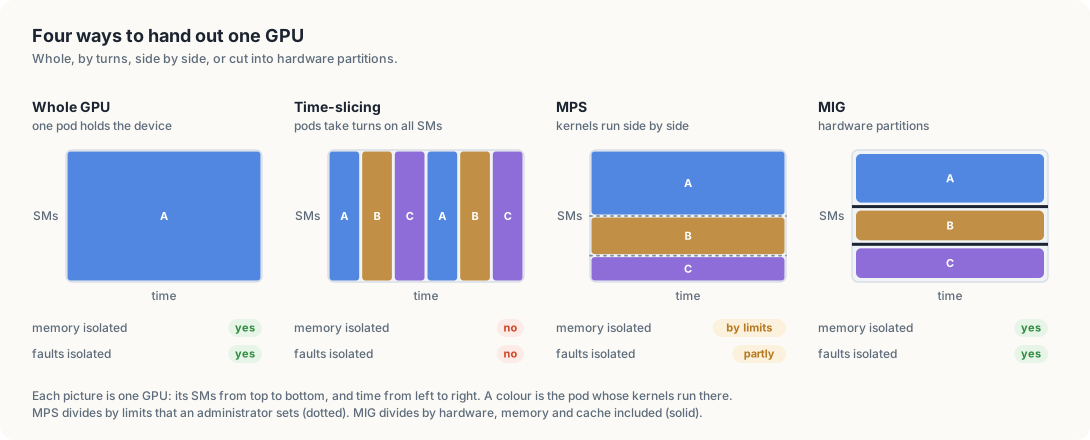
method          what a pod gets                 memory isolated   faults isolated
--------------  ------------------------------  ----------------  ---------------
whole GPU       the entire device               yes               yes
time-slicing    turns on the entire device      no                no
MPS             a share of threads and memory   by limits         partly
MIG             a hardware partition            yes               yes
vGPU            a device inside a VM            yes               yes
Whole GPUs suit training jobs that keep a GPU busy. Time-slicing suits development and light, trusted workloads that tolerate each other. MPS suits many small inference processes that each use part of the SMs. MIG suits multi-tenant clusters that need guaranteed memory and bandwidth for each tenant. vGPU suits workloads that must run in virtual machines.
The complete programs
Listing 2.13 `gpu_load`, complete. code/gpu-sharing/gpu_load.cu
// gpu_load keeps the GPU busy with a fixed amount of arithmetic and prints how
// long the work took. Running it alone and running several copies that share
// one GPU shows how much GPU time each copy receives.
//
// How it runs, end to end:
//   1. nvcc compiles this file on the host (-arch=sm_87, -cudart static), and
//      the binary is copied into the gpu-sharing:1 image.
//   2. Each pod of the gpu-load Job runs it with the pod's name as argument and
//      receives one nvidia.com/gpu unit, so the NVIDIA container runtime gives
//      it the GPU's device files and libcuda.
//   3. main launches the spin kernel kRounds times on the default stream. The
//      launches queue up on the GPU, and cudaDeviceSynchronize waits until all
//      of them have finished, so the measured time covers the GPU work.
//   4. When several pods share the GPU through time-slicing, the driver
//      switches between their CUDA contexts, and each copy's time grows by the
//      share of the GPU that the others take.
//
// Build: nvcc -O2 -arch=sm_87 -cudart static -o gpu_load gpu_load.cu
#include <chrono>
#include <cstdio>
#include <cuda_runtime.h>

// kBlocks and kThreads give 262,144 threads per launch, enough to occupy every
// SM of the GPU many times over.
constexpr int kBlocks = 1024;
constexpr int kThreads = 256;

// kIterations is the number of multiply-adds each thread performs per launch.
constexpr int kIterations = 200000;

// kRounds is the number of kernel launches in one measurement.
constexpr int kRounds = 10;

// spin performs `iterations` dependent multiply-adds on a per-thread value and
// stores the result, so the compiler cannot remove the loop.
__global__ void spin(float *out, int iterations) {
    int i = blockIdx.x * blockDim.x + threadIdx.x;
    float x = i * 1e-6f;
    for (int k = 0; k < iterations; k++) {
        x = x * 1.000001f + 0.5f;
    }
    out[i] = x;
}

// main runs the measurement and prints "<name>: <result>, <milliseconds> ms",
// where name is the first argument. It exits with status 1 if the GPU reported
// an error.
int main(int argc, char **argv) {
    const char *name = argc > 1 ? argv[1] : "load";
    float *out;
    cudaMalloc(&out, kBlocks * kThreads * sizeof(float));

    auto start = std::chrono::steady_clock::now();
    for (int r = 0; r < kRounds; r++) {
        spin<<<kBlocks, kThreads>>>(out, kIterations);
    }
    cudaError_t err = cudaDeviceSynchronize();
    double ms = std::chrono::duration<double, std::milli>(
                    std::chrono::steady_clock::now() - start).count();

    std::printf("%s: %s, %.0f ms\n", name, cudaGetErrorString(err), ms);
    cudaFree(out);
    return err == cudaSuccess ? 0 : 1;
}
Listing 2.14 `gpuusage`, complete, in Go. code/go/gpuusage/main.go
// Command gpuusage reports, for every node in the cluster, how many
// nvidia.com/gpu units the node advertises, how many are held by pods, and
// which pods hold them. It is a read-only client: it lists nodes and pods
// through the API server and does the accounting itself, the same way the
// scheduler counts extended resources.
//
// Run it from code/go, against the cluster in the current kubeconfig context,
// with:
//
//	go run ./gpuusage
package main

import (
	"cmp"
	"context"
	"fmt"
	"os"
	"slices"
	"text/tabwriter"

	corev1 "k8s.io/api/core/v1"
	metav1 "k8s.io/apimachinery/pkg/apis/meta/v1"
	"k8s.io/client-go/kubernetes"
	ctrl "sigs.k8s.io/controller-runtime"
)

// gpu is the extended resource that the NVIDIA device plugin advertises.
const gpu corev1.ResourceName = "nvidia.com/gpu"

// holder is a pod that holds GPU units on a node.
type holder struct {
	// pod is the pod's namespace and name, as "namespace/name".
	pod string
	// units is the number of nvidia.com/gpu units the pod holds.
	units int64
}

// podGPUs returns the number of GPU units a pod requests: the sum of the
// nvidia.com/gpu limits of its containers.
func podGPUs(pod *corev1.Pod) int64 {
	var units int64

	for _, c := range pod.Spec.Containers {
		if q, ok := c.Resources.Limits[gpu]; ok {
			units += q.Value()
		}
	}

	return units
}

// holdsResources reports whether a pod currently holds its resources on a
// node. A pod holds them from the moment it is bound to a node until it
// finishes; a pod that has succeeded or failed gives them back.
func holdsResources(pod *corev1.Pod) bool {
	finished := pod.Status.Phase == corev1.PodSucceeded || pod.Status.Phase == corev1.PodFailed

	return pod.Spec.NodeName != "" && !finished
}


// main runs the report and exits with status 1 on any error.
func main() {
	if err := run(context.Background()); err != nil {
		fmt.Fprintln(os.Stderr, err)
		os.Exit(1)
	}
}

// run lists every node and every pod, groups the GPU-holding pods by node,
// and prints one table row per node followed by the pods that hold its units.
func run(ctx context.Context) error {
	clientset, err := kubernetes.NewForConfig(ctrl.GetConfigOrDie())

	if err != nil {
		return err
	}

	nodes, err := clientset.CoreV1().Nodes().List(ctx, metav1.ListOptions{})

	if err != nil {
		return err
	}

	pods, err := clientset.CoreV1().Pods(metav1.NamespaceAll).List(ctx, metav1.ListOptions{})

	if err != nil {
		return err
	}

	holders := map[string][]holder{}

	for i := range pods.Items {
		pod := &pods.Items[i]

		if units := podGPUs(pod); units > 0 && holdsResources(pod) {
			name := pod.Namespace + "/" + pod.Name
			holders[pod.Spec.NodeName] = append(holders[pod.Spec.NodeName], holder{name, units})
		}
	}

	table := tabwriter.NewWriter(os.Stdout, 0, 0, 2, ' ', 0)
	fmt.Fprintln(table, "NODE\tCAPACITY\tALLOCATABLE\tIN USE\tFREE")

	for _, node := range nodes.Items {
		capacity := node.Status.Capacity[gpu]
		allocatable := node.Status.Allocatable[gpu]
		var inUse int64

		for _, h := range holders[node.Name] {
			inUse += h.units
		}

		fmt.Fprintf(table, "%s\t%d\t%d\t%d\t%d\n",
			node.Name, capacity.Value(), allocatable.Value(), inUse, allocatable.Value()-inUse)
	}

	if err := table.Flush(); err != nil {
		return err
	}

	for _, node := range nodes.Items {
		list := holders[node.Name]
		slices.SortFunc(list, func(a, b holder) int { return cmp.Compare(a.pod, b.pod) })

		for _, h := range list {
			fmt.Printf("  %s holds %d on %s\n", h.pod, h.units, node.Name)
		}
	}

	return nil
}
Listing 2.15 `gpuusage`, complete, in Rust. code/rust/gpuusage/src/main.rs
//! Reports, for every node in the cluster, how many `nvidia.com/gpu` units the
//! node advertises, how many are held by pods, and which pods hold them. It is
//! a read-only client: it lists nodes and pods through the API server and does
//! the accounting itself, the same way the scheduler counts extended resources.
//!
//! Run it from `code/rust`, against the cluster in the current kubeconfig
//! context, with `cargo run -p gpuusage`.

use k8s_openapi::api::core::v1::{Node, Pod};
use k8s_openapi::apimachinery::pkg::api::resource::Quantity;
use kube::api::ListParams;
use kube::{Api, Client, ResourceExt};
use std::collections::BTreeMap;
use std::error::Error;

/// The extended resource that the NVIDIA device plugin advertises.
const GPU: &str = "nvidia.com/gpu";

/// A pod that holds GPU units on a node.
struct Holder {
    /// The pod's namespace and name, as `namespace/name`.
    pod: String,
    /// The number of `nvidia.com/gpu` units the pod holds.
    units: i64,
}

/// Returns the number of GPU units a pod requests: the sum of the
/// `nvidia.com/gpu` limits of its containers.
fn pod_gpus(pod: &Pod) -> i64 {
    let Some(spec) = &pod.spec else { return 0 };
    spec.containers
        .iter()
        .filter_map(|c| c.resources.as_ref()?.limits.as_ref()?.get(GPU))
        .filter_map(|q| q.0.parse::<i64>().ok())
        .sum()
}

/// Returns the node a pod currently holds resources on. A pod holds them from
/// the moment it is bound to a node until it finishes; a pod that has
/// succeeded or failed gives them back.
fn holding_node(pod: &Pod) -> Option<&str> {
    let phase = pod.status.as_ref().and_then(|s| s.phase.as_deref());

    if matches!(phase, Some("Succeeded" | "Failed")) {
        return None;
    }

    pod.spec.as_ref()?.node_name.as_deref()
}

/// Reads the number of GPU units from a node's capacity or allocatable map.
fn gpu_units(resources: Option<&BTreeMap<String, Quantity>>) -> i64 {
    resources
        .and_then(|r| r.get(GPU))
        .and_then(|q| q.0.parse().ok())
        .unwrap_or(0)
}

/// Lists every node and every pod, groups the GPU-holding pods by node, and
/// prints one table row per node followed by the pods that hold its units.
#[tokio::main]
async fn main() -> Result<(), Box<dyn Error>> {
    let client = Client::try_default().await?;
    let nodes = Api::<Node>::all(client.clone())
        .list(&ListParams::default())
        .await?;
    let pods = Api::<Pod>::all(client).list(&ListParams::default()).await?;

    let mut holders: BTreeMap<String, Vec<Holder>> = BTreeMap::new();

    for pod in &pods {
        let units = pod_gpus(pod);
        if let Some(node) = holding_node(pod)
            && units > 0
        {
            let name = format!("{}/{}", pod.namespace().unwrap_or_default(), pod.name_any());
            holders
                .entry(node.to_string())
                .or_default()
                .push(Holder { pod: name, units });
        }
    }

    println!(
        "{:<23}{:<10}{:<13}{:<8}FREE",
        "NODE", "CAPACITY", "ALLOCATABLE", "IN USE"
    );

    for node in &nodes {
        let name = node.name_any();
        let in_use: i64 = holders
            .get(&name)
            .map_or(0, |h| h.iter().map(|h| h.units).sum());
        let status = node.status.as_ref();
        let capacity = gpu_units(status.and_then(|s| s.capacity.as_ref()));
        let allocatable = gpu_units(status.and_then(|s| s.allocatable.as_ref()));
        println!(
            "{:<23}{:<10}{:<13}{:<8}{}",
            name,
            capacity,
            allocatable,
            in_use,
            allocatable - in_use
        );
    }

    for (node, list) in &mut holders {
        list.sort_by(|a, b| a.pod.cmp(&b.pod));

        for h in list.iter() {
            println!("  {} holds {} on {node}", h.pod, h.units);
        }
    }

    Ok(())
}
References
- NVIDIA Multi-Instance GPU user guide: https://docs.nvidia.com/datacenter/tesla/mig-user-guide/index.html
- NVIDIA GPU Operator, time-slicing GPUs in Kubernetes: https://docs.nvidia.com/datacenter/cloud-native/gpu-operator/latest/gpu-sharing.html
- NVIDIA device plugin for Kubernetes, “Shared Access to GPUs”: https://github.com/NVIDIA/k8s-device-plugin
- NVIDIA Multi-Process Service documentation: https://docs.nvidia.com/deploy/mps/index.html
- NVIDIA vGPU software user guide: https://docs.nvidia.com/vgpu/latest/grid-vgpu-user-guide/index.html
- Kubernetes, Dynamic Resource Allocation: https://kubernetes.io/docs/concepts/resource-management/dynamic-resource-allocation/
- Kubernetes v1.34: DRA has graduated to GA: https://kubernetes.io/blog/2025/09/01/kubernetes-v1-34-dra-updates/
- DRA Driver for NVIDIA GPUs: https://github.com/NVIDIA/k8s-dra-driver-gpu
- NVIDIA Jetson Orin technical specifications: https://www.nvidia.com/en-us/autonomous-machines/embedded-systems/jetson-orin/