Low-level design: the review server
This chapter covers
- Routes and request handling
- Rendering data as text
- Binding to the loopback address
- Personal-data patterns and their limits
- Slop flags
Replaced on 2026-10-06. This chapter records the first review server, a binary in
thor-hammer-trainer. It was removed oncereinforcer(cratethor-tigress-reinforcer-frontend) took over: one server on port 8787 that shows the training set, the teacher set and the distilled conversations, each with its own flags file, in a dark page where selected text is marked with a slop category in one click. Start it withcargo run --release -p thor-tigress-reinforcer-frontendand open http://127.0.0.1:8787. The design below is kept because the flag format and the loopback rule it describes are still the ones in use.
The review server was a binary in thor-hammer-trainer (src/bin/review.rs, about 400 lines). It uses the standard
library plus serde for flags, and one HTML page with inline JavaScript.
4.1 Routes
| Request | Response |
|---|---|
GET / | review.html, embedded with include_str! |
GET /train.jsonl | the training file, read from disk per request |
GET /slop.jsonl | examples removed as slop, so they stay visible and can be unflagged |
GET /flags | labels/slop_flags.jsonl, empty if absent |
POST /flags | {id, note, spans, flagged}: replace or clear one example’s flag; the file is rewritten |
| any other path | 404 Not Found |
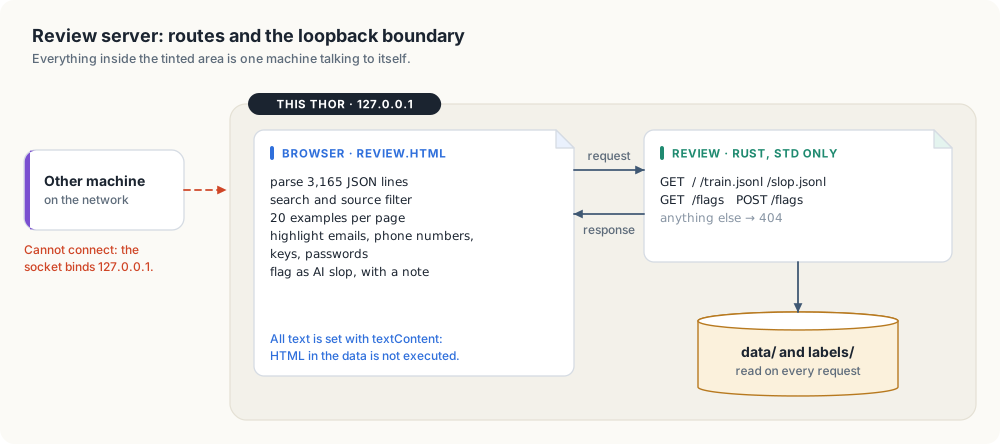
The browser parses the file and performs search, source filtering, paging (20 examples per page) and highlighting. The server performs no processing.
#![allow(unused)]
fn main() {
let response = match (request.method.as_str(), request.path.as_str()) {
    ("GET", "/") => Response::ok("text/html; charset=utf-8", REVIEW_PAGE.as_bytes().to_vec()),
    ("GET", "/train.jsonl") => {
        let training_data =
            fs::read(&files.training).map_err(io_error("reading the training file"))?;
        Response::ok("application/x-ndjson; charset=utf-8", training_data)
    }
    ("GET", "/slop.jsonl") => Response::ok(
        "application/x-ndjson; charset=utf-8",
        read_optional_file(&files.removed_as_slop)?,
    ),
    ("GET", "/flags") => Response::ok(
        "application/x-ndjson; charset=utf-8",
        read_optional_file(&files.flags)?,
    ),
    ("POST", "/flags") => change_flag(&request, &files.flags),
    (method, path) => {
        eprintln!("review: no route for {method} {path}");
        Response::error("404 Not Found", "not found")
    }
};
}
For each connection the server:
- reads the request line
- reads the headers, keeping
Content-LengthandContent-Type - reads the body up to 64 KiB
- writes the response
- closes the connection
Request headers are consumed before writing, because closing a socket with unread input can cause the kernel to send a reset. Connections are handled sequentially.
4.2 Text rendering
Examples contain HTML, such as quoted web pages and <figure> tags from the books. The page creates elements
with document.createElement and assigns content with textContent. Markup in the data is displayed, not
executed.
4.3 Loopback binding
The listener binds 127.0.0.1. Connections from other hosts are refused by the kernel.
4.4 Personal-data patterns
| Pattern | Matches |
|---|---|
name@domain.tld | |
| phone number | digit groups with separators, such as +1 206 555 0100 |
| API key | prefixes sk-, ghp_, github_pat_, AKIA, xox, hf_ |
| private key | -----BEGIN ... PRIVATE KEY----- |
| password | password=..., pwd: ... |
| bearer token | Bearer followed by 20 or more token characters |
Matches are highlighted. A checkbox limits the list to examples with matches: 20 of 3,165 on the current set.
Limit: names, health details and private events have no fixed format and are not matched.
4.5 Slop flags
Each example card ends with a curation panel:
| Control | Effect |
|---|---|
| select text in the instruction or response | the selection is shown in the panel |
| category menu, Flag selection | adds a span with that category; the example becomes flagged |
| span list, remove | removes one span |
| note, Flag whole example / Save note | flags the example or updates its note |
| Unflag | removes the flag and all its spans |
Marked spans are highlighted in the text with a wavy underline; the category is shown on hover. A checkbox limits the list to flagged examples, and the summary line counts flagged examples and marked sentences.
The selection is captured on mouseup inside an instruction or response section. It is stored with the example id
and field, because clicking the button can clear the browser selection.
Each change sends the complete flag for one example:
{"id": "2e6e9c9623674c82", "note": "opener and sign-off", "flagged": true,
 "spans": [{"field": "response", "text": "Great question!", "category": "flattery_filler_opener"}]}
The server deserializes the body into typed structs; an unknown category returns 400 Bad Request.
POST /flags is accepted only with Content-Type: application/json. A web page on another origin can send that
content type only after a CORS preflight. The server does not answer the preflight, so other sites open in the same
browser cannot write flags. A text/plain request returns 415 Unsupported Media Type.
Flags take effect on the next run of the generator, which moves flagged examples from train.jsonl to
slop.jsonl.