Bindings, functions, and loops
This chapter covers
- What a
letbinding is and where its value lives - Shadowing a name, and how it differs from changing a value with
mut - Writing a function that calls itself, and what happens on the stack when it does
- Replacing that recursion with a loop, and with a table of saved answers
- Timing code with
Instant, and passing a function to another function
This chapter begins Part 1 of the book. Part 1 covers the pieces of Rust that every later chapter uses. This first chapter works with the smallest pieces: names for values, functions, and loops.
You will read and run two short programs. The first gives one name to three different values in turn. It
shows what a let statement does, and how that differs from changing a value in place. The second
program computes Fibonacci numbers in three ways and times each one. It shows how a function that calls
itself uses memory, and it compares the running times of the three versions.
A few terms first:
- A binding is a name attached to a value.
let x = 5;binds the namexto the value5. - A scope is the region of code where a binding can be used. In Rust, a scope is usually a block
between
{and}. - The stack is the memory where a function keeps its local values while it runs.
- A stack frame is the part of the stack that belongs to one running call of a function.
1.1 A binding is a name for a value
When a function starts, Rust reserves a stack frame for it. Each let in the function gets a place in
that frame, sized for its type. A u32 takes 4 bytes, and a usize takes 8 bytes on a 64-bit machine.
A String is different. Its text can grow, so the text is kept in heap memory. The heap is memory the
program requests while it runs and gives back when it is done. The String value on the stack holds three
numbers. They are the address of the text on the heap, the length of the text, and the size of the heap block.
When a function returns, its frame is removed. Every value in the frame is dropped. For a String,
dropping it also frees its heap block.
1.2 Shadowing: one name, several values
You can write a second let with a name that is already in use. This does not change the first value.
It creates a second binding with the same name, and the name now refers to the new value. Rust calls this
shadowing. The first value still exists until the end of its scope, but you can no longer reach it by
that name.
Because the second binding is a new variable, it can have a different type. Figure 1.1 follows the name
value through three bindings of three types.
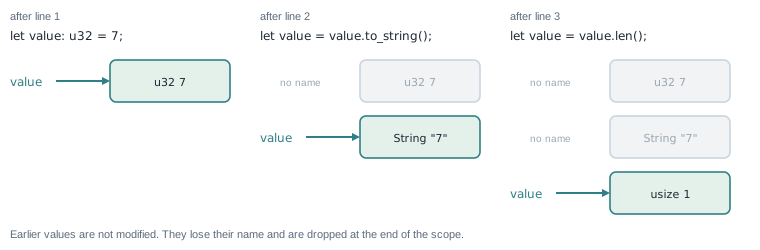
let creates a new value and moves the name to it. The earlier values are not changed; they lose their name.Here is the function that performs those three steps:
Listing 1.1 One name, three types. src/bin/shadowing.rs, lines 27 to 41
fn demonstrate_shadowing() -> String {
    // First binding is an integer.
    let value: u32 = 7;
    let mut log = format!("integer: {value}");

    // Shadow the integer with a String. The old integer is gone.
    let value = value.to_string();
    log.push_str(&format!("\nstring: {value}"));

    // Shadow the String with a usize computed from it.
    let value = value.len();
    log.push_str(&format!("\nusize: {value}"));

    log
}
Read the three let value lines in order:
let value: u32 = 7;creates au32.let value = value.to_string();reads theu32, builds aStringfrom it, and binds the name to theString. On the right-hand side,valuestill means theu32, because the new binding does not exist until the statement finishes.let value = value.len();reads theStringand binds the name to its length, ausize.
None of these lines needs mut, because no value is changed after it is created. The log string does
change, so it is declared let mut log. Each push_str appends one line to it, so the test can check all
three stages.
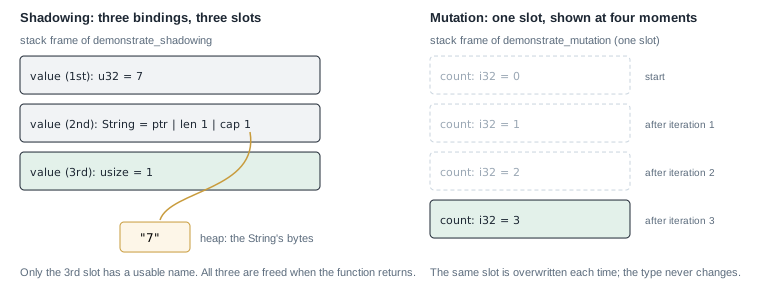
Figure 1.2 (left) shows the stack frame after the third line. There are three values, and only the last one has a usable name.
1.2.1 When shadowing helps
Programs often receive a value in one form and need it in another. A number typed by a user arrives as text. After you parse it, you want the number and never the text again. Shadowing lets the number take the text’s name:
let count = read_line_from_user();   // a String, for example "42"
let count: u32 = count.trim().parse().expect("a number");
After the second line, count is a u32. Code below it cannot use the unparsed text by mistake, because
no name refers to it any more.
1.2.2 A value captured earlier keeps its old value
A closure or a reference created before a shadowing let still refers to the first value:
let x = 1;
let show = || println!("{x}");
let x = x + 1;   // a new x
show();          // prints 1
The closure captured the first x. The second let created a new variable, and the closure never sees it.
WARNING: Inside a loop, let x = x + 1; creates a new x that lives only until the end of that pass
through the loop. On the next pass, the outer x has its old value again. To count across passes, declare
let mut x before the loop and write x += 1 inside it.
1.3 Mutation: one value that changes
When you want one variable whose value changes over time, declare it with mut. The type stays the same,
and each assignment writes into the same place in the frame.
Listing 1.2 A counter that changes in place. src/bin/shadowing.rs, lines 43 to 53
fn demonstrate_mutation() -> String {
    // If you need to mutate the same binding's value (same type) without
    // creating a new binding, mark it `mut`.
    let mut count = 0;
    let mut log = String::from("mut count:");
    for _ in 0..3 {
        count += 1;
        log.push_str(&format!(" {count}"));
    }
    log
}
for _ in 0..3 runs the loop body three times. The _ means the loop does not use the counter it is given.
Each pass adds 1 to count and appends the new value to log. Figure 1.2 (right) shows the one slot for
count at four moments.
Table 1.1 compares the two ways of changing what a name refers to.
Shadowing (let x = ... again) | Mutation (let mut x, then x = ...) | |
|---|---|---|
| Creates a new variable | yes | no |
| Can change the type | yes | no |
Needs mut | no | yes |
A closure that captured x earlier sees | the old value | a compile error if it is still in use |
1.4 The first complete program
The rest of shadowing.rs runs both functions and tests them. The file starts with a comment that
explains the program:
Listing 1.3 The complete program. src/bin/shadowing.rs
// ============================================================================
// Variable shadowing vs mutation
//
// Ported from the Rust playground repo (`shadowing.rs`).
//
// What this demonstrates:
//   - Rust allows a new `let` binding with the same name as an existing
//     binding. This is called **shadowing**.
//   - Shadowing can change the value *and the type* of a variable without
//     declaring it `mut`.
//   - The old binding is no longer reachable after the shadowing `let`.
//
// Where this appears in practice:
//   - Rust SDK code often shadows parsed/deserialized values to convert them
//     from raw input to typed domain values:
//
//       let raw = request.header("X-GPU-Count")?;
//       let raw: u64 = raw.parse()?;   // shadow with a typed value
//
//   - Shadowing is also useful after unwrapping an `Option`/`Result` when the
//     guard value is no longer needed.
//
// Run:
//   cargo run --bin shadowing
// ============================================================================

fn demonstrate_shadowing() -> String {
    // First binding is an integer.
    let value: u32 = 7;
    let mut log = format!("integer: {value}");

    // Shadow the integer with a String. The old integer is gone.
    let value = value.to_string();
    log.push_str(&format!("\nstring: {value}"));

    // Shadow the String with a usize computed from it.
    let value = value.len();
    log.push_str(&format!("\nusize: {value}"));

    log
}

fn demonstrate_mutation() -> String {
    // If you need to mutate the same binding's value (same type) without
    // creating a new binding, mark it `mut`.
    let mut count = 0;
    let mut log = String::from("mut count:");
    for _ in 0..3 {
        count += 1;
        log.push_str(&format!(" {count}"));
    }
    log
}

fn main() {
    println!("=== Shadowing ===");
    println!("{}", demonstrate_shadowing());

    println!("\n=== Mutation ===");
    println!("{}", demonstrate_mutation());
}

// ============================================================================
// Tests (cargo test --bin shadowing)
// ============================================================================
#[cfg(test)]
mod tests {
    use super::*;

    #[test]
    fn shadowing_allows_type_changes() {
        let log = demonstrate_shadowing();
        assert!(log.contains("integer: 7"));
        assert!(log.contains("string: 7"));
        assert!(log.contains("usize: 1"));
    }

    #[test]
    fn mutation_requires_mut_binding() {
        let log = demonstrate_mutation();
        assert!(log.contains("mut count: 1 2 3"));
    }
}
The tests at the end are in a module marked #[cfg(test)]. The compiler builds that module only when you
run cargo test. use super::*; brings the functions from the rest of the file into the test module.
Each test calls a function and uses assert! to check that the log contains the expected text.
Run the program and its tests from the rust-interview-lab directory:
$ cargo run --bin shadowing
=== Shadowing ===
integer: 7
string: 7
usize: 1

=== Mutation ===
mut count: 1 2 3

$ cargo test --bin shadowing
running 2 tests
test tests::mutation_requires_mut_binding ... ok
test tests::shadowing_allows_type_changes ... ok
Now that you know where a function keeps its values, you can look at what happens when a function calls itself many times.
1.5 A function that calls itself
The Fibonacci numbers start with 0 and 1. Each later number is the sum of the two before it:
| n | 0 | 1 | 2 | 3 | 4 | 5 | 6 | 7 | 8 |
|---|---|---|---|---|---|---|---|---|---|
| fib(n) | 0 | 1 | 1 | 2 | 3 | 5 | 8 | 13 | 21 |
The definition can be written directly as a Rust function. A function that calls itself is recursive.
Listing 1.4 Fibonacci by recursion. src/bin/cs_fib.rs, lines 8 to 15
use std::time::{Duration, Instant};

/// Exponential: fib(n) recomputes fib(n - 1) and fib(n - 2) from scratch.
fn recursive(n: u64) -> u64 {
    if n < 2 {
        n
    } else {
        recursive(n - 1) + recursive(n - 2)
    }
}
For n of 0 or 1, the function returns n. This is the base case, the input that needs no further
calls. For larger n, it calls itself twice and adds the results. The if is an expression, so its
value is the function’s return value, and no return keyword is needed.
1.5.1 Counting the calls
Work out recursive(5) by hand. It calls recursive(4) and recursive(3). recursive(4) then calls
recursive(3) again. Figure 1.3 draws every call.
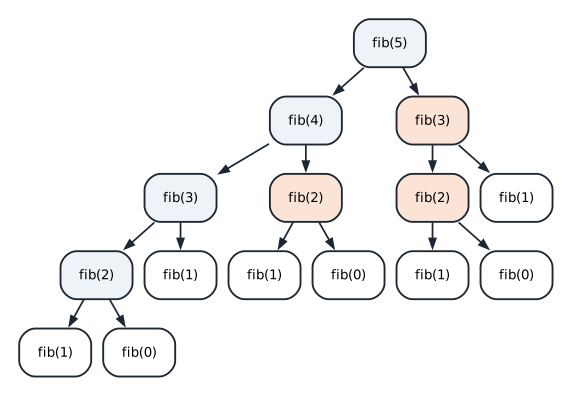
recursive(5). Shaded calls repeat work that another branch already did: fib(3) is computed twice and fib(2) three times.The tree has 15 calls for n = 5. The tree for n contains the trees for n - 1 and n - 2, so the
count grows by about 1.6 times per step. For n = 30, the function makes about 2.7 million calls. For n = 90,
the count would be about 1019.
1.5.2 What each call uses on the stack
Every call gets its own stack frame, holding its n and the address to return to. A frame is removed when
its call returns. So the stack does not hold all the calls at once, only the chain of calls that are
waiting on each other. Figure 1.4 shows the deepest moment of recursive(4).
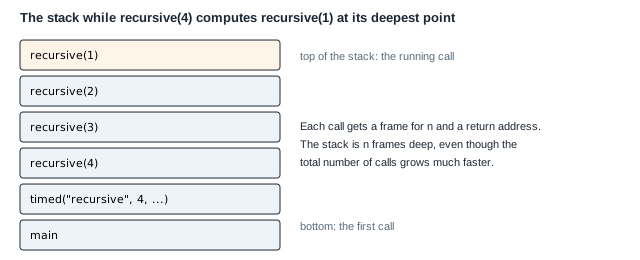
recursive(4). The depth is about n frames, while the number of calls grows much faster.So the recursive version has two costs. Its time grows exponentially with n, because it repeats work.
Its stack depth grows with n, which is small here but limits recursion on very deep inputs. Chapter 9
shows a list that crashes because of this second cost.
1.6 The same numbers with a loop
You only ever need the last two numbers to compute the next one. A loop can keep those two and move them forward one step at a time.
Listing 1.5 Fibonacci with a loop. src/bin/cs_fib.rs, lines 17 to 24
/// Linear time, constant space.
fn iterative(n: u64) -> u64 {
    let (mut previous, mut current) = (0u64, 1u64);
    for _ in 0..n {
        (previous, current) = (current, previous + current);
    }
    previous
}
let (mut previous, mut current) = (0u64, 1u64); declares two variables in one statement by matching a
pair. The suffix u64 on each literal sets its type.
(previous, current) = (current, previous + current); assigns both variables at once. Rust evaluates the
whole right-hand side first, using the old values, and only then writes both. Without the pair, you would
need a temporary variable to avoid overwriting previous before it is used.
Trace iterative(5):
| after pass | 0 (start) | 1 | 2 | 3 | 4 | 5 |
|---|---|---|---|---|---|---|
previous | 0 | 1 | 1 | 2 | 3 | 5 |
current | 1 | 1 | 2 | 3 | 5 | 8 |
After five passes, previous is 5, which is fib(5). The loop runs n times and keeps two numbers, so its
time grows in proportion to n and its memory stays constant.
1.7 Recursion with a memory
The loop is fast, but the recursive version matches the definition more closely. You can keep the recursion and remove the repeated work by saving each answer the first time you compute it. Saving answers this way is called memoization, and the table of saved answers is a cache.
Listing 1.6 Fibonacci with a cache. src/bin/cs_fib.rs, lines 26 to 41
/// Linear time, linear space: recursion plus a cache of subproblem answers.
fn memoized(n: u64) -> u64 {
    fn go(n: u64, cache: &mut [u64]) -> u64 {
        if n < 2 {
            return n;
        }
        let index = n as usize;
        if cache[index] == 0 {
            cache[index] = go(n - 1, cache) + go(n - 2, cache);
        }
        cache[index]
    }

    let mut cache = vec![0u64; n as usize + 1];
    go(n, &mut cache)
}
This listing uses three pieces of syntax you may not have used before:
- A function inside a function.
gois declared insidememoized. Onlymemoizedcan call it. It is an ordinary function; it does not seememoized’s variables. vec![0u64; n as usize + 1]. This creates aVecofn + 1zeros.n as usizeconverts theu64tousize, the type Rust uses for lengths and indexes.&mut [u64]. This is a mutable slice: a borrowed view of the vector’s elements that allows writing.goreceives the cache this way, so every call shares one table instead of copying it.
go checks the base case first. Then it looks in the cache. A zero means “not computed yet”. In that case
it computes the value with two recursive calls and stores it. Either way, it returns the saved value.
Zero can mark an empty slot here because fib(n) is never zero for n of 2 or more. Smaller values
return before the cache is read. Figure 1.5 shows the cache after memoized(6).
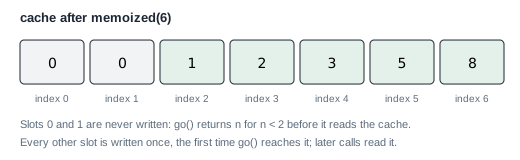
memoized(6). Each slot from 2 to 6 is computed once and then read.With the cache, each value from 2 to n is computed once, so the time grows in proportion to n. The
cache uses memory in proportion to n, and the recursion still uses n stack frames.
Animation 1.1 runs memoized(5) and recursive(5) side by side in time. The tree on the left gains a node per
call, and the stack on the right holds only the calls that are still waiting.
1.8 Timing the three versions
To compare the versions, the program measures how long each call takes.
Listing 1.7 Timing a function and printing the result. src/bin/cs_fib.rs, lines 43 to 51
fn timed(label: &str, n: u64, operation: impl Fn(u64) -> u64) {
    let start = Instant::now();
    let value = operation(n);
    report(label, n, value, start.elapsed());
}

fn report(label: &str, n: u64, value: u64, elapsed: Duration) {
    println!("  {label:<10} fib({n:>2}) = {value:<20} in {elapsed:?}");
}
timed takes a parameter operation: impl Fn(u64) -> u64. This means “any function or closure that takes
a u64 and returns a u64”. So main can pass recursive, iterative, or memoized by name.
Instant::now() reads a clock that only moves forward. start.elapsed() returns the time since then as a
Duration.
report uses format specifiers inside the braces. {label:<10} pads the label to 10 characters, aligned
left. {n:>2} right-aligns n in 2 characters. {elapsed:?} prints the Duration with its debug format,
which chooses a unit such as µs or ms.
1.9 The complete Fibonacci program
Here is the whole program, including main. main times each version, then checks that all three agree.
Listing 1.8 The complete program. src/bin/cs_fib.rs
//! Three ways to compute Fibonacci: naive recursion, iteration, and memoization.
//! The first shows why exponential blowup happens; the other two fix it.
//!
//! Run with: cargo run --bin cs_fib

use std::time::{Duration, Instant};

/// Exponential: fib(n) recomputes fib(n - 1) and fib(n - 2) from scratch.
fn recursive(n: u64) -> u64 {
    if n < 2 {
        n
    } else {
        recursive(n - 1) + recursive(n - 2)
    }
}

/// Linear time, constant space.
fn iterative(n: u64) -> u64 {
    let (mut previous, mut current) = (0u64, 1u64);
    for _ in 0..n {
        (previous, current) = (current, previous + current);
    }
    previous
}

/// Linear time, linear space: recursion plus a cache of subproblem answers.
fn memoized(n: u64) -> u64 {
    fn go(n: u64, cache: &mut [u64]) -> u64 {
        if n < 2 {
            return n;
        }
        let index = n as usize;
        if cache[index] == 0 {
            cache[index] = go(n - 1, cache) + go(n - 2, cache);
        }
        cache[index]
    }

    let mut cache = vec![0u64; n as usize + 1];
    go(n, &mut cache)
}

fn timed(label: &str, n: u64, operation: impl Fn(u64) -> u64) {
    let start = Instant::now();
    let value = operation(n);
    report(label, n, value, start.elapsed());
}

fn report(label: &str, n: u64, value: u64, elapsed: Duration) {
    println!("  {label:<10} fib({n:>2}) = {value:<20} in {elapsed:?}");
}

fn main() {
    println!("small input, all three should agree");
    timed("recursive", 20, recursive);
    timed("iterative", 20, iterative);
    timed("memoized", 20, memoized);

    println!("\nrecursive cost grows quickly");
    timed("recursive", 30, recursive);
    timed("iterative", 30, iterative);

    println!("\nlarge input: recursion alone would not finish");
    timed("iterative", 90, iterative);
    timed("memoized", 90, memoized);

    for n in 0..20 {
        assert_eq!(recursive(n), iterative(n));
        assert_eq!(memoized(n), iterative(n));
    }
    assert_eq!(iterative(30), 832_040);
    assert_eq!(iterative(90), 2_880_067_194_370_816_120);

    println!("\nall checks passed");
}
The loop near the end of main compares the three versions for every n below 20. If any pair disagrees,
assert_eq! stops the program with both values. The two final assertions check known values of fib(30) and
fib(90).
This output comes from a debug build, the default for cargo run:
$ cargo run --bin cs_fib
small input, all three should agree
  recursive  fib(20) = 6765                 in 90.908µs
  iterative  fib(20) = 6765                 in 567ns
  memoized   fib(20) = 6765                 in 10.826µs

recursive cost grows quickly
  recursive  fib(30) = 832040               in 11.124774ms
  iterative  fib(30) = 832040               in 542ns

large input: recursion alone would not finish
  iterative  fib(90) = 2880067194370816120  in 937ns
  memoized   fib(90) = 2880067194370816120  in 5.749µs

all checks passed
Compare the two recursive timings. Going from n = 20 to n = 30, the time grows about 120 times. That
matches the growth rate from section 1.5.1: 1.618 multiplied by itself 10 times is about 123. At that rate,
recursive(90) would run for over a thousand years, so main does not call it.
The memoized version is slower than the loop, although both grow in proportion to n. It allocates a
Vec and makes function calls, and the loop does neither.
NOTE: fib(93) is the largest Fibonacci number that fits in a u64. iterative(94) would overflow. In
a debug build, an overflow stops the program with a panic. In a release build, the value silently wraps
around.
Summary
- A
letbinding attaches a name to a value in the current stack frame. AStringkeeps its text on the heap and a small header on the stack. - Shadowing creates a new binding, which may have a new type. Earlier values are unchanged and lose their name. Closures that captured the old binding keep the old value.
mutlets one binding change its value. The type stays the same.- A recursive function uses one stack frame per active call. Naive recursive Fibonacci repeats work, so its time grows exponentially.
- A loop that keeps only the last two values computes the same result in linear time and constant memory.
- Memoization keeps the recursion and saves each answer in a cache, making the time linear.
impl Fn(u64) -> u64accepts any function or closure with that signature, andInstantmeasures elapsed time.
Chapter 2 moves from computation to the operating system. You will read and write files, walk
directories, and parse command-line arguments, and meet Result and ?, which every later chapter uses.
Exercises
- Add a counter to
recursivethat records how many calls it makes. Print the count fornfrom 1 to 25, and check that each count is close to 1.6 times the previous one. - Rewrite
memoizedso the cache holdsOption<u64>instead of using 0 as “empty”. Explain why the 0 marker is safe for Fibonacci but would not be safe for a function that can return 0. - Change
iterativeto returnOption<u64>and usechecked_add, so thatiterative(94)returnsNoneinstead of overflowing. - Run
cargo run --release --bin cs_fiband compare the timings with the debug build above.