Files, paths, and the command line
This chapter covers
- What happens between your program and the disk when you read a file
Resultand the?operator, which every later chapter usesPathandPathBuf, and reading a file whole or line by line- Appending, copying, renaming, and deleting files, and telling one error from another
- Listing and walking directories
- Reading a large file one page at a time, and parsing command-line arguments
In chapter 1 your programs only computed values. In this chapter they talk to the operating system. They read and write files, look inside directories, and read the arguments you type after a program’s name.
Every one of these operations can fail. A file may not exist, or you may not have permission to read it.
Rust reports such failures through a type called Result, so this chapter starts there. After that come
paths, reading, writing, and directories. The chapter ends with two complete tools. One reads a file a page
at a time. The other turns command-line arguments into typed options.
A few terms:
- The kernel is the core of the operating system. It controls the disk, memory, and devices.
- A system call is a request from a program to the kernel, such as “open this file” or “read 100 bytes”.
- A file descriptor is a small number the kernel gives your program for each open file. Later system calls use it to name that file.
2.1 What happens when you read a file
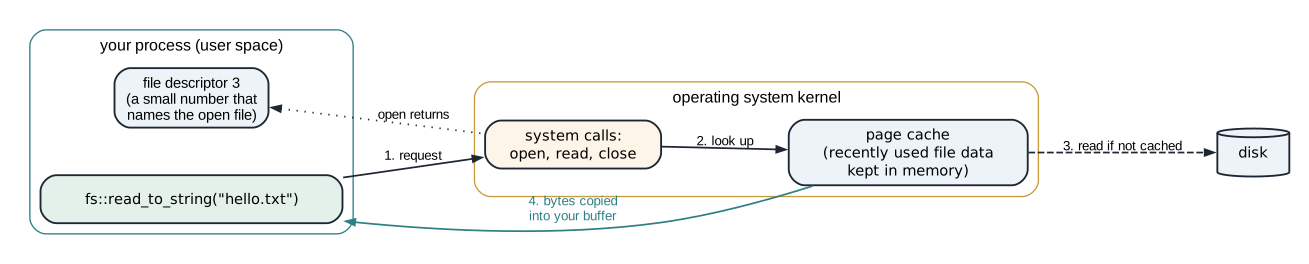
Your program cannot read the disk directly. It asks the kernel with system calls, and the kernel does the work. Figure 2.1 shows the steps for reading a small file.
The steps are:
openasks the kernel to open the file. The kernel checks permissions and returns a file descriptor.readasks for bytes from that descriptor. The kernel copies them into a buffer in your program.closetells the kernel you are done, so it can release the descriptor.
Rust’s standard library makes these calls for you. Each call can fail, and the library reports that with
Result.
2.2 Result and the ? operator
Result is an enum with two variants:
enum Result<T, E> {
    Ok(T),    // the operation succeeded and produced a T
    Err(E),   // the operation failed with an error of type E
}
For file operations, the error type is std::io::Error, and io::Result<T> is a shorter name for
Result<T, io::Error>. So fs::read_to_string(path) returns io::Result<String>: either the file’s text,
or the reason it could not be read.
You can handle a Result with match. That gets long when a function makes several calls, each of which
can fail. The ? operator shortens it. Put ? after an expression of type Result, and it does one of two
things (figure 2.2):
- If the value is
Ok(x), the expression evaluates toxand the function continues. - If the value is
Err(e), the function returnsErr(e)immediately.
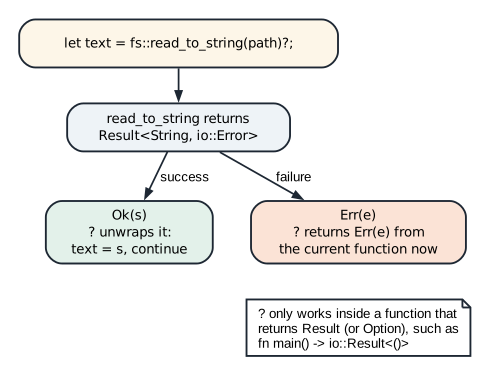
? operator. It can only be used inside a function that itself returns Result.Because ? returns from the function, the function must return a Result too. That is why the programs in
this chapter declare fn main() -> io::Result<()>. If main returns an Err, Rust prints the error and
the program exits with status 1.
2.3 Paths
A path names a file or directory, such as /tmp/data.txt. Rust has two path types. &Path is a
borrowed view of a path, and PathBuf is an owned path that can grow. They relate the same way &str
relates to String (figure 2.3).
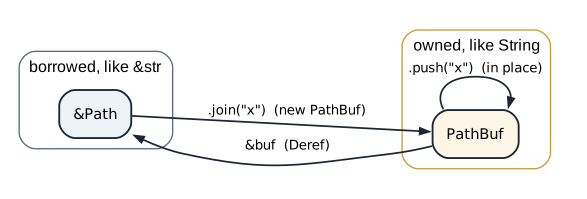
join returns a new owned path. push extends a PathBuf in place. A &PathBuf converts to &Path automatically when a function asks for one.Listing 2.1 Building paths and taking them apart. src/bin/path_buff.rs
use std::path::{Path, PathBuf};

fn main() {
    let dir = Path::new("/tmp");
    let file = dir.join("data.txt");

    let mut buf = PathBuf::from(dir);
    buf.push("nested");
    buf.push("file.txt");

    println!("file: {}", file.display());
    println!("buf:  {}", buf.display());
    println!("parent: {:?}", buf.parent());
    println!("file_name: {:?}", buf.file_name());
    println!("ext: {:?}", buf.extension());
}
Path::new("/tmp") wraps a string as a path without copying it. dir.join("data.txt") builds a new
PathBuf. PathBuf::from(dir) copies the path into an owned buffer, and each push adds one component.
$ cargo run --bin path_buff
file: /tmp/data.txt
buf:  /tmp/nested/file.txt
parent: Some("/tmp/nested")
file_name: Some("file.txt")
ext: Some("txt")
parent, file_name, and extension return Option, because some paths lack them: / has no parent.
To print a path you call display(). On Linux and macOS a path is a sequence of bytes that need not be
valid UTF-8. display() replaces any invalid bytes when it prints.
WARNING: If the argument to join or push is an absolute path, it replaces the whole path instead of
extending it. Path::new("/srv").join("/etc/passwd") is /etc/passwd. If part of a path comes from a user,
reject absolute paths and .. before you join it.
2.4 Reading a file
2.4.1 The whole file at once
The simplest read loads the whole file into one String.
Listing 2.2 Write a file, then read it back. src/bin/read_write_file.rs
use std::{
    fs,
    io,
    path::{Path, PathBuf},
};

// `&Path` accepts both a `&Path` and a `&PathBuf` argument; `&PathBuf` would not.
fn read_content_of_file(path: &Path) -> io::Result<String> {
    fs::read_to_string(path)
}

fn main() -> io::Result<()> {
    fs::write("hello.txt", "Hello, Rust!\n")?;

    // `join` builds a new PathBuf and leaves `base_dir` unchanged.
    let base_dir = PathBuf::from(".");
    let joined_path = base_dir.join("hello.txt");

    // `push` mutates the PathBuf in place instead of returning a new one.
    let mut mut_base_dir = PathBuf::from(".");
    mut_base_dir.push("hello.txt");

    let text = read_content_of_file(&joined_path)?;
    println!("File contents (via .join()):\n{}", text);

    let text_inplace = read_content_of_file(&mut_base_dir)?;
    println!("File contents (via .push()):\n{}", text_inplace);

    Ok(())
}
fs::write creates the file (or empties an existing one) and writes the text. fs::read_to_string opens,
reads, and closes the file in one call. Both calls end with ?, so a failure in either one returns from
main.
read_content_of_file takes &Path. The program calls it twice, with a path built by join and a path built
by push. Both are PathBuf values that convert to &Path. The two calls print the
same text.
read_to_string keeps the whole file in memory. That suits a small configuration file. For a log of
several gigabytes, read one line at a time instead.
2.4.2 One line at a time
To read line by line, wrap the file in a BufReader. Figure 2.4 shows why the buffer helps.
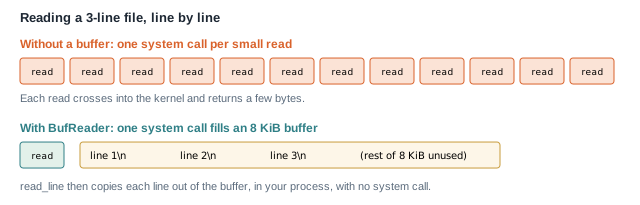
BufReader asks the kernel for a large block at once and hands out lines from it. Fewer system calls means less time spent crossing into the kernel.Listing 2.3 Numbered lines through a buffered reader. src/bin/readfile_line_by_line.rs
use std::{
    fs::File,
    io::{BufRead, BufReader},
}; // BufRead brings `lines()` into scope.

fn main() -> std::io::Result<()> {
    let file = File::open("log.txt")?;
    let reader = BufReader::new(file);

    for (i, line) in reader.lines().enumerate() {
        let line = line?;
        println!("{}: {}", i + 1, line);
    }

    Ok(())
}
BufReader::new(file) takes ownership of the file and adds an 8 KiB buffer. The lines method comes from
the BufRead trait, so the program imports that trait. Without the import, the method is not visible.
lines() yields one io::Result<String> per line, with the newline removed. Reading can fail partway
through the file, so each line is a Result. let line = line?; replaces the Result with the String
inside it, using the shadowing you saw in section 1.2. enumerate() pairs each line with its index,
starting at 0, which is why the program prints i + 1.
Animation 2.1 runs this loop on a 12-byte file of three lines, and counts the read system calls. Then it runs
the same lines through a reader with no buffer.
BufReader makes one large read and serves the lines from memory: 2 calls. Reading one byte at a time costs a system call per byte: 13 calls.2.4.3 Reusing one buffer, and skipping bad lines
lines() allocates a new String for every line. For a very large file, you can read every line into the
same String instead.
Listing 2.4 One reused buffer, with invalid lines skipped. src/bin/read_large_file.rs
use std::{
    fs::File,
    io::{self, BufRead, BufReader},
};

fn main() -> io::Result<()> {
    let file = File::open("large.txt")?;
    let mut reader = BufReader::new(file);
    let mut line = String::new();

    while match reader.read_line(&mut line) {
        Ok(0) => false, // EOF, stop
        Ok(_) => {
            process(line.trim_end());
            line.clear();
            true // keep reading
        }
        Err(e) if e.kind() == io::ErrorKind::InvalidData => {
            eprintln!("skipping bad line: {e}");
            line.clear();
            true
        }
        Err(e) => return Err(e), // return works inside the condition
    } {}

    Ok(())
}

fn process(line: &str) {
    println!("{line}");
}
reader.read_line(&mut line) appends the next line, including its newline, to line. It returns the
number of bytes read. The loop is written in an unusual way: while match ... { ... } {}. The whole
match is the loop’s condition, and the loop’s body, {}, is empty. Each arm of the match evaluates to
true to continue or false to stop.
Table 2.1 lists the four outcomes.
read_line returns | Meaning | What the loop does |
|---|---|---|
Ok(0) | end of the file | stops |
Ok(n) | a line of n bytes | processes it, clears the buffer, continues |
Err(e) with kind InvalidData | the line is not valid UTF-8 text | prints a message, clears, continues |
any other Err | a real read failure | returns the error from main |
Because read_line appends, the loop must call line.clear() after each line. Otherwise the buffer would
grow to hold the whole file.
The InvalidData arm can continue safely because read_line has already consumed the invalid bytes. You
can check this with a file whose second line holds two bytes that are not UTF-8:
$ printf 'ok\n\xff\xfebad\nfine\n' > large.txt
$ cargo run --bin read_large_file
ok
skipping bad line: stream did not contain valid UTF-8
fine
2.5 Writing and changing files
2.5.1 Appending
fs::write replaces a file’s contents. To add lines to the end of a log instead, open the file with
OpenOptions.
Listing 2.5 Appending lines to a file. src/bin/append_to_file_open_options.rs
use std::{fs::OpenOptions, io::Write};

fn main() -> std::io::Result<()> {
    let mut file = OpenOptions::new()
        .create(true) // create if missing
        .append(true) // always write at the end
        .open("log.txt")?;

    writeln!(file, "New log line")?;
    writeln!(file, "Another line")?;

    Ok(())
}
OpenOptions collects settings, and open applies them. create(true) creates the file if it is missing.
append(true) asks the kernel to move to the end of the file before every write. The kernel does that move
and the write as one step. So two programs appending to the same log do not overwrite each other’s lines.
writeln! works like println!, but writes to any value that implements the std::io::Write trait, such
as a File. The trait must be imported, as the second use line does.
2.5.2 Copying, renaming, and deleting
The standard library has one function for each of these file operations. The program copies a file, renames the copy, and deletes the original.
Listing 2.6 Copy, rename, remove. src/bin/copy_rename_delete_file.rs
use std::{fs, io};

fn main() -> io::Result<()> {
    fs::write("a.txt", "hello")?;

    fs::copy("a.txt", "b.txt")?;
    fs::rename("b.txt", "c.txt")?;
    fs::remove_file("a.txt")?;

    println!("Done");
    Ok(())
}
After the program runs, a.txt is gone and c.txt holds hello. Each call is one or two system calls.
fs::rename has a property you can build on. When both names are on the same disk, the rename is
atomic. Any other program sees either the old name or the new one, never a half-renamed file. To update
a file safely, write the new contents to a temporary file, then rename it over the old one. A crash in the
middle leaves either the old file or the new file, never a partial one.
2.5.3 Telling one error from another
An io::Error carries a kind, an enum value such as NotFound or PermissionDenied. You can match on
it to handle one failure and report the others.
Listing 2.7 Matching on the kind of an error. src/bin/file_error_handling.rs
use std::{fs, io};

fn read_file(path: &str) -> Result<String, io::Error> {
    fs::read_to_string(path)
}

fn main() {
    match read_file("missing.txt") {
        Ok(text) => println!("{}", text),
        Err(e) if e.kind() == io::ErrorKind::NotFound => {
            eprintln!("File not found");
        }
        Err(e) => eprintln!("Error: {}", e),
    }
}
The second arm has a match guard, the if after the pattern. It matches only errors whose kind is
NotFound. Every other error falls through to the third arm. This main does not return a Result, so it
cannot use ?; it handles every case itself. Run it where missing.txt does not exist, and it prints
File not found.
2.6 Directories
A directory is a list of entries. Each entry has a name and a type: a file, a directory, or a symbolic link. A symbolic link is an entry that points to another path.
2.6.1 One level
A directory is a list of entries, each a name and a type. The program prints the entries of the current directory and marks which are directories.
Listing 2.8 Listing the current directory. src/bin/list_directory.rs
use std::{fs, io};

fn main() -> io::Result<()> {
    for entry in fs::read_dir(".")? {
        let entry = entry?;
        let path = entry.path();

        if path.is_dir() {
            println!("[DIR]  {}", path.display());
        } else {
            println!("[FILE] {}", path.display());
        }
    }
    Ok(())
}
fs::read_dir(".") returns an iterator over the entries of the current directory. Each item is a
Result, because reading an entry can fail. path.is_dir() asks the kernel for the entry’s details. If
the entry is a symbolic link, is_dir follows it and reports on the target.
2.6.2 Every level
To visit subdirectories, the function calls itself on each directory it finds, the recursion you met in section 1.5.
Listing 2.9 Walking a directory tree. src/bin/recusrive_directory_walk.rs
use std::{fs, io, path::Path};

fn walk(dir: &Path) -> io::Result<()> {
    for entry in fs::read_dir(dir)? {
        let entry = entry?;
        let path = entry.path();
        let file_type = entry.file_type()?;

        if file_type.is_dir() {
            println!("[DIR]  {}", path.display());
            walk(&path)?;
        } else {
            println!("[FILE] {}", path.display());
        }
    }
    Ok(())
}

fn main() -> io::Result<()> {
    walk(Path::new("."))?;
    Ok(())
}
walk uses entry.file_type() instead of path.is_dir(). The difference is how each treats symbolic
links. file_type() does not follow them, so a link to a directory is reported as a link, and walk does
not descend into it. That keeps the walk from looping forever through a link that points back to one of its
own parent directories. On Linux, file_type() is usually also faster, because the kernel returns the type
together with the name.
The recursion goes one level deeper per directory level. Real directory trees are shallow, so the stack is not a concern here.
2.7 Project: reading a large file one page at a time
Suppose a service stores millions of job records, one per line, in a file. A client asks for them a page at a time. With each page, the service returns a cursor, a value the client sends back to get the next page.
If the cursor is the byte position where the next page starts, the service needs no memory of past requests. Any copy of the service can read the next page from the cursor alone.
2.7.1 The page type
A page is the lines it holds, plus the cursor where the next page starts. The cursor is a byte offset into the file.
Listing 2.10 The Page type (lines 1 to 9). src/bin/file_pagination.rs
use std::{
    fs::File,
    io::{self, BufRead, BufReader, Seek, SeekFrom},
};

struct Page {
    jobs: Vec<String>,
    next_cursor: Option<u64>, // Byte offset where the next page starts
}
A Page holds the lines and an Option<u64> for the next cursor. None means there are no more pages.
2.7.2 Counting bytes to find the next cursor
The next cursor is the byte where this page ends. There is a trap in finding it. You might ask the file for
its current position after reading three lines. That answer is wrong, because the BufReader read 8 KiB
ahead on its first read, as figure 2.4 showed. The file’s position is past the buffered data, not after the
third line (figure 2.5).
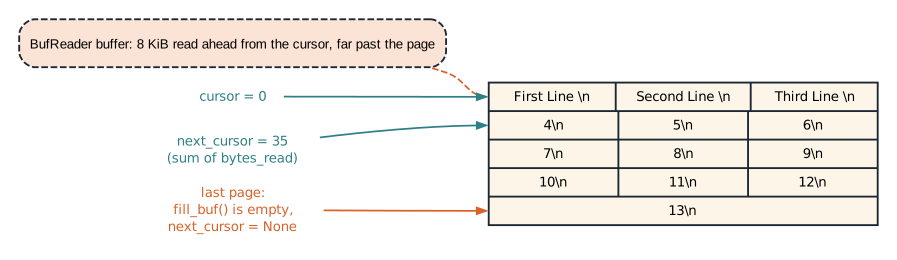
read_line returned: 12 + 12 + 11 = 35 for the first page. The file's own position is far past that, at the end of what the buffer read.So read_page counts the bytes itself:
Listing 2.11 read_page (lines 11 to 38).
fn read_page(path: &str, cursor: u64, page_size: usize) -> io::Result<Page> {
    let mut file = File::open(path)?;
    file.seek(SeekFrom::Start(cursor))?;
    let mut reader = BufReader::new(file);

    // Optimization which preserves as large as the max mage size
    let mut jobs: Vec<String> = Vec::with_capacity(page_size);
    let mut offset = cursor;
    let mut line = String::new();

    while jobs.len() < page_size {
        // Clear the previously read line
        line.clear();

        match reader.read_line(&mut line)? {
            0 => break,
            bytes_read => {
                offset += bytes_read as u64;
                jobs.push(line.trim_end().to_string());
            }
        }
    }

    let at_end = reader.fill_buf()?.is_empty();
    let next_cursor = if at_end { None } else { Some(offset) };

    Ok(Page { jobs, next_cursor })
}
read_page opens the file and calls seek(SeekFrom::Start(cursor)), which moves the file’s read position
to byte cursor. Then it wraps the file in a BufReader. Vec::with_capacity(page_size) reserves room
for a full page, so pushing lines does not reallocate.
offset starts at cursor. Each read_line returns how many bytes it consumed, newline included, and
offset grows by that amount. line.trim_end() removes the newline (and any trailing spaces) before the
line is stored, but the count still includes them, so offset stays exact.
The last page needs care. If the file ends exactly after this page’s last line, the page should report no
next cursor. reader.fill_buf() returns the bytes waiting in the buffer, reading more if the buffer is
empty, without consuming them. If it returns nothing, the file has ended, and the cursor is None.
2.7.3 The complete program
main acts as a client. It asks for pages of three lines until the cursor is None.
Listing 2.12 The complete program. src/bin/file_pagination.rs
use std::{
    fs::File,
    io::{self, BufRead, BufReader, Seek, SeekFrom},
};

struct Page {
    jobs: Vec<String>,
    next_cursor: Option<u64>, // Byte offset where the next page starts
}

fn read_page(path: &str, cursor: u64, page_size: usize) -> io::Result<Page> {
    let mut file = File::open(path)?;
    file.seek(SeekFrom::Start(cursor))?;
    let mut reader = BufReader::new(file);

    // Optimization which preserves as large as the max mage size
    let mut jobs: Vec<String> = Vec::with_capacity(page_size);
    let mut offset = cursor;
    let mut line = String::new();

    while jobs.len() < page_size {
        // Clear the previously read line
        line.clear();

        match reader.read_line(&mut line)? {
            0 => break,
            bytes_read => {
                offset += bytes_read as u64;
                jobs.push(line.trim_end().to_string());
            }
        }
    }

    let at_end = reader.fill_buf()?.is_empty();
    let next_cursor = if at_end { None } else { Some(offset) };

    Ok(Page { jobs, next_cursor })
}

fn main() -> io::Result<()> {
    let mut cursor = 0;

    loop {
        let page = read_page("src/bin/large_file.txt", cursor, 3)?;

        println!("--- page ---");
        for job in &page.jobs {
            println!("{job}");
        }

        match page.next_cursor {
            Some(next) => cursor = next,
            None => break,
        }
    }

    Ok(())
}
The input file has thirteen lines, so the program prints four full pages and one page of one line:
$ cargo run --bin file_pagination
--- page ---
First Line
Second Line
Thrid Line
--- page ---
4
5
6
--- page ---
7
8
9
--- page ---
10
11
12
--- page ---
13
TIP: If the file can change between requests, an old cursor may point into the middle of a line. You can include a version number with the offset in the cursor, and reject cursors whose version is out of date.
2.8 Project: command-line arguments
When you run command_line_args --name ada --count 2 --verbose, the operating system passes the program a
list of strings (figure 2.6). The first string is the program’s own path. The rest are the arguments, in
the order you typed them.

--name and --count each take the next string as their value.This program turns that list into a struct of typed options, or an error message.
2.8.1 The options and their defaults
The program’s settings live in one struct, with a default value for each setting the user does not give.
Listing 2.13 The options (lines 1 to 17). src/bin/command_line_args.rs
use std::{env::args, process::ExitCode};

/// The options this program understands.
#[derive(Debug, PartialEq)]
struct Options {
    name: String,
    count: u32,
    verbose: bool,
}

impl Default for Options {
    fn default() -> Self {
        Self {
            name: String::from("world"),
            count: 1,
            verbose: false,
        }
    }
}
Options has one field per option. The Default trait gives the values used when an option is not given.
#[derive(Debug, PartialEq)] lets the tests print and compare Options values.
2.8.2 Parsing
Parsing walks the arguments one at a time and fills in the options. An unknown argument is an error. So is a flag with no value after it, and a count that is not a number.
Listing 2.14 parse (lines 21 to 47).
/// Turn the arguments after the program name into `Options`.
fn parse(arguments: impl IntoIterator<Item = String>) -> Result<Options, String> {
    let mut options = Options::default();
    let mut arguments = arguments.into_iter();

    while let Some(argument) = arguments.next() {
        match argument.as_str() {
            "--name" => {
                options.name = arguments
                    .next()
                    .ok_or("--name needs a value")?;
            }
            "--count" => {
                let value = arguments
                    .next()
                    .ok_or("--count needs a value")?;
                options.count = value
                    .parse()
                    .map_err(|_| format!("--count needs a number, got {value:?}"))?;
            }
            "--verbose" => options.verbose = true,
            other => return Err(format!("unknown argument {other:?}")),
        }
    }

    Ok(options)
}
parse takes impl IntoIterator<Item = String>, which means “anything that can produce Strings one at a
time”. The program passes the real arguments. The tests pass short lists written in the test code.
The loop is while let Some(argument) = arguments.next(). It calls next() itself, rather than using
for, because --name must take the next string from the same iterator as its value. A for loop holds
the iterator for the whole loop, so the body could not call next() on it.
arguments.next().ok_or("--name needs a value")? does two steps. ok_or turns None into an Err with
the message. Then ? returns that error from parse. The --count arm adds a third step. parse()
converts the text to a number, and map_err replaces a parse error with a message that includes the text.
An argument the program does not know is an error, so a misspelled option is reported instead of ignored.
2.8.3 The exit code
main ties the pieces together: it parses the arguments, runs, and tells the shell whether it succeeded.
Listing 2.15 main (lines 49 to 68).
fn main() -> ExitCode {
    let options = match parse(args().skip(1)) {
        Ok(options) => options,
        Err(message) => {
            eprintln!("error: {message}");
            eprintln!("usage: command_line_args [--name NAME] [--count N] [--verbose]");
            return ExitCode::FAILURE;
        }
    };

    for index in 0..options.count {
        if options.verbose {
            println!("[{index}] hello, {}", options.name);
        } else {
            println!("hello, {}", options.name);
        }
    }

    ExitCode::SUCCESS
}
A program’s exit code is a number it returns to whoever started it. Zero means success. main returns
ExitCode, so it can report failure after printing its own message. args().skip(1) drops the program’s
path. On an error, main prints the message and a usage line to standard error with eprintln!, then
returns ExitCode::FAILURE, which is 1.
2.8.4 The complete program
Listing 2.16 The complete program, with its tests. src/bin/command_line_args.rs
use std::{env::args, process::ExitCode};

/// The options this program understands.
#[derive(Debug, PartialEq)]
struct Options {
    name: String,
    count: u32,
    verbose: bool,
}

impl Default for Options {
    fn default() -> Self {
        Self {
            name: String::from("world"),
            count: 1,
            verbose: false,
        }
    }
}

/// Turn the arguments after the program name into `Options`.
fn parse(arguments: impl IntoIterator<Item = String>) -> Result<Options, String> {
    let mut options = Options::default();
    let mut arguments = arguments.into_iter();

    while let Some(argument) = arguments.next() {
        match argument.as_str() {
            "--name" => {
                options.name = arguments
                    .next()
                    .ok_or("--name needs a value")?;
            }
            "--count" => {
                let value = arguments
                    .next()
                    .ok_or("--count needs a value")?;
                options.count = value
                    .parse()
                    .map_err(|_| format!("--count needs a number, got {value:?}"))?;
            }
            "--verbose" => options.verbose = true,
            other => return Err(format!("unknown argument {other:?}")),
        }
    }

    Ok(options)
}

fn main() -> ExitCode {
    let options = match parse(args().skip(1)) {
        Ok(options) => options,
        Err(message) => {
            eprintln!("error: {message}");
            eprintln!("usage: command_line_args [--name NAME] [--count N] [--verbose]");
            return ExitCode::FAILURE;
        }
    };

    for index in 0..options.count {
        if options.verbose {
            println!("[{index}] hello, {}", options.name);
        } else {
            println!("hello, {}", options.name);
        }
    }

    ExitCode::SUCCESS
}

#[cfg(test)]
mod tests {
    use super::*;

    fn parse_args(arguments: &[&str]) -> Result<Options, String> {
        parse(
            arguments
                .iter()
                .map(|value| value.to_string()),
        )
    }

    #[test]
    fn defaults_apply_when_there_are_no_arguments() {
        assert_eq!(parse_args(&[]).unwrap(), Options::default());
    }

    #[test]
    fn a_value_option_consumes_the_next_argument() {
        let options = parse_args(&["--name", "ada", "--count", "3"]).unwrap();
        assert_eq!(options.name, "ada");
        assert_eq!(options.count, 3);
    }

    #[test]
    fn verbose_is_a_flag() {
        assert!(
            parse_args(&["--verbose"])
                .unwrap()
                .verbose
        );
        assert!(!parse_args(&[]).unwrap().verbose);
    }

    #[test]
    fn a_value_option_without_a_value_is_an_error() {
        assert!(parse_args(&["--name"]).is_err());
        assert!(parse_args(&["--count"]).is_err());
    }

    #[test]
    fn a_non_numeric_count_is_an_error() {
        assert!(parse_args(&["--count", "many"]).is_err());
    }

    #[test]
    fn an_unknown_argument_is_an_error() {
        assert!(parse_args(&["--colour", "red"]).is_err());
        assert!(parse_args(&["extra"]).is_err());
    }
}
The helper parse_args in the test module converts a list of &str into Strings, so each test states its
input in one line. The tests cover the defaults, each option, a missing value, a bad number, and an unknown
argument.
$ cargo run --bin command_line_args -- --name ada --count 2 --verbose
[0] hello, ada
[1] hello, ada
$ cargo run --bin command_line_args -- --count many
error: --count needs a number, got "many"
usage: command_line_args [--name NAME] [--count N] [--verbose]
$ echo $?
1
The -- after cargo run --bin command_line_args tells Cargo that the rest of the line belongs to your
program, not to Cargo.
Summary
- A program reads files through system calls. The kernel keeps recent file data in its page cache.
Result<T, E>holds either a value or an error.?returns the error from the current function, so that function must returnResult.&PathandPathBufare the borrowed and owned path types. Functions should take&Path.fs::read_to_stringreads a whole file. ABufReaderreads large files a line at a time with few system calls.read_lineinto one reusedStringavoids an allocation per line.OpenOptionswithappend(true)adds to a file safely. A rename within one disk is atomic.io::Error::kind()lets you handle one kind of failure and report the others.file_type()does not follow symbolic links, which keeps a recursive walk from looping.- A byte offset works as a page cursor if you count the bytes you read, not the file’s position.
- Command-line arguments arrive as strings. Parse them in a function that takes an iterator, and return an exit code.
Chapter 3 begins Part 2. It works with Rust’s main collections, Vec, String, and HashMap, on a series
of problems about arrays and text.
Exercises
- Rewrite
walkwithout recursion. Keep aVec<PathBuf>of directories still to visit, and count the files and total bytes for each file extension. - Write
atomic_write(path, bytes). Write to a temporary file in the same directory, callsync_all()on it, and rename it over the target. - Add a version number to the pagination cursor, and return an error when the file changed between pages.
- Let the argument parser accept
--name=adaas well as--name ada.