Building a Shell
A shell is a user program that reads command lines and converts each into the system
calls of the previous chapters: pipe, fork, dup2, exec and wait. It has no
special privileges and no private interface to the kernel. Everything a shell does, any
program can do.
In this chapter, we will write msh, a shell that runs pipelines with input and output
redirection and has the built-in commands cd and exit. We will first watch a real
shell at work, by tracing the system calls it makes for a single line. Then we will
build msh in stages: the parser, the redirections, the launch of a pipeline, the
collection of statuses, and the built-in commands.
This chapter covers
- the loop of a shell: read, parse, start, wait
- a system call trace of a shell running a pipeline
- how a shell finds a program: the
PATHvariable - the environment, and how it reaches a new program
- the system calls behind
|,<,>and>> - why the shell closes its own copies of every descriptor it hands to a child
- the status a shell reports for a pipeline, a signal, and a missing command
- why
cdandexitcannot be separate programs - what a full shell adds: expansion, quoting, and job control
The loop of a shell
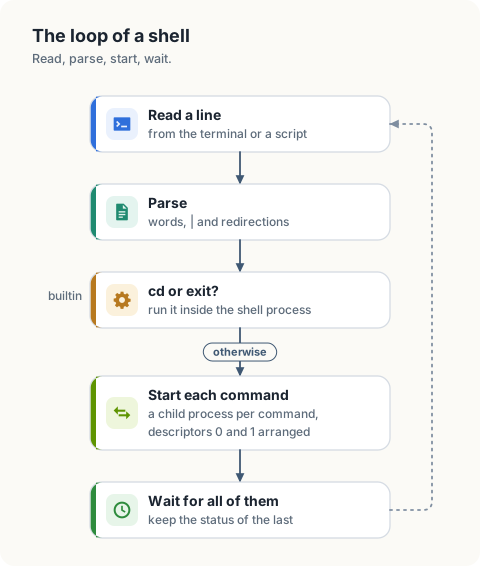
A shell repeats 4 steps. It reads a line. It parses the line into commands. It starts a process for each command, with the descriptors of each process arranged as the line asks. It waits for the processes to end and remembers the status of the last one. A few commands, the built-in commands, are carried out by the shell itself in place of the third step.
Each element of a command line corresponds to a small number of system calls.
| Syntax | What the shell does |
|---|---|
cmd args | starts a child process that executes cmd, then waits for it |
a | b | creates a pipe; starts a with descriptor 1 on the write end and b with descriptor 0 on the read end |
cmd < file | opens file for reading and makes it descriptor 0 of the child |
cmd > file | opens file with O_CREAT and O_TRUNC and makes it descriptor 1 of the child |
cmd >> file | the same with O_APPEND in place of O_TRUNC |
cd dir | calls chdir in the shell process |
exit n | ends the shell process with status n |
A real shell, traced
strace prints the system calls of a process as it makes them. With -f it follows the
children as well. This is the system shell, sh, running the line
seq 1 3 | wc -l > count.txt on our machine. The first column is the pid of the caller.
The calls that load shared libraries are removed, and calls that were interleaved are
shown in order.
$ strace -f -e trace=pipe2,clone,dup3,execve,wait4,close,openat sh -c 'seq 1 3 | wc -l > count.txt'
570272 pipe2([3, 4], 0)                                  = 0
570272 clone(... flags=...|SIGCHLD ...)                  = 570273
570272 close(4)                                          = 0
570273 close(3)                                          = 0
570273 dup3(4, 1, 0)                                     = 1
570273 close(4)                                          = 0
570273 execve("/usr/bin/seq", ["seq", "1", "3"], ...)    = 0
570272 clone(... flags=...|SIGCHLD ...)                  = 570274
570272 close(3)                                          = 0
570272 wait4(-1, ...
570274 dup3(3, 0, 0)                                     = 0
570274 close(3)                                          = 0
570274 openat(AT_FDCWD, "count.txt", O_WRONLY|O_CREAT|O_TRUNC, 0666) = 3
570274 close(1)                                          = 0
570274 dup3(3, 1, 0)                                     = 1
570274 close(3)                                          = 0
570274 execve("/usr/bin/wc", ["wc", "-l"], ...)          = 0
570273 +++ exited with 0 +++
570272 ... wait4 resumed                                 = 570273
570274 +++ exited with 0 +++
570272 wait4(-1, ...)                                    = 570274
Every line of the trace is something we have already met.
| Call | Meaning |
|---|---|
pipe2([3, 4], 0) | The shell creates the pipe. Descriptor 3 is the read end and 4 the write end (chapter 1). |
clone(...) | The shell creates a child. On Linux, fork is implemented by clone (chapter 3). The return value is the pid of the child. |
570273 dup3(4, 1, 0) | The first child makes descriptor 1 refer to the write end. dup3 is dup2 with a flags argument (chapter 2). |
570273 close(3), close(4) | The child closes the pipe descriptors it does not need under their old numbers. |
570273 execve("/usr/bin/seq", ...) | The child becomes seq. Its descriptor 1 is the pipe, and seq does not know it. |
570272 close(4), close(3) | The shell closes its own copies of both ends. |
570274 openat("count.txt", O_WRONLY|O_CREAT|O_TRUNC, 0666) | The second child opens the output file. The file is truncated here, before wc runs. |
570272 wait4(-1, ...) | The shell waits for any child, 2 times. |
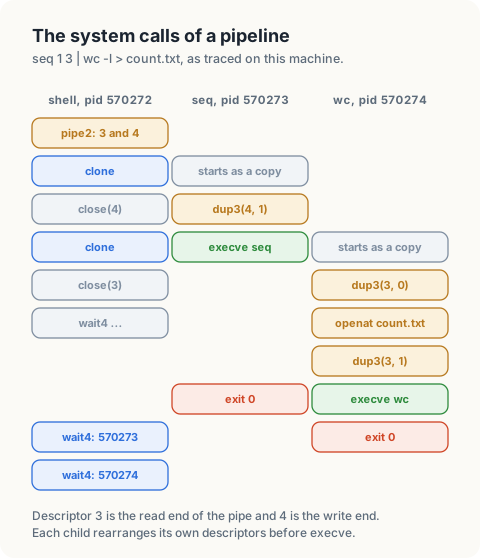
A trace is easier to read one process at a time. Follow the lines that begin with
570273 and ignore the rest: it closes 3, makes 4 its descriptor 1, closes 4, and becomes
seq. The whole preparation is 3 calls. Figure 4.3 shows the result
as descriptor tables.
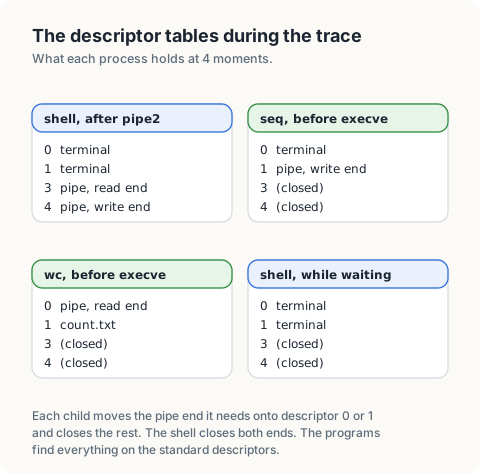
The redirections are carried out in the children, between clone and execve. The
shell’s own descriptors 0, 1 and 2 are untouched, so the next command line starts from
the same state.
Finding the program, and the environment
The trace shows execve("/usr/bin/seq", ...), although the line said seq. execve
takes a path, and the shell has to find one. It looks the name up in each directory
listed in the variable PATH, in order, and uses the first match. A name that contains
a / is used as it is.
$ type seq cd
seq is /usr/bin/seq
cd is a shell builtin
PATH is an environment variable. The environment is a list of strings of the form
NAME=value that every process has. It is the third argument of execve: the trace
shows /* 92 vars */ where strace abbreviated it. A program started without special
arrangement receives a copy of the environment of the process that started it, which is
how settings such as PATH, HOME and LANG reach every program in a session. The
environment lives in the memory of the process, so a change in a child is invisible to
the parent.
msh leaves the lookup to the standard library. Go’s exec.Command and Rust’s
Command::new search PATH when the name has no /, and both pass the environment of
msh on to the child.
Setting up
msh uses only the standard libraries.
$ cargo new msh
Low-level design: msh
| Type | Fields | Meaning |
|---|---|---|
command | args, input, output, appendOutput | a stage of a pipeline and its redirections |
shell | last, exiting | the status of the previous line; whether exit has run |
| Function | Behaviour |
|---|---|
parse(line) | splits a line into commands; fails on an empty command or a missing file name |
redirect(command) | opens the files named by <, > and >> |
launch(pipeline) | starts every command with its descriptors; closes the shell’s copies |
run(pipeline) | launches, waits for every child, returns the status of the last |
execute(line) | runs cd and exit in the shell; passes everything else to run |
Parsing
A pipeline is a list of commands, and a command is a list of arguments with optional
file names for its input and output. parse reads the words of a line from left to
right. A | ends the current command, a redirection operator consumes the next word as
a file name, and every other word is an argument.
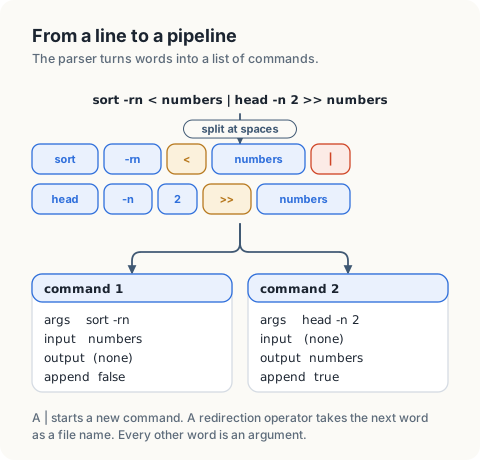
parse builds.msh requires spaces around operators and has no quoting, which keeps the parser to a
single loop.
 Listing 4.1 The imports of
 msh, in Go. code/go/msh/main.go
import (
	"bufio"
	"errors"
	"fmt"
	"log"
	"os"
	"os/exec"
	"strconv"
	"strings"
	"syscall"
)
 Listing 4.2 The imports of
 msh, in Rust. code/rust/msh/src/main.rs
use std::env;
use std::fs::{self, File, OpenOptions};
use std::io::{self, BufRead, PipeReader, Write};
use std::os::unix::process::ExitStatusExt;
use std::process::{self, Child, Stdio};
Listing 4.3 Parsing a line into a pipeline, in Go. code/go/msh/main.go
// A command is one stage of a pipeline: its arguments and the files that
// replace its standard input and output, when the line names any.
type command struct {
	args         []string
	input        string
	output       string
	appendOutput bool
}

var errSyntax = errors.New("syntax error")

// parse splits a line into the commands of a pipeline. Words and operators
// are separated by spaces. The operators are | < > and >>.
func parse(line string) ([]command, error) {
	pipeline := []command{{}}
	words := strings.Fields(line)

	for i := 0; i < len(words); i++ {
		current := &pipeline[len(pipeline)-1]

		switch word := words[i]; word {
		case "|":
			if len(current.args) == 0 {
				return nil, errSyntax
			}

			pipeline = append(pipeline, command{})

		case "<", ">", ">>":
			i++

			if i == len(words) {
				return nil, errSyntax
			}

			if word == "<" {
				current.input = words[i]
			} else {
				current.output, current.appendOutput = words[i], word == ">>"
			}

		default:
			current.args = append(current.args, word)
		}
	}

	if len(pipeline[len(pipeline)-1].args) == 0 {
		return nil, errSyntax
	}

	return pipeline, nil
}
Listing 4.4 Parsing a line into a pipeline, in Rust. code/rust/msh/src/main.rs
/// One stage of a pipeline: its arguments and the files that replace its
/// standard input and output, when the line names any.
#[derive(Default)]
struct Command {
    args: Vec<String>,
    input: Option<String>,
    output: Option<String>,
    append_output: bool,
}

struct SyntaxError;

/// Splits a line into the commands of a pipeline. Words and operators are
/// separated by spaces. The operators are | < > and >>.
fn parse(line: &str) -> Result<Vec<Command>, SyntaxError> {
    let mut pipeline = Vec::new();
    let mut current = Command::default();
    let mut words = line.split_whitespace();

    while let Some(word) = words.next() {
        match word {
            "|" => {
                if current.args.is_empty() {
                    return Err(SyntaxError);
                }

                pipeline.push(std::mem::take(&mut current));
            }
            "<" | ">" | ">>" => {
                let file = words.next().ok_or(SyntaxError)?.to_owned();

                if word == "<" {
                    current.input = Some(file);
                } else {
                    current.output = Some(file);
                    current.append_output = word == ">>";
                }
            }
            _ => current.args.push(word.to_owned()),
        }
    }

    if current.args.is_empty() {
        return Err(SyntaxError);
    }

    pipeline.push(current);

    Ok(pipeline)
}
Redirections
redirect opens the files a command names. > truncates the file when it is opened,
which is before the command runs, as the trace showed. For this reason
sort < numbers > numbers empties the file before sort reads it. >> opens with
O_APPEND and keeps the contents.
Listing 4.5 Opening the files of a redirection, in Go. code/go/msh/main.go
// redirect opens the files a command names and returns the files to use as
// its standard input and output. A nil result means "keep the default".
func redirect(c command) (input, output *os.File, err error) {
	if c.input != "" {
		input, err = os.Open(c.input)

		if err != nil {
			return nil, nil, err
		}
	}

	if c.output != "" {
		flags := os.O_WRONLY | os.O_CREATE | os.O_TRUNC

		if c.appendOutput {
			flags = os.O_WRONLY | os.O_CREATE | os.O_APPEND
		}

		output, err = os.OpenFile(c.output, flags, 0o644)

		if err != nil {
			return nil, nil, err
		}
	}

	return input, output, nil
}
Listing 4.6 Opening the files of a redirection, in Rust. code/rust/msh/src/main.rs
/// Opens the files a command names and returns the files to use as its
/// standard input and output. `None` means "keep the default".
fn redirect(command: &Command) -> io::Result<(Option<File>, Option<File>)> {
    let input = command.input.as_ref().map(File::open).transpose()?;

    let output = command
        .output
        .as_ref()
        .map(|path| {
            OpenOptions::new()
                .write(true)
                .create(true)
                .append(command.append_output)
                .truncate(!command.append_output)
                .open(path)
        })
        .transpose()?;

    Ok((input, output))
}
Launching a pipeline
launch walks the pipeline from left to right. For each command except the last it
creates a pipe, gives the write end to this command as descriptor 1, and carries the
read end to the next iteration, where it becomes descriptor 0 of the next command. A
redirection takes precedence over the pipe: when a command names a file for a
descriptor, the file replaces the pipe end on that descriptor.
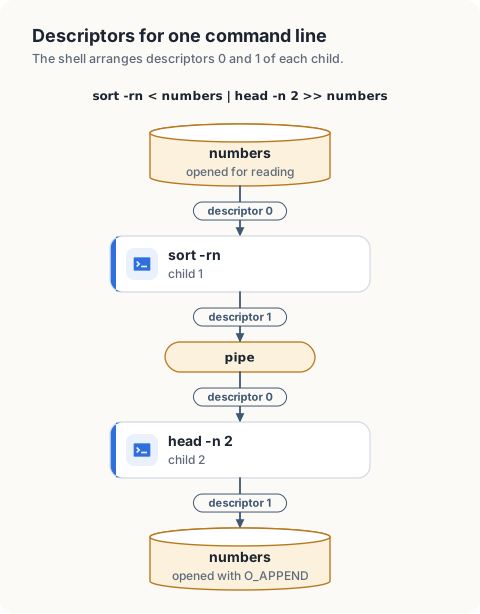
After a child has started, the shell closes every descriptor it opened for that child,
as sh did in the trace. The rule from chapter 1 applies: a write end
that stays open in the shell keeps the write count of the pipe above 0, and the next
command waits for an end of the stream that is not reported.
The standard libraries perform the clone, the dup3 calls and the execve in a
single call, Start in Go and spawn in Rust. We name the files for descriptors 0 and 1
of the child, and the library arranges them in the child.
Listing 4.7 Starting the commands of a pipeline, in Go. code/go/msh/main.go
// launch starts every command of a pipeline and returns the commands that
// started. Command i reads from the pipe that command i-1 writes to, unless
// a redirection replaces that descriptor.
func launch(pipeline []command) []*exec.Cmd {
	var started []*exec.Cmd
	var fromPrevious *os.File

	for i, c := range pipeline {
		stdin, stdout := os.Stdin, os.Stdout
		var toNext, nextInput *os.File

		if fromPrevious != nil {
			stdin = fromPrevious
		}

		if i < len(pipeline)-1 {
			reader, writer, err := os.Pipe()

			if err != nil {
				fmt.Fprintln(os.Stderr, "msh:", err)

				break
			}

			stdout, toNext, nextInput = writer, writer, reader
		}

		input, output, err := redirect(c)

		if input != nil {
			stdin = input
		}

		if output != nil {
			stdout = output
		}

		if err == nil {
			child := exec.Command(c.args[0], c.args[1:]...)
			child.Stdin, child.Stdout, child.Stderr = stdin, stdout, os.Stderr
			err = child.Start()

			if err == nil {
				started = append(started, child)
			}
		}

		if errors.Is(err, exec.ErrNotFound) {
			fmt.Fprintf(os.Stderr, "msh: %s: command not found\n", c.args[0])
		} else if err != nil {
			fmt.Fprintln(os.Stderr, "msh:", err)
		}

		// The child has its own copies. The shell closes every descriptor it
		// opened for this command.
		for _, file := range []*os.File{input, output, toNext, fromPrevious} {
			if file != nil {
				file.Close()
			}
		}

		fromPrevious = nextInput
	}

	return started
}
Listing 4.8 Starting the commands of a pipeline, in Rust. code/rust/msh/src/main.rs
/// Starts every command of a pipeline and returns the children that started.
/// Command `i` reads from the pipe that command `i - 1` writes to, unless a
/// redirection replaces that descriptor.
fn launch(pipeline: &[Command]) -> Vec<Child> {
    let mut started = Vec::new();
    let mut from_previous: Option<PipeReader> = None;

    for (i, command) in pipeline.iter().enumerate() {
        let mut stdin = from_previous
            .take()
            .map_or_else(Stdio::inherit, Stdio::from);
        let mut stdout = Stdio::inherit();

        if i + 1 < pipeline.len() {
            let Ok((reader, writer)) = io::pipe() else {
                eprintln!("msh: cannot create a pipe");

                break;
            };

            stdout = writer.into();
            from_previous = Some(reader);
        }

        let (input, output) = match redirect(command) {
            Ok(files) => files,
            Err(error) => {
                eprintln!("msh: {error}");

                continue;
            }
        };

        if let Some(file) = input {
            stdin = file.into();
        }

        if let Some(file) = output {
            stdout = file.into();
        }

        // The `Command` owns the shell's copies of the descriptors. It is
        // dropped when the statement ends, which closes them.
        let child = process::Command::new(&command.args[0])
            .args(&command.args[1..])
            .stdin(stdin)
            .stdout(stdout)
            .spawn();

        match child {
            Ok(child) => started.push(child),
            Err(error) if error.kind() == io::ErrorKind::NotFound => {
                eprintln!("msh: {}: command not found", command.args[0]);
            }
            Err(error) => eprintln!("msh: {error}"),
        }
    }

    started
}
Collecting statuses
The shell waits for every child. A child that is not waited for remains a zombie, as
chapter 3 showed. The status of a pipeline is the status of its last
command. status applies the conventions of a shell.
| Ending of the last command | Status |
|---|---|
it called exit(n) | n |
it was ended by signal n | 128 + n |
| it could not be started | 127 |
By convention 0 means success and any other value means failure, and the commands if
and while of a full shell test exactly this number.
Listing 4.9 Waiting for the pipeline, in Go. code/go/msh/main.go
// status converts a wait status to the number a shell reports: the exit
// status, or 128 plus the signal number.
func status(child *exec.Cmd) int {
	child.Wait()

	if wait, ok := child.ProcessState.Sys().(syscall.WaitStatus); ok && wait.Signaled() {
		return 128 + int(wait.Signal())
	}

	return child.ProcessState.ExitCode()
}

// run starts a pipeline, waits for every command, and returns the status of
// the last command, or 127 when the last command did not start.
func run(pipeline []command) int {
	started := launch(pipeline)
	last := 127

	for _, child := range started {
		last = status(child)
	}

	if len(started) < len(pipeline) {
		return 127
	}

	return last
}
Listing 4.10 Waiting for the pipeline, in Rust. code/rust/msh/src/main.rs
/// Converts a wait status to the number a shell reports: the exit status, or
/// 128 plus the signal number.
fn status(child: &mut Child) -> i32 {
    let Ok(status) = child.wait() else {
        return 127;
    };

    match (status.signal(), status.code()) {
        (Some(signal), _) => 128 + signal,
        (None, Some(code)) => code,
        (None, None) => 127,
    }
}

/// Starts a pipeline, waits for every command, and returns the status of the
/// last command, or 127 when the last command did not start.
fn run(pipeline: &[Command]) -> i32 {
    let mut started = launch(pipeline);
    let mut last = 127;

    for child in &mut started {
        last = status(child);
    }

    if started.len() < pipeline.len() {
        return 127;
    }

    last
}
Built-in commands
The working directory is an attribute of a process, kept by the kernel, and a child
receives a copy of it. If cd were a separate program, it would change the directory of
its own process and exit, and the directory of the shell would be unchanged. The same
reasoning applies to exit. Both therefore run inside the shell process.
Listing 4.11 Running a line: built-in commands and pipelines, in Go. code/go/msh/main.go
// A shell holds the state that outlives a command line.
type shell struct {
	last    int
	exiting bool
}

// execute runs one command line. cd and exit change the shell process
// itself, so they run inside it. Everything else runs in child processes.
func (s *shell) execute(line string) {
	pipeline, err := parse(line)

	if err != nil {
		fmt.Fprintln(os.Stderr, "msh:", err)
		s.last = 2

		return
	}

	switch first := pipeline[0]; {
	case len(pipeline) == 1 && first.args[0] == "cd" && len(first.args) == 2:
		s.last = 0

		if err := os.Chdir(first.args[1]); err != nil {
			fmt.Fprintln(os.Stderr, "msh:", err)
			s.last = 1
		}

	case len(pipeline) == 1 && first.args[0] == "exit":
		s.exiting = true

		if len(first.args) == 2 {
			s.last, _ = strconv.Atoi(first.args[1])
		}

	default:
		s.last = run(pipeline)
	}
}
Listing 4.12 Running a line: built-in commands and pipelines, in Rust. code/rust/msh/src/main.rs
/// The state that outlives a command line.
#[derive(Default)]
struct Shell {
    last: i32,
    exiting: bool,
}

impl Shell {
    /// Runs one command line. cd and exit change the shell process itself, so
    /// they run inside it. Everything else runs in child processes.
    fn execute(&mut self, line: &str) {
        let Ok(pipeline) = parse(line) else {
            eprintln!("msh: syntax error");
            self.last = 2;

            return;
        };

        let args: Vec<&str> = pipeline[0].args.iter().map(String::as_str).collect();

        match (pipeline.len(), args.as_slice()) {
            (1, ["cd", directory]) => {
                self.last = 0;

                if let Err(error) = env::set_current_dir(directory) {
                    eprintln!("msh: {error}");
                    self.last = 1;
                }
            }
            (1, ["exit", rest @ ..]) => {
                self.exiting = true;

                if let [code] = rest
                    && let Ok(code) = code.parse()
                {
                    self.last = code;
                }
            }
            _ => self.last = run(&pipeline),
        }
    }
}
cd works because it runs inside the shell. A separate cd program would change its own directory and exit.
Running a script
Without arguments, msh runs a fixed script in a temporary directory and prints the
status after each line. With -i, it reads lines from standard input.
Listing 4.13 The script, and the interactive loop, in Go. code/go/msh/main.go
// script is the demonstration that msh runs without arguments.
var script = []string{
	"seq 1 5 > numbers",
	"wc -l < numbers",
	"sort -rn < numbers | head -n 2 >> numbers",
	"paste -sd, numbers",
	"false",
	"nosuchcommand",
	"cd /",
	"pwd",
	"exit 3",
	"echo not reached",
}

// demonstrate runs the script in a new temporary directory and prints the
// status after each line.
func demonstrate() error {
	dir, err := os.MkdirTemp("", "msh")

	if err != nil {
		return err
	}

	defer os.RemoveAll(dir)

	if err := os.Chdir(dir); err != nil {
		return err
	}

	s := &shell{}

	for _, line := range script {
		fmt.Println("$", line)
		s.execute(line)

		if s.exiting {
			fmt.Printf("[the shell exits with status %d]\n", s.last)

			return nil
		}

		fmt.Printf("[status %d]\n", s.last)
	}

	return nil
}

// interact reads command lines from standard input until exit or the end of
// the input, and ends the process with the last status.
func interact() {
	s := &shell{}
	lines := bufio.NewScanner(os.Stdin)

	for !s.exiting {
		fmt.Print("msh$ ")

		if !lines.Scan() {
			break
		}

		if strings.TrimSpace(lines.Text()) != "" {
			s.execute(lines.Text())
		}
	}

	os.Exit(s.last)
}

func main() {
	if len(os.Args) > 1 && os.Args[1] == "-i" {
		interact()
	}

	if err := demonstrate(); err != nil {
		log.Fatal(err)
	}
}
Listing 4.14 The script, and the interactive loop, in Rust. code/rust/msh/src/main.rs
/// The demonstration that msh runs without arguments.
const SCRIPT: [&str; 10] = [
    "seq 1 5 > numbers",
    "wc -l < numbers",
    "sort -rn < numbers | head -n 2 >> numbers",
    "paste -sd, numbers",
    "false",
    "nosuchcommand",
    "cd /",
    "pwd",
    "exit 3",
    "echo not reached",
];

/// Runs the script in a new temporary directory and prints the status after
/// each line.
fn demonstrate() -> io::Result<()> {
    let dir = env::temp_dir().join(format!("msh-{}", process::id()));

    fs::create_dir_all(&dir)?;
    env::set_current_dir(&dir)?;

    let mut shell = Shell::default();

    for line in SCRIPT {
        println!("$ {line}");
        shell.execute(line);

        if shell.exiting {
            println!("[the shell exits with status {}]", shell.last);

            break;
        }

        println!("[status {}]", shell.last);
    }

    fs::remove_dir_all(&dir)
}

/// Reads command lines from standard input until exit or the end of the
/// input, and ends the process with the last status.
fn interact() -> io::Result<()> {
    let mut shell = Shell::default();
    let mut lines = io::stdin().lock().lines();

    while !shell.exiting {
        print!("msh$ ");
        io::stdout().flush()?;

        let Some(line) = lines.next().transpose()? else {
            break;
        };

        if !line.trim().is_empty() {
            shell.execute(&line);
        }
    }

    process::exit(shell.last);
}

fn main() -> io::Result<()> {
    if env::args().nth(1).as_deref() == Some("-i") {
        interact()?;
    }

    demonstrate()
}
$ seq 1 5 > numbers
[status 0]
$ wc -l < numbers
5
[status 0]
$ sort -rn < numbers | head -n 2 >> numbers
[status 0]
$ paste -sd, numbers
1,2,3,4,5,5,4
[status 0]
$ false
[status 1]
$ nosuchcommand
msh: nosuchcommand: command not found
[status 127]
$ cd /
[status 0]
$ pwd
/
[status 0]
$ exit 3
[the shell exits with status 3]
| Line | What it shows |
|---|---|
seq 1 5 > numbers | Descriptor 1 of seq is the file. Nothing is printed. |
wc -l < numbers | Descriptor 0 of wc is the file. |
sort -rn < numbers | head -n 2 >> numbers | sort reads its whole input before writing, so the 2 lines that head appends are 5 and 4. |
paste -sd, numbers | The file now has 7 lines. |
false | The status is the exit status of the command, 1. |
nosuchcommand | The command could not be started. The status is 127. |
cd / then pwd | The child pwd inherits the directory that the built-in cd set in the shell. |
exit 3 | The shell ends, and the last line of the script is not run. |
What a full shell adds
msh passes each word of a line to the program unchanged. A shell such as bash or
dash processes the words first, and it is useful to know that these steps happen in
the shell, before any program starts.
| Feature | What the shell does before exec |
|---|---|
| variables | replaces $HOME with the value of the variable |
| wildcards | replaces *.txt with the list of matching file names; the program receives the names and does not see the * |
| command substitution | runs the command inside $(...) with its output on a pipe, and inserts what it reads |
| quoting | '...' and "..." keep spaces and operators from being treated as separators |
a && b, a || b | runs b depending on whether the status of a was 0 |
cmd & | starts the command and does not wait for it |
The last row leads to job control. A shell places each pipeline in a process group,
a set of processes that can be signalled together, and tells the terminal which group is
in the foreground. When we press Ctrl-C, the terminal driver in the kernel sends
SIGINT to every process of the foreground group, and the shell itself, which is in a
different group, is unaffected. Signals are the subject of
chapter 5.
Inspecting a shell at work
| Command | Shows |
|---|---|
strace -f -e trace=process,pipe2,dup3 sh -c '...' | the system calls of a shell and its children for a line |
type name | whether a name is a built-in command or a program, and which file |
echo $? | the status of the previous command |
set -x | each command, after expansion, as the shell runs it |
echo $PATH | the directories searched for programs |
The complete program
Listing 4.15 The complete msh, in Go. code/go/msh/main.go
// Command msh is a small shell. It parses a command line into a pipeline of
// commands with redirections, starts each command with its descriptors
// arranged, waits for all of them, and reports the status of the last. The
// commands cd and exit are built in.
//
// Without arguments it runs a fixed script in a temporary directory. With -i
// it reads command lines from standard input.
//
// Run it from code/go with:
//
//	go run ./msh
package main

import (
	"bufio"
	"errors"
	"fmt"
	"log"
	"os"
	"os/exec"
	"strconv"
	"strings"
	"syscall"
)


// A command is one stage of a pipeline: its arguments and the files that
// replace its standard input and output, when the line names any.
type command struct {
	args         []string
	input        string
	output       string
	appendOutput bool
}

var errSyntax = errors.New("syntax error")

// parse splits a line into the commands of a pipeline. Words and operators
// are separated by spaces. The operators are | < > and >>.
func parse(line string) ([]command, error) {
	pipeline := []command{{}}
	words := strings.Fields(line)

	for i := 0; i < len(words); i++ {
		current := &pipeline[len(pipeline)-1]

		switch word := words[i]; word {
		case "|":
			if len(current.args) == 0 {
				return nil, errSyntax
			}

			pipeline = append(pipeline, command{})

		case "<", ">", ">>":
			i++

			if i == len(words) {
				return nil, errSyntax
			}

			if word == "<" {
				current.input = words[i]
			} else {
				current.output, current.appendOutput = words[i], word == ">>"
			}

		default:
			current.args = append(current.args, word)
		}
	}

	if len(pipeline[len(pipeline)-1].args) == 0 {
		return nil, errSyntax
	}

	return pipeline, nil
}


// redirect opens the files a command names and returns the files to use as
// its standard input and output. A nil result means "keep the default".
func redirect(c command) (input, output *os.File, err error) {
	if c.input != "" {
		input, err = os.Open(c.input)

		if err != nil {
			return nil, nil, err
		}
	}

	if c.output != "" {
		flags := os.O_WRONLY | os.O_CREATE | os.O_TRUNC

		if c.appendOutput {
			flags = os.O_WRONLY | os.O_CREATE | os.O_APPEND
		}

		output, err = os.OpenFile(c.output, flags, 0o644)

		if err != nil {
			return nil, nil, err
		}
	}

	return input, output, nil
}


// launch starts every command of a pipeline and returns the commands that
// started. Command i reads from the pipe that command i-1 writes to, unless
// a redirection replaces that descriptor.
func launch(pipeline []command) []*exec.Cmd {
	var started []*exec.Cmd
	var fromPrevious *os.File

	for i, c := range pipeline {
		stdin, stdout := os.Stdin, os.Stdout
		var toNext, nextInput *os.File

		if fromPrevious != nil {
			stdin = fromPrevious
		}

		if i < len(pipeline)-1 {
			reader, writer, err := os.Pipe()

			if err != nil {
				fmt.Fprintln(os.Stderr, "msh:", err)

				break
			}

			stdout, toNext, nextInput = writer, writer, reader
		}

		input, output, err := redirect(c)

		if input != nil {
			stdin = input
		}

		if output != nil {
			stdout = output
		}

		if err == nil {
			child := exec.Command(c.args[0], c.args[1:]...)
			child.Stdin, child.Stdout, child.Stderr = stdin, stdout, os.Stderr
			err = child.Start()

			if err == nil {
				started = append(started, child)
			}
		}

		if errors.Is(err, exec.ErrNotFound) {
			fmt.Fprintf(os.Stderr, "msh: %s: command not found\n", c.args[0])
		} else if err != nil {
			fmt.Fprintln(os.Stderr, "msh:", err)
		}

		// The child has its own copies. The shell closes every descriptor it
		// opened for this command.
		for _, file := range []*os.File{input, output, toNext, fromPrevious} {
			if file != nil {
				file.Close()
			}
		}

		fromPrevious = nextInput
	}

	return started
}


// status converts a wait status to the number a shell reports: the exit
// status, or 128 plus the signal number.
func status(child *exec.Cmd) int {
	child.Wait()

	if wait, ok := child.ProcessState.Sys().(syscall.WaitStatus); ok && wait.Signaled() {
		return 128 + int(wait.Signal())
	}

	return child.ProcessState.ExitCode()
}

// run starts a pipeline, waits for every command, and returns the status of
// the last command, or 127 when the last command did not start.
func run(pipeline []command) int {
	started := launch(pipeline)
	last := 127

	for _, child := range started {
		last = status(child)
	}

	if len(started) < len(pipeline) {
		return 127
	}

	return last
}


// A shell holds the state that outlives a command line.
type shell struct {
	last    int
	exiting bool
}

// execute runs one command line. cd and exit change the shell process
// itself, so they run inside it. Everything else runs in child processes.
func (s *shell) execute(line string) {
	pipeline, err := parse(line)

	if err != nil {
		fmt.Fprintln(os.Stderr, "msh:", err)
		s.last = 2

		return
	}

	switch first := pipeline[0]; {
	case len(pipeline) == 1 && first.args[0] == "cd" && len(first.args) == 2:
		s.last = 0

		if err := os.Chdir(first.args[1]); err != nil {
			fmt.Fprintln(os.Stderr, "msh:", err)
			s.last = 1
		}

	case len(pipeline) == 1 && first.args[0] == "exit":
		s.exiting = true

		if len(first.args) == 2 {
			s.last, _ = strconv.Atoi(first.args[1])
		}

	default:
		s.last = run(pipeline)
	}
}


// script is the demonstration that msh runs without arguments.
var script = []string{
	"seq 1 5 > numbers",
	"wc -l < numbers",
	"sort -rn < numbers | head -n 2 >> numbers",
	"paste -sd, numbers",
	"false",
	"nosuchcommand",
	"cd /",
	"pwd",
	"exit 3",
	"echo not reached",
}

// demonstrate runs the script in a new temporary directory and prints the
// status after each line.
func demonstrate() error {
	dir, err := os.MkdirTemp("", "msh")

	if err != nil {
		return err
	}

	defer os.RemoveAll(dir)

	if err := os.Chdir(dir); err != nil {
		return err
	}

	s := &shell{}

	for _, line := range script {
		fmt.Println("$", line)
		s.execute(line)

		if s.exiting {
			fmt.Printf("[the shell exits with status %d]\n", s.last)

			return nil
		}

		fmt.Printf("[status %d]\n", s.last)
	}

	return nil
}

// interact reads command lines from standard input until exit or the end of
// the input, and ends the process with the last status.
func interact() {
	s := &shell{}
	lines := bufio.NewScanner(os.Stdin)

	for !s.exiting {
		fmt.Print("msh$ ")

		if !lines.Scan() {
			break
		}

		if strings.TrimSpace(lines.Text()) != "" {
			s.execute(lines.Text())
		}
	}

	os.Exit(s.last)
}

func main() {
	if len(os.Args) > 1 && os.Args[1] == "-i" {
		interact()
	}

	if err := demonstrate(); err != nil {
		log.Fatal(err)
	}
}
 Listing 4.16 The complete
 msh, in Rust. code/rust/msh/src/main.rs
//! A small shell. It parses a command line into a pipeline of commands with
//! redirections, starts each command with its descriptors arranged, waits for
//! all of them, and reports the status of the last. The commands cd and exit
//! are built in.
//!
//! Without arguments it runs a fixed script in a temporary directory. With -i
//! it reads command lines from standard input.
//!
//! Run it from code/rust with:
//!
//! ```text
//! cargo run -p msh
//! ```

use std::env;
use std::fs::{self, File, OpenOptions};
use std::io::{self, BufRead, PipeReader, Write};
use std::os::unix::process::ExitStatusExt;
use std::process::{self, Child, Stdio};

/// One stage of a pipeline: its arguments and the files that replace its
/// standard input and output, when the line names any.
#[derive(Default)]
struct Command {
    args: Vec<String>,
    input: Option<String>,
    output: Option<String>,
    append_output: bool,
}

struct SyntaxError;

/// Splits a line into the commands of a pipeline. Words and operators are
/// separated by spaces. The operators are | < > and >>.
fn parse(line: &str) -> Result<Vec<Command>, SyntaxError> {
    let mut pipeline = Vec::new();
    let mut current = Command::default();
    let mut words = line.split_whitespace();

    while let Some(word) = words.next() {
        match word {
            "|" => {
                if current.args.is_empty() {
                    return Err(SyntaxError);
                }

                pipeline.push(std::mem::take(&mut current));
            }
            "<" | ">" | ">>" => {
                let file = words.next().ok_or(SyntaxError)?.to_owned();

                if word == "<" {
                    current.input = Some(file);
                } else {
                    current.output = Some(file);
                    current.append_output = word == ">>";
                }
            }
            _ => current.args.push(word.to_owned()),
        }
    }

    if current.args.is_empty() {
        return Err(SyntaxError);
    }

    pipeline.push(current);

    Ok(pipeline)
}

/// Opens the files a command names and returns the files to use as its
/// standard input and output. `None` means "keep the default".
fn redirect(command: &Command) -> io::Result<(Option<File>, Option<File>)> {
    let input = command.input.as_ref().map(File::open).transpose()?;

    let output = command
        .output
        .as_ref()
        .map(|path| {
            OpenOptions::new()
                .write(true)
                .create(true)
                .append(command.append_output)
                .truncate(!command.append_output)
                .open(path)
        })
        .transpose()?;

    Ok((input, output))
}

/// Starts every command of a pipeline and returns the children that started.
/// Command `i` reads from the pipe that command `i - 1` writes to, unless a
/// redirection replaces that descriptor.
fn launch(pipeline: &[Command]) -> Vec<Child> {
    let mut started = Vec::new();
    let mut from_previous: Option<PipeReader> = None;

    for (i, command) in pipeline.iter().enumerate() {
        let mut stdin = from_previous
            .take()
            .map_or_else(Stdio::inherit, Stdio::from);
        let mut stdout = Stdio::inherit();

        if i + 1 < pipeline.len() {
            let Ok((reader, writer)) = io::pipe() else {
                eprintln!("msh: cannot create a pipe");

                break;
            };

            stdout = writer.into();
            from_previous = Some(reader);
        }

        let (input, output) = match redirect(command) {
            Ok(files) => files,
            Err(error) => {
                eprintln!("msh: {error}");

                continue;
            }
        };

        if let Some(file) = input {
            stdin = file.into();
        }

        if let Some(file) = output {
            stdout = file.into();
        }

        // The `Command` owns the shell's copies of the descriptors. It is
        // dropped when the statement ends, which closes them.
        let child = process::Command::new(&command.args[0])
            .args(&command.args[1..])
            .stdin(stdin)
            .stdout(stdout)
            .spawn();

        match child {
            Ok(child) => started.push(child),
            Err(error) if error.kind() == io::ErrorKind::NotFound => {
                eprintln!("msh: {}: command not found", command.args[0]);
            }
            Err(error) => eprintln!("msh: {error}"),
        }
    }

    started
}

/// Converts a wait status to the number a shell reports: the exit status, or
/// 128 plus the signal number.
fn status(child: &mut Child) -> i32 {
    let Ok(status) = child.wait() else {
        return 127;
    };

    match (status.signal(), status.code()) {
        (Some(signal), _) => 128 + signal,
        (None, Some(code)) => code,
        (None, None) => 127,
    }
}

/// Starts a pipeline, waits for every command, and returns the status of the
/// last command, or 127 when the last command did not start.
fn run(pipeline: &[Command]) -> i32 {
    let mut started = launch(pipeline);
    let mut last = 127;

    for child in &mut started {
        last = status(child);
    }

    if started.len() < pipeline.len() {
        return 127;
    }

    last
}

/// The state that outlives a command line.
#[derive(Default)]
struct Shell {
    last: i32,
    exiting: bool,
}

impl Shell {
    /// Runs one command line. cd and exit change the shell process itself, so
    /// they run inside it. Everything else runs in child processes.
    fn execute(&mut self, line: &str) {
        let Ok(pipeline) = parse(line) else {
            eprintln!("msh: syntax error");
            self.last = 2;

            return;
        };

        let args: Vec<&str> = pipeline[0].args.iter().map(String::as_str).collect();

        match (pipeline.len(), args.as_slice()) {
            (1, ["cd", directory]) => {
                self.last = 0;

                if let Err(error) = env::set_current_dir(directory) {
                    eprintln!("msh: {error}");
                    self.last = 1;
                }
            }
            (1, ["exit", rest @ ..]) => {
                self.exiting = true;

                if let [code] = rest
                    && let Ok(code) = code.parse()
                {
                    self.last = code;
                }
            }
            _ => self.last = run(&pipeline),
        }
    }
}

/// The demonstration that msh runs without arguments.
const SCRIPT: [&str; 10] = [
    "seq 1 5 > numbers",
    "wc -l < numbers",
    "sort -rn < numbers | head -n 2 >> numbers",
    "paste -sd, numbers",
    "false",
    "nosuchcommand",
    "cd /",
    "pwd",
    "exit 3",
    "echo not reached",
];

/// Runs the script in a new temporary directory and prints the status after
/// each line.
fn demonstrate() -> io::Result<()> {
    let dir = env::temp_dir().join(format!("msh-{}", process::id()));

    fs::create_dir_all(&dir)?;
    env::set_current_dir(&dir)?;

    let mut shell = Shell::default();

    for line in SCRIPT {
        println!("$ {line}");
        shell.execute(line);

        if shell.exiting {
            println!("[the shell exits with status {}]", shell.last);

            break;
        }

        println!("[status {}]", shell.last);
    }

    fs::remove_dir_all(&dir)
}

/// Reads command lines from standard input until exit or the end of the
/// input, and ends the process with the last status.
fn interact() -> io::Result<()> {
    let mut shell = Shell::default();
    let mut lines = io::stdin().lock().lines();

    while !shell.exiting {
        print!("msh$ ");
        io::stdout().flush()?;

        let Some(line) = lines.next().transpose()? else {
            break;
        };

        if !line.trim().is_empty() {
            shell.execute(&line);
        }
    }

    process::exit(shell.last);
}

fn main() -> io::Result<()> {
    if env::args().nth(1).as_deref() == Some("-i") {
        interact()?;
    }

    demonstrate()
}
Summary
- A shell is an ordinary program built on
pipe,fork,dup2,execandwait. |becomes a pipe between descriptor 1 of one child and descriptor 0 of the next.<,>and>>become anopenwhose result replaces descriptor 0 or 1.- Redirections are performed in the child, between its creation and
exec. The shell’s own descriptors do not change. >truncates its file before the command starts.- The shell finds a program by searching the directories of
PATH, and the environment is passed to the program byexec. - The shell closes its own copies of pipe ends and redirected files after starting each child, and waits for every child.
- The status of a pipeline is the status of its last command; a signal is reported as
128 + n, and a command that cannot be started as 127. cdandexitact on the shell process and are built in for that reason.- Variables, wildcards and quoting are processed by the shell before a program starts.
References
- The Open Group Base Specifications, Shell Command Language: https://pubs.opengroup.org/onlinepubs/9699919799/utilities/V3_chap02.html
execve(2),environ(7),chdir(2)andstrace(1), Linux manual pages: https://man7.org/linux/man-pages/man2/execve.2.html- M. Kerrisk, The Linux Programming Interface, No Starch Press, 2010, chapters 6, 27, 34 and 44.