
Web chat: Thor Tigress Cub
The Thor Tigress Cub is the browser face of the Thor: a chat page that talks to Nemotron 3 Nano on the Jetson AGX Thor, can search the web before it answers, and can show its reasoning. It is one HTML file in front of one small Rust server, and everything it calls runs on the Thor.
The Thor serves the page itself, at https://<thor>.<tailnet>.ts.net
through Tailscale Funnel. https://voltforge.tech/thor-tigress-cub is a
short address whose one-file page on GitHub Pages sends the browser there
(chapter “Bring your own domain”); there is no other copy of the chat.
This chapter covers
- what the page does, screen by screen
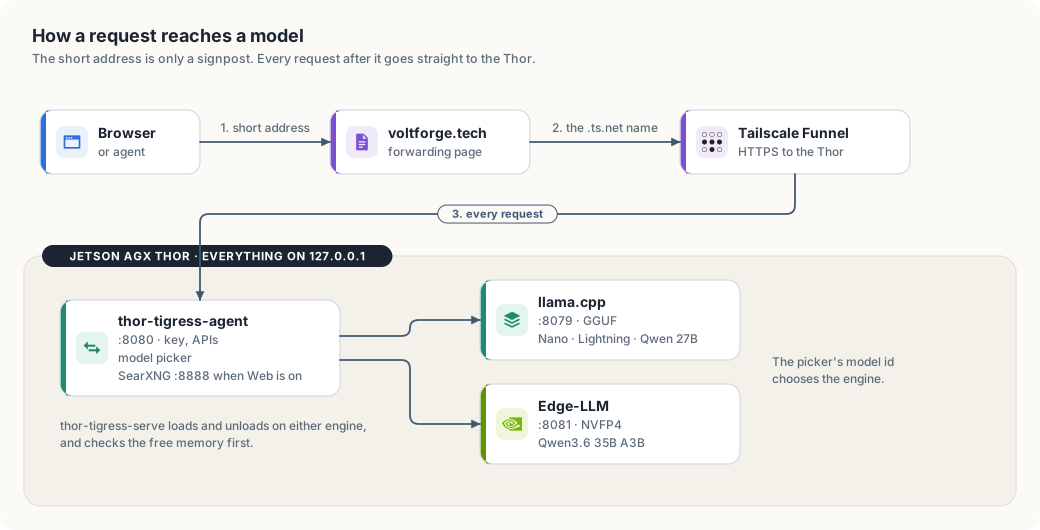
- how the page, the Rust server, llama-server and SearXNG fit together
- starting it on the Thor, sharing it, and handing out access keys
- changing the page or the server without cutting anyone off
- what goes wrong and how to tell
A tour of the page
Welcome
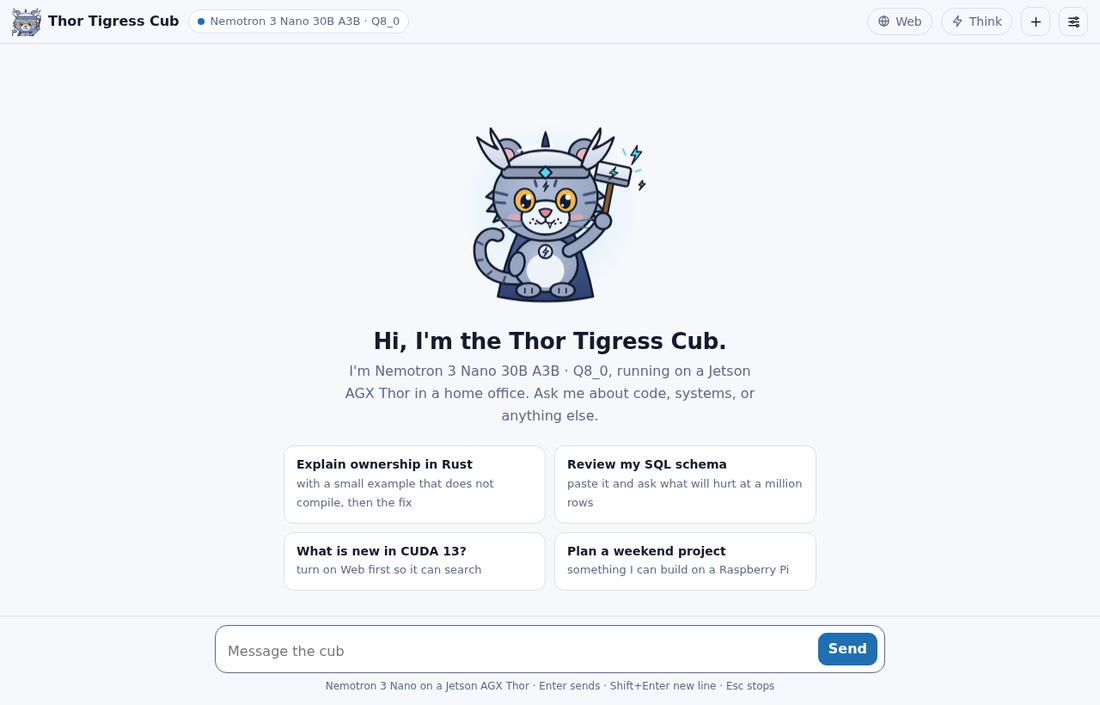
A new conversation opens on the cub, a greeting that names the model the server reports, and four suggested prompts. Clicking a suggestion puts it in the message box so it can be edited before sending; nothing is sent until you press Enter.
The header holds, from left to right:
- Thor Tigress Cub and the model picker. The dot is the server’s state:
green when
/v1/modelsanswers, red when the key is missing or the server can’t be reached. The picker lists what/v1/modelsreturns, remembers the choice in the browser, and sends it asmodelwith every message. With one model served it is greyed out. See “Two models” below. - Web: lets the model search before it answers (below).
- Think: lets the model reason before it answers (below).
- + starts a new conversation; the old one is discarded.
- The sliders icon opens Settings.
A conversation
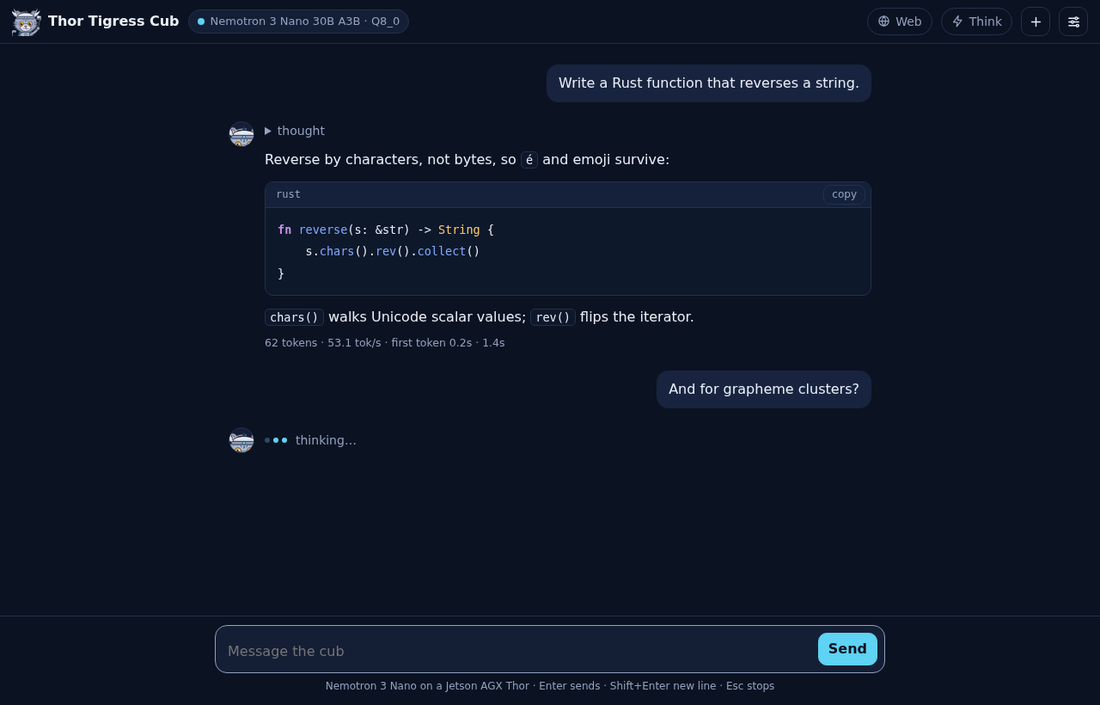
Replies stream in as Nemotron writes them. Until the first word arrives, the cub’s avatar sits next to three hopping dots and “thinking…” (or “searching and thinking…” with Web on), so a slow start never looks like a dead page.
Code blocks are highlighted for Rust, Python, Go, C and C++, CUDA, JavaScript and TypeScript, shell, TOML, JSON and YAML, and each has a copy button. The page builds the formatted reply from DOM nodes only, so nothing the model writes is ever run as HTML.
Under each finished reply, the stats line reports what the server measured:
| Part | Meaning |
|---|---|
62 tokens | tokens generated for this reply |
53.1 tok/s | generation speed; about 53 with one reply running |
first token 0.2s | time spent reading your conversation before the first word |
1.4s | the whole reply, as your browser saw it |
These come from llama-server’s own timings. TensorRT Edge-LLM (the Qwen model) reports only the token count, so for it the page measures the speed itself: the tokens after the first, divided by the time from the first token to the last, and the first token’s time as the browser saw it. Measured on 2026-10-06: “281 tokens · 79.4 tok/s · first token 0.1s · 3.6s”. With Web on, the count is for the last round, the answer after the searches.
Esc stops a reply; the part already written stays.
Think
With Think on, Nemotron writes its reasoning first, and the page folds it under a “thinking…” line, which becomes “thought” when the answer starts. Click it to read the reasoning.
Thinking helps with code, maths and anything with several steps, and costs time: the reasoning is generated at the same ~53 tokens/s as the answer, so 1,000 tokens of reasoning is about 19 seconds before the first word of the answer. For quick questions, leave it off. The switch is remembered in your browser.
Web
With Web on, the server gives the model two tools. The first round requires
a tool call, so the model looks before it answers; each search goes to SearXNG
on the Thor, which queries several search engines and returns titles, links,
dates and snippets, filtered to a range when the model asks for one (day,
week, month or year). One call can carry several sub-questions at once,
and the model can ask for jobs - the angles that find a posting - or people,
which looks for the recruiter and the hiring manager behind one. The model then reads what it needs: up to eight
rounds, with fetch_page_content_recursive to open a cited page and the links
on that page’s own site. The page lists every query and source above the answer
under “searched: …”, and every page read under “read: …”.
Search alone hands the model snippets only. The fetch tool opens the page, up to six per answer; check the sources before trusting a detail.
Invite screen
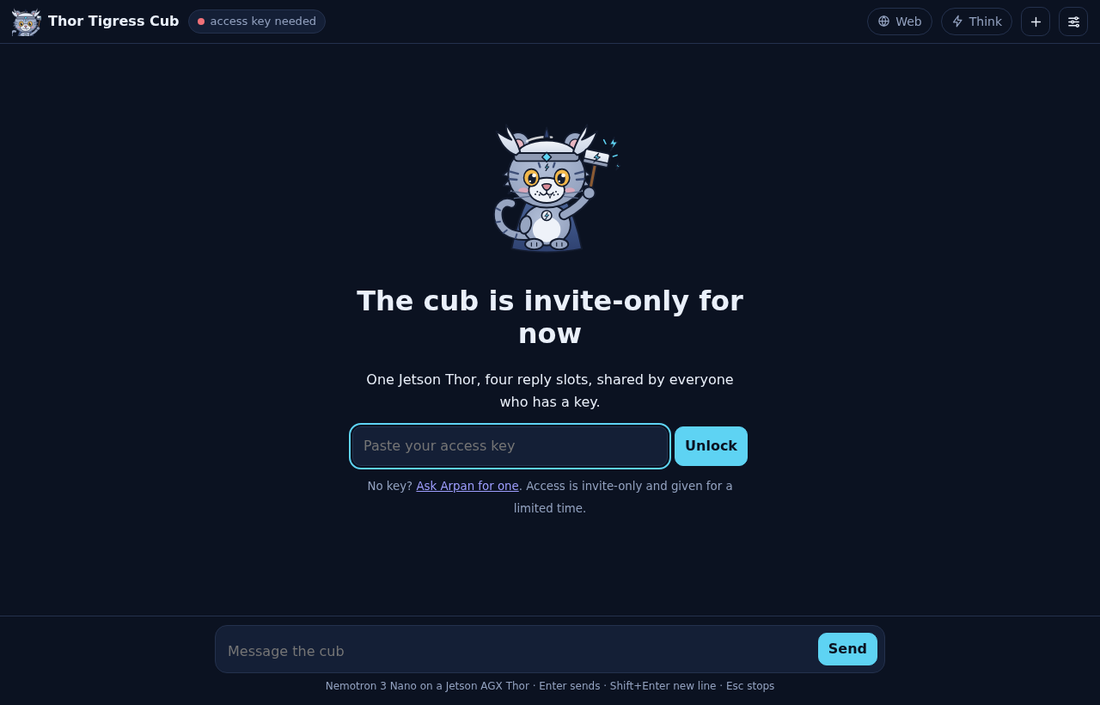
When the server refuses the page (no key, or a revoked one), the page says so instead of failing silently. It offers two ways in:
- Already have a key? Paste it and press Unlock. The key is kept in the browser and can be changed later in Settings.
- New here? Give a name and an email and press Request access. The
request is saved in the keyring as
requested, and the page says to send a message on LinkedIn or X. A person approves it by hand and sends the key back; there is no account, no password and no email from the server.
On a phone
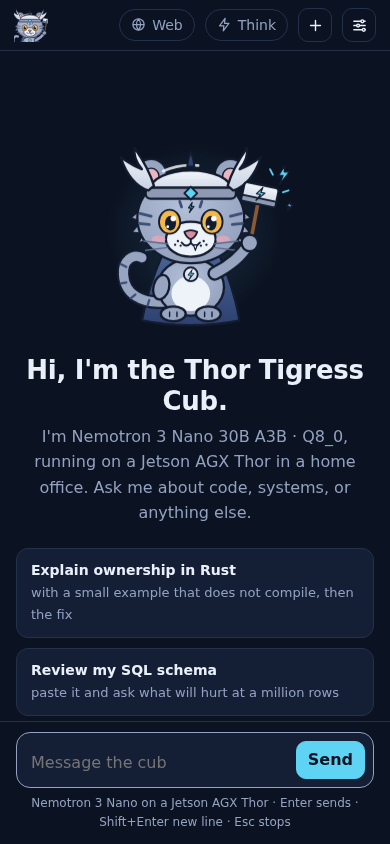
On narrow screens the name steps aside and the model picker shrinks, so the switches and the message box keep their room.
About page
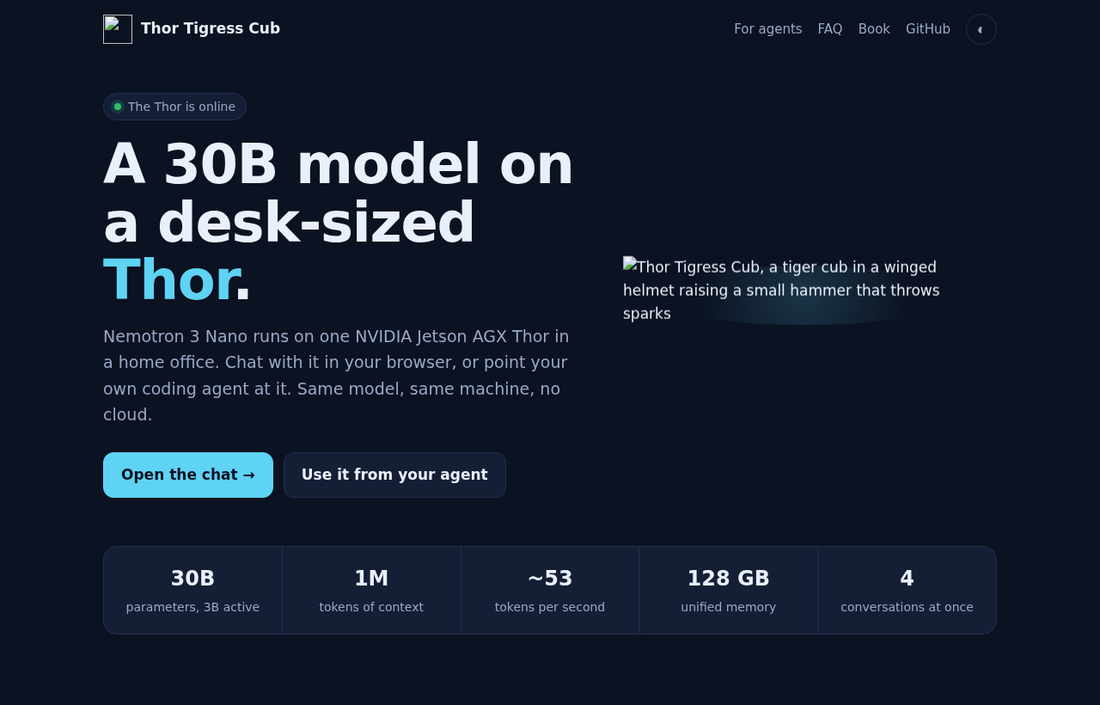
/about.html, for people who arrive from a shared link./about.html explains the project to someone who hasn’t seen it: the model
and machine, the measured numbers, what the chat and the API can do, how a
reply travels, how to get access, and a short FAQ. Its badge turns to “The
Thor is online” when /health answers. The About link in the chat’s
header opens it.
Settings
| Setting | Effect |
|---|---|
| Theme | Cub (default; light or dark following your device), Paper, Night, Material Deep Ocean, GitHub Light, Solarized Light and Dark, Nord, Dracula, One Dark, Gruvbox Dark, Monokai |
| Access key | sent as Authorization: Bearer <key> with every request |
| System prompt | sent first in every conversation; empty sends none |
| Temperature | empty uses the model’s default |
Conversations, settings and the key live in your browser’s local storage, nowhere else. Another browser or device starts empty.
| Key | Does |
|---|---|
| Enter | send |
| Shift+Enter | new line |
| Esc | stop the reply |
How it fits together
| Part | Where | What it does |
|---|---|---|
jetson-thor/web/index.html | this repository | the page’s markup and the cub; no build step |
jetson-thor/web/chat.css | this repository | one style block per theme, plus the table and source cards |
jetson-thor/web/chat.js | this repository | the page’s script: markdown, clickable links, tables, the model stream |
thor-tigress-agent | crates/thor-tigress-agent | serves the page, checks the key, runs the web-search loop, passes /v1/* to llama-server |
llama-server | ~/.local/src/llama.cpp on the Thor | router mode: Nemotron 3 Nano 30B-A3B Q8_0, four replies at a time, 1M tokens each; more models can be added (chapter “Model serving”) |
| SearXNG | ~/.local/src/searxng, user service searxng | meta search engine with JSON output |
| Tailscale Funnel | the Thor | HTTPS at a .ts.net address; no ports open on the home router |
All three programs listen on 127.0.0.1 only. Funnel is the only way in from
outside, and it reaches port 8080 alone.
thor-tigress-agent speaks just enough HTTP for this job, one thread per
connection:
| Request | Answer |
|---|---|
GET /, /thor-tigress-cub/ | the page (no key needed) |
GET /about.html, /chat.css, /chat.js, /cub.svg, /cub.png | the About page, the page’s own styles and script, and the art; a fixed list, nothing else in the folder is served |
GET /health | {"status":"ok"} (no key needed) |
GET /v1/models | the served models: llama-server’s, plus each engine’s given with --engine |
POST /v1/chat/completions | streamed through; with thor_web_search: true, the search loop; without stream: true, plain JSON |
POST /v1/messages | Anthropic’s API, for Claude Code (chapter “Bring your own agent”) |
OPTIONS * | CORS preflight, so pages and tools on other sites may call the API with a key |
Every response carries Access-Control-Allow-Origin: *. That is safe here
because access depends on a key the caller must send, not on cookies another
site could borrow (chapter “Security”).
Start it on the Thor
cd ~/Projects/thor-thunder-tigress-platform
cargo install --path crates/thor-tigress-agent
jetson-thor/model-serving/thor-tigress-serve install   # both services, started at boot; puts thor-tigress-serve on your PATH
thor-tigress-serve logs                                 # follow both logs
thor-tigress-serve install writes two systemd user services: thor-chat
(llama-server) and thor-tigress-agent (the page and API). Settings go in
~/.config/thor-chat/env, then thor-tigress-serve install again:
| Setting | Default | Notes |
|---|---|---|
USERS | 4 | replies generated at once; a fifth waits |
CONTEXT | 1,048,576 | tokens per reply; memory for all four is reserved at start (57.8 GB measured); what this costs and how to change it: chapter “Memory, context and slots” |
MODEL | Nemotron 3 Nano 30B-A3B Q8_0 | any GGUF with a chat template |
MODELS_MAX / MIN_FREE_GB | 2 / 8 | models in memory at once; memory kept free (chapter “Model serving”) |
PORT / MODEL_PORT / SEARCH_PORT | 8080 / 8079 / 8888 |
SearXNG runs as the searxng user service from ~/.local/src/searxng, with
settings in ~/.config/searxng/settings.yml (JSON output on).
More than one model
llama-server runs in router mode and sends each request to the model its
model field names. The page’s picker lists the loaded models; with one, it
is greyed out. Loading and unloading models is in chapter “Model serving”.
| Model id | Also answers to | Replies at once | Tokens per reply |
|---|---|---|---|
NVIDIA-Nemotron-3-Nano-30B-A3B-Q8_0 (the default) | nemotron, nemotron-think, the GGUF path | 4 | 1,048,576 |
Qwen3.6-35B-A3B-NVFP4, on TensorRT Edge-LLM | its id only | 1 | 32,768 |
| a model loaded from disk | its id only | 1 | 65,536 |
Any other name is refused with 400, and so is a request without model.
Before router mode the name was ignored.
Nemotron 3.5 Lightning ran next to the Nano on 2026-10-06, with one reply at 256K tokens. Measured then:
| Nano | Lightning | |
|---|---|---|
| generation, same Rust prompt, thinking off, 600 tokens | 53.5 tok/s | 52.5 tok/s |
| short reply through the agent | 48.0 tok/s | 49.1 tok/s |
Both were loaded 32 seconds after a restart, with 26 GB of memory still available. Lightning was unloaded the same day because its answers were disappointing; it is on disk. Both models at four replies of 1M tokens don’t fit in the Thor’s 122 GB: that was tried, memory ran out on the first reply, and the chat was down for three minutes.
Share it
Install Tailscale on the Thor once:
curl -fsSL https://tailscale.com/install.sh | sh
sudo tailscale up --ssh
Then pick one:
| Command | Who can open it | |
|---|---|---|
| Private | sudo tailscale serve --bg 8080 | devices on your tailnet; share the Thor from the Tailscale admin console |
| Public | thor-tigress-serve key, then sudo tailscale funnel --bg 8080 | anyone with the link; the model only for those with the key |
A new public address can take a few minutes to resolve everywhere. For a shorter address on your own domain, see chapter “Bring your own domain”.
Access keys
Each person gets their own key, kept in an encrypted keyring on the Thor (chapter “Keys, and the cryptography under them”). Make the keyring once:
thor-tigress-serve keyring-init          # the keyring and its passphrase, both mode 600
thor-tigress-serve keyring requests      # who asked from the invite screen
thor-tigress-serve keyring approve EMAIL # mints a key and prints it once
The agent reads the active keys when it starts and re-reads the file when it
changes, so an approval or a revocation takes effect on the next request: no
restart. ~/.config/thor-chat/api-key still exists, but it is now only the one
key the agent and llama-server use between themselves; visitors never see it.
The operator’s own copy still works, so a lost keyring does not lock the
operator out.
A leak is handled with one command: thor-tigress-serve keyring revoke-all
marks every active key revoked at once, and the records stay so people can be
approved again.
Change the page or the server
The page is read from disk on every request, so editing
jetson-thor/web/index.html, chat.css or chat.js in your clone is enough:
thor-sync copies them to the Thor and the next page load has them. No
restart. (Editing them on the Thor directly works too.)
A change to thor-tigress-agent needs a build and a restart. A restart cuts
off any reply being written, so wait until none is:
ssh thor 'cd ~/Projects/thor-thunder-tigress-platform &&
  cargo install --path crates/thor-tigress-agent --locked &&
  K=$(cat ~/.config/thor-chat/api-key) &&
  until [ "$(curl -s "127.0.0.1:8079/slots?model=nemotron" -H "Authorization: Bearer $K" |
             python3 -c "import sys,json;print(sum(s[\"is_processing\"] for s in json.load(sys.stdin)))")" = 0 ];
  do sleep 2; done &&
  systemctl --user restart thor-tigress-agent'
When something is wrong
| You see | Likely cause | Check |
|---|---|---|
| Red dot, “server not reachable” | Funnel off, the Thor asleep, or thor-tigress-agent stopped | curl https://<thor>.<tailnet>.ts.net/health |
| Invite screen with a key pasted | the key was changed | cat ~/.config/thor-chat/api-key on the Thor |
| Replies slower than ~53 tok/s | other people are chatting; four replies share the memory bandwidth | thor-tigress-serve models, then curl "127.0.0.1:8079/slots?model=nemotron" on the Thor (add -H "Authorization: Bearer $K") |
| A long wait before anything | all four slots busy, or a long conversation being read | the same |
| “searched” missing with Web on | the first search failed, or SearXNG is down | systemctl --user status searxng |
| Error under a reply | the message from the server, shown as is | thor-tigress-serve logs |
Not done yet
- No per-person limits, quotas or accounting; a revocation is the only brake.
- The registration form is open and can be spammed; the waiting list is the only damage, but each request costs an Argon2id run.
- Search reads snippets; the fetch tool reads pages, two hops into a cited site’s own links (chapter “Tool calling”). Both are on with Web, within their limits.
- Conversations stay in one browser; there is no account to sync them.