Local models
2026-10-11.
openbatrangs --thornow uses the Thor’s Tailscale address instead of127.0.0.1:8079, so it works without the SSH tunnel. The details are in chapter Coding tools on TensorRT Edge-LLM.
edgechat (local-copilot-codebuddy)
Terminal chat that runs the model inside the program with llama.cpp. On the Thor:
edgechat # pick a model from ~/models
| Model | File | Context | Speed (measured) |
|---|---|---|---|
| Nemotron 3 Nano 30B-A3B, Q8_0 | ~/models/gguf/Nemotron-3-Nano-30B-A3B/ | 1M tokens | 52 tok/s |
| Qwen3.6-27B, Q4_K_M | linked from Ollama’s copy | 256K tokens | 12 tok/s |
- It uses each model’s full context unless
--kv-cache-tokenscaps it. - It sends no built-in prompt. Your rules file
~/.config/local-copilot-codebuddy/rules.mdgoes into every chat as written. - To add a model, put a ChatML
.gguffile under~/models/gguf/.
SSH tunnel from your machine
Any machine that can ssh thor (chapter “Access and syncing”) can reach the
Thor’s services without the public address: SSH forwards ports on your
machine to the same ports on the Thor. This is what the local agents below
use, and it works the same on Linux, macOS and Windows (OpenSSH).
| Local address | On the Thor |
|---|---|
127.0.0.1:8079 | llama-server (Nemotron), OpenAI and Anthropic APIs |
127.0.0.1:8080 | thor-tigress-agent: the chat page and the API with key check, web search and thinking translation |
127.0.0.1:8888 | SearXNG |
Nothing new is opened on the network: the tunnel rides on your SSH login. Machines without SSH access use the public address instead (chapter “Bring your own agent”).
Any OS, for the current session:
ssh -fN -o ExitOnForwardFailure=yes \
  -L 127.0.0.1:8079:127.0.0.1:8079 -L 127.0.0.1:8080:127.0.0.1:8080 -L 127.0.0.1:8888:127.0.0.1:8888 thor
Linux, kept up across reboots as a user service,
~/.config/systemd/user/thor-model-tunnel.service:
[Unit]
Description=SSH tunnel to the Thor: Nemotron (8079), SearXNG (8888), front server (8080)
After=network-online.target

[Service]
ExecStart=/usr/bin/ssh -o ControlMaster=no -o ControlPath=none -o BatchMode=yes -o ServerAliveInterval=30 -o ExitOnForwardFailure=yes -N -L 127.0.0.1:8079:127.0.0.1:8079 -L 127.0.0.1:8888:127.0.0.1:8888 -L 127.0.0.1:8080:127.0.0.1:8080 thor
Restart=always
RestartSec=5

[Install]
WantedBy=default.target
systemctl --user enable --now thor-model-tunnel
macOS: the one-line ssh -fN … above, or an alias that opens it when
needed, as in the OpenCode setup below. A launchd agent would keep it up
across reboots; that has not been set up or tested here.
Check it:
curl -s 127.0.0.1:8079/health    # {"status":"ok"}
curl -s 127.0.0.1:8080/health    # {"status":"ok"}
Tested on a Jetson Orin NX running Ubuntu (yahboom), with the Linux service.
Coding agent: OpenCode
OpenCode is a terminal coding agent: it reads and edits files and runs commands on the machine you use, and calls Nemotron on the Thor for the model. Your code stays on your machine; only model calls reach the Thor.
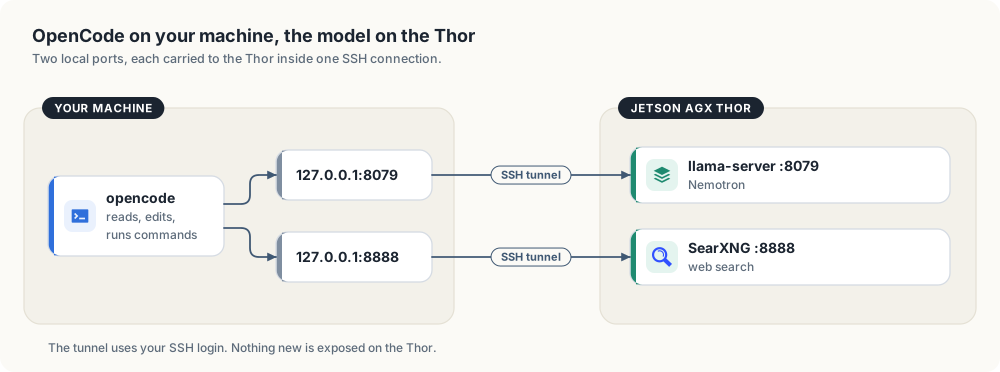
It uses the SSH tunnel from the section above.
OpenCode was tried on a Jetson Orin NX dev machine (yahboom) on 2026-10-05 and removed the same day. In the
sessions there, Nemotron’s tool calls often came back as plain text instead of
calls, so files it reported as written did not exist, and with a project-level
CLAUDE.md in the folder it refused multi-file work. openbatrangs (below)
replaced it. The setup is kept here for anyone who wants to try it.
Setup on Linux
curl -fsSL https://opencode.ai/install | bash        # installs to ~/.opencode/bin
mkdir -p ~/.config/thor-chat
(umask 077; ssh thor cat .config/thor-chat/api-key > ~/.config/thor-chat/api-key)
~/.config/opencode/opencode.json:
{
  "$schema": "https://opencode.ai/config.json",
  "model": "thor/nemotron",
  "provider": {
    "thor": {
      "npm": "@ai-sdk/openai-compatible",
      "name": "Thor",
      "options": {
        "baseURL": "http://127.0.0.1:8079/v1",
        "apiKey": "{file:~/.config/thor-chat/api-key}"
      },
      "models": {
        "nemotron": {
          "name": "Nemotron 3 Nano (Thor)",
          "options": { "chat_template_kwargs": { "enable_thinking": false } }
        },
        "nemotron-think": { "name": "Nemotron 3 Nano (Thor, thinking)" }
      }
    }
  },
  "agent": { "plan": { "model": "thor/nemotron-think" } },
  "mcp": {
    "searxng": {
      "type": "local",
      "command": ["npx", "-y", "mcp-searxng@2.5.0"],
      "environment": { "SEARXNG_URL": "http://127.0.0.1:8888" },
      "enabled": true
    }
  }
}
- Build mode uses
nemotronwith thinking off, so it acts. - Plan mode (Tab) uses
nemotron-think, so it reasons before proposing. - Web search comes from the SearXNG instance on the Thor through the
mcp-searxngplugin (an npm package, run locally bynpx): toolssearxng_web_searchandweb_url_read, which reads a page as text.
enable_thinking: false matters: Nemotron thinks by default, and on a large
task it spent a whole turn reasoning (11,504 characters) and stopped without
calling a single tool. With thinking off it goes straight to reading, writing
and running. The web chat’s think toggle is not affected.
Setup on macOS
curl -fsSL https://opencode.ai/install | bash
mkdir -p ~/.config/opencode ~/.config/thor-chat
# write ~/.config/opencode/opencode.json as in the Linux setup above
(umask 077; ssh thor cat .config/thor-chat/api-key > ~/.config/thor-chat/api-key)
echo 'alias opencode="(nc -z 127.0.0.1 8079 || ssh -fN -L 8079:127.0.0.1:8079 -L 8888:127.0.0.1:8888 thor) && command opencode"' >> ~/.zshrc
The alias opens the tunnel when it is not already up.
Use
cd ~/Projects/some-project
opencode                           # interactive
opencode run "add a unit test"     # one task, then exit
Check the tunnel: curl -s 127.0.0.1:8079/health (must print {"status":"ok"}).
Each running session uses one of the Thor’s chat slots while it generates.
After a new access key (thor-tigress-serve key on the Thor), copy it again with the
ssh thor cat … line above.
Ollama
ollama run qwen3.6:27b --verbose    # "eval rate" is tokens/s
ollama ps                           # must show 100% GPU
ollama stop qwen3.6:27b             # free its memory
Coding agent: openbatrangs with Nemotron
openbatrangs is a terminal
coding agent: it writes files and runs commands in the current folder, one
action per step, until the task is done. --thor points it at Nemotron’s
llama-server instead of Ollama.
ssh thor
mkdir -p ~/some-project && cd ~/some-project
openbatrangs --thor                  # interactive; /models lists the served model
openbatrangs --thor "create a cargo project named dsa with a stack and a queue, with tests, then run cargo test"
| Option | Effect |
|---|---|
--thor | llama-server at 127.0.0.1:8079/v1, key from ~/.config/thor-chat/api-key |
--openai-url URL --api-key-file PATH | any other OpenAI-compatible server |
--no-think | thinking off (on by default; reasoning is shown dimmed after 💭) |
--max-steps N | step limit, default 40 |
The same command works on any machine with the SSH tunnel (above), since
--thor means 127.0.0.1:8079. Without the tunnel, use the public address
(chapter “Bring your own agent”). Install anywhere with Rust:
cargo install --git https://github.com/arpanpathak/openbatrangs --locked.
Measured on 2026-10-05, from a Jetson Orin NX (yahboom) through the SSH tunnel, thinking on, task: “a cargo project with a stack, a queue, a singly linked list, binary search and quicksort, each with unit tests, then run cargo test and fix anything that fails”:
| Steps | Time | Result |
|---|---|---|
| 14 of 40 | 293 s | 5 modules; fixed two rounds of compile errors itself; 14 tests pass |
Each step is 10–20 s of generation at about 53 tok/s. A run takes one of the four chat slots, so it competes with web chat users while it works.
Two bugs that made it look like it was overthinking:
- Commands ran with a relative
TMPDIR, socd dsa && cargo testfailed in the doc-test step every time. The model saw a failing test and kept rewriting working code until it ran out of steps. Sandbox paths are now absolute. - Through the SSH tunnel, a reused idle connection failed between steps (“connection closed before message completed”). The client no longer keeps idle connections to this server.
Memory
The CPU and GPU share 128 GB. The web chat (chapter “Web chat: Thor Tigress Cub”) keeps Nemotron loaded:
about 58 GB at 4 people × 1M context. Stop it before loading a second large
model or training: systemctl --user stop thor-chat.