
Bring your own domain
The Thor Tigress Cub runs on the Thor and is reachable at its Tailscale
address, https://arpanpathak.taildb9a39.ts.net. That address is long and
says nothing. This chapter makes https://voltforge.tech/thor-tigress-cub,
a domain bought from Namecheap, open the same chat: over HTTPS from the first
byte, with no proxy in between, no port opened at home and no copy of the UI
anywhere else.
This chapter covers
- what happens between typing an address and seeing the chat
- the ways to put a domain in front of the Thor, the one tried first and why it was replaced
- every IP address involved, who owns it, and which ones are used
- the exact Namecheap and GitHub steps, how to check each, and how to undo them
From an address to the chat
Three things happen when someone types voltforge.tech/thor-tigress-cub:
- Lookup. The browser asks DNS for the IP address of
voltforge.tech. The answer comes from the domain’s nameservers, the servers the registrar lists as responsible for it. Their records map names to addresses: anArecord gives an IPv4 address, anAAAArecord an IPv6 one, aCNAMEsays “same as this other name”. - Connection. The browser connects to that IP address and, for HTTPS,
checks that the server holds a certificate for
voltforge.tech. - Answer. The server returns a page, which may send the browser on to another address.
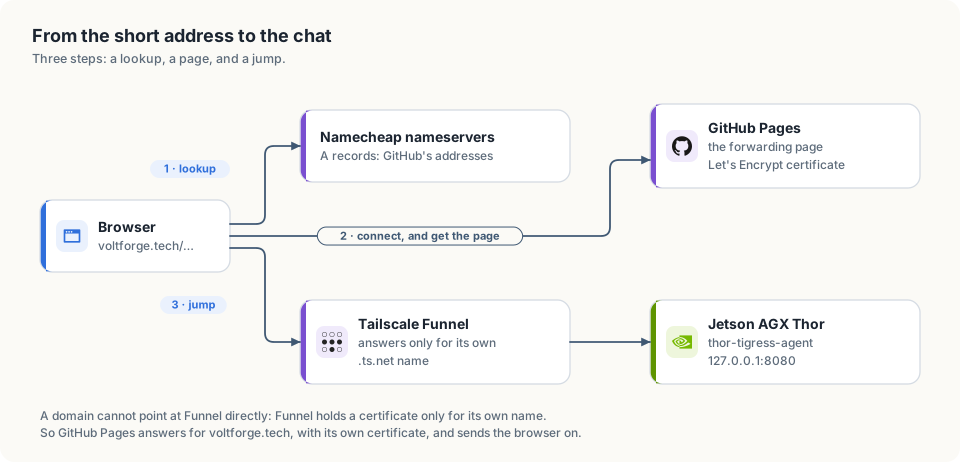
voltforge.tech, with the forwarding page this chapter chooses.The Thor’s chat is published by Tailscale Funnel. Funnel only answers for the
name it was given, arpanpathak.taildb9a39.ts.net: it holds a certificate for
that name and routes traffic by it. Pointing voltforge.tech’s records at
Funnel’s addresses would reach Funnel, which would not know the name and would
refuse it. So a domain can’t be attached to the Thor directly. Something else
has to answer for voltforge.tech, with its own certificate, and send the
browser to the Thor.
The ways, and the choice
| Way | Who answers for voltforge.tech | HTTPS on the short address | Home IP | Cost | Downside |
|---|---|---|---|---|---|
| Redirect record at Namecheap (tried first) | Namecheap’s redirect server | no (measured below) | hidden | none | the first hop is plain HTTP |
| Forwarding page on GitHub Pages (chosen) | GitHub Pages, with a free Let’s Encrypt certificate | yes | hidden | none | address bar shows .ts.net after the jump |
| Port forward on the router, Caddy on the Thor | the Thor itself | yes | public | none | every internet host can reach port 443 at home; needs a public IPv4, which shared (CGNAT) connections don’t have |
| Rented server with Caddy, over Tailscale | the rented server, passing all traffic to the Thor | yes | hidden | ~$4–6 a month | a proxy: one more machine to patch, and it sees all traffic in clear text |
Why the Namecheap redirect was replaced
The first setup used a URL Redirect record at Namecheap. It worked over HTTP and failed over HTTPS. Measured on 2026-10-05:
| Request | Result |
|---|---|
http://voltforge.tech/thor-tigress-cub | 302 Found, Location: https://arpanpathak.taildb9a39.ts.net, Server: namecheap-nginx |
https://voltforge.tech/thor-tigress-cub | no answer: the connection to port 443 timed out |
| a browser that tries HTTPS first, or remembers an old “always HTTPS” rule for the domain | “This site can’t be reached” |
Namecheap’s free redirect has no certificate and doesn’t listen on port 443. That is worse than inconvenient: the plain-HTTP hop can be changed by anyone on the same network as the visitor (a café Wi-Fi, say), who could send them to a look-alike page that asks for their key. The short address has to be HTTPS.
Why the forwarding page
- HTTPS on both hops. GitHub Pages gets a certificate for
voltforge.techfrom Let’s Encrypt; the Thor’s.ts.netaddress has its own. Nothing travels in plain text. - No proxy. The page is a few lines that send the browser on. After that, the browser talks to the Thor through Funnel exactly as before. GitHub never sees a key, a message or a reply.
- No copy of the UI. The chat is only ever served by the Thor; the repository holds the forwarding page and nothing else.
- Nothing exposed at home. No router port is opened; the home IP is never published. Port forwarding would put the Thor’s whole HTTPS stack in front of every scanner on the internet, and a home IP, once published, can’t be taken back.
- Free and reversible. Deleting four DNS records undoes it.
The cost is the address bar: it shows arpanpathak.taildb9a39.ts.net after
the jump. People share and bookmark voltforge.tech/thor-tigress-cub.
What the jump costs
Opening the short address takes two requests instead of one: the forwarding page, then the chat. Measured on 2026-10-05 from a Linux machine on a home connection:
| Step | Time |
|---|---|
DNS lookup of voltforge.tech (cached after the first time) | 0.03 s |
| GitHub Pages answering with the forwarding page | about 0.1 s |
| the chat page from the Thor, over Funnel, TLS included | 0.37–0.5 s |
| total, short address to chat on screen | about 0.5 s |
The Namecheap redirect felt much slower, for a reason that has nothing to do with the Thor. Browsers try HTTPS first, both when a bare address is typed and when they remember an “always HTTPS” rule for the domain. Namecheap’s redirect server never answered on the HTTPS port, so the browser waited for that attempt to time out, several seconds, before falling back to plain HTTP and following the redirect. With GitHub Pages the HTTPS attempt is answered at once, so there is nothing to wait for.
GitHub Pages added one more hop of its own: it answered /thor-tigress-cub
with a redirect to /thor-tigress-cub/ and only then served the folder’s
index.html. The forwarding page is therefore a file, thor-tigress-cub.html,
which GitHub serves at /thor-tigress-cub directly.
One jump remains and can’t be removed without a proxy: the forwarding page has to tell the browser where the Thor is. A rented server passing traffic on (the last row of the table above) would hide it, at the price of a machine in the middle.
Every IP address in this story
| Address | Owner (from its network registration) | What it is | Used? |
|---|---|---|---|
185.199.108.153, 185.199.109.153, 185.199.110.153, 185.199.111.153 | Fastly (AS54113), which delivers GitHub Pages | GitHub Pages’ published addresses; the A records of voltforge.tech | yes: they serve the forwarding page |
arpanpathak.github.io | GitHub | the CNAME of www.voltforge.tech | yes |
208.111.35.209, 208.111.34.11, 2607:f740:0:3f::3cc, 2607:f740:0:3f::2f0 | NetActuate (AS36236), hosting Tailscale’s Funnel relays | what arpanpathak.taildb9a39.ts.net resolves to; Funnel relays the connection to the Thor | yes: where the page sends the browser |
100.84.254.65 | Tailscale (private range 100.64.0.0/10) | the Thor inside the tailnet | only on your own devices |
192.168.0.189 | none; private home range | the Thor on the home Ethernet | only at home |
192.64.119.155 | Namecheap (AS22612) | Namecheap’s redirect server, used by the first setup | no longer |
172.67.173.34, 104.21.72.4, 2606:4700:3037::ac43:ad22, 2606:4700:3036::6815:4804 | Cloudflare (AS13335) | left from when Cloudflare ran the domain’s DNS; they answered “error 1033”, a Cloudflare tunnel with nothing behind it | deleted |
The owners come from public routing registrations, which anyone can query:
curl -s https://ipinfo.io/185.199.108.153/org    # AS54113 Fastly, Inc.
curl -s https://ipinfo.io/208.111.35.209/org     # AS36236 NetActuate, Inc
curl -s https://ipinfo.io/192.64.119.155/org     # AS22612 Namecheap, Inc.
curl -s https://ipinfo.io/172.67.173.34/org      # AS13335 Cloudflare, Inc.
The home connection’s public IP appears nowhere in this table, and nothing in this setup publishes it.
The forwarding page
The repository arpanpathak/voltforge.tech holds five small files:
| File | Purpose |
|---|---|
CNAME | voltforge.tech; tells GitHub Pages which domain it serves |
index.html | forwards voltforge.tech/ to the Thor |
thor-tigress-cub.html | forwards voltforge.tech/thor-tigress-cub; as a file, not a folder, so GitHub serves it without first redirecting to /thor-tigress-cub/ |
404.html | forwards every other path too |
.nojekyll | serve the files as they are |
Each HTML file is the same:
<!doctype html>
<html lang="en">
<meta charset="utf-8">
<title>Thor Tigress Cub</title>
<meta http-equiv="refresh" content="0; url=https://arpanpathak.taildb9a39.ts.net/">
<link rel="canonical" href="https://arpanpathak.taildb9a39.ts.net/">
<script>location.replace("https://arpanpathak.taildb9a39.ts.net/");</script>
<p>Opening the <a href="https://arpanpathak.taildb9a39.ts.net/">Thor Tigress Cub</a>…</p>
</html>
The script forwards at once and keeps the short address out of the back
button’s history; the refresh tag does the same without JavaScript; the
link is for anything that follows neither.
What the Thor serves
thor-tigress-agent answers the chat at more than one path, so links to the
Thor keep working whatever path they carry:
| Path | Answer |
|---|---|
/, /thor-tigress-cub, /thor-tigress-cub/ | the chat |
/about.html (also under /thor-tigress-cub/) | the About page |
/chat.css, /chat.js | the page’s own styles and script |
/cub.svg, /cub.png | the art; the PNG is the preview when the link is shared |
/health | {"status":"ok"} |
anything else outside /v1/ | 404; only these files are served, never the rest of the folder |
Step 1: Namecheap answers for the domain
Namecheap → Domain List → Manage next to voltforge.tech →
Nameservers → Namecheap BasicDNS → save. Usually takes under an hour,
at most 48.
curl -s "https://dns.google/resolve?name=voltforge.tech&type=NS" | python3 -m json.tool | grep data
Done when it lists dns1.registrar-servers.com and dns2.registrar-servers.com.
Step 2: the repository and GitHub Pages
gh repo create arpanpathak/voltforge.tech --public \
  --description "Forwards voltforge.tech to the Thor Tigress Cub on a Jetson AGX Thor" --source . --push
gh api -X POST repos/arpanpathak/voltforge.tech/pages -f "source[branch]=main" -f "source[path]=/"
gh api -X PUT  repos/arpanpathak/voltforge.tech/pages -f cname=voltforge.tech
run in a folder holding the five files above. Or in the browser: the
repository → Settings → Pages → Deploy from a branch, main,
/ (root) → Custom domain voltforge.tech → Save.
Step 3: the DNS records
Namecheap → Manage → Advanced DNS → Host Records. Delete
everything for @ and www that isn’t listed here (old Cloudflare
addresses, parking pages, URL Redirect records), then Add New Record:
| Type | Host | Value |
|---|---|---|
| A Record | @ | 185.199.108.153 |
| A Record | @ | 185.199.109.153 |
| A Record | @ | 185.199.110.153 |
| A Record | @ | 185.199.111.153 |
| CNAME Record | www | arpanpathak.github.io. |
Keep the TXT record v=spf1 include:spf.efwd.registrar-servers.com ~all:
it belongs to Namecheap’s email forwarding, not to the website.
Check, against Namecheap’s own nameserver and a public resolver:
curl -s "https://dns.google/resolve?name=voltforge.tech&type=A" | python3 -m json.tool | grep data
curl -s "https://dns.google/resolve?name=www.voltforge.tech&type=CNAME" | python3 -m json.tool | grep data
Step 4: protect the domain on GitHub
Optional, recommended: it stops anyone else from claiming voltforge.tech on
GitHub Pages if this repository is ever removed.
- GitHub → your picture → Settings → Pages → Add a domain →
voltforge.tech. - Add the TXT record GitHub shows in Namecheap: Host
_github-pages-challenge-arpanpathak, the value it gives. - Verify on GitHub.
Step 5: HTTPS
GitHub requests the Let’s Encrypt certificate itself once the records from
step 3 answer, usually within 15 to 60 minutes. If its state still reads
“none” after about 10 minutes, remove the custom domain on the repository’s
Pages settings, save, and add it again; GitHub records this as two commits
(“Delete CNAME”, “Create CNAME”) and starts the request. Then turn on Enforce
HTTPS, so http://voltforge.tech is upgraded too:
gh api repos/arpanpathak/voltforge.tech/pages -q '.https_certificate.state'   # "approved" when ready
gh api -X PUT repos/arpanpathak/voltforge.tech/pages -F https_enforced=true
or tick Enforce HTTPS on the repository’s Pages settings.
Step 6: check it
curl -sI https://voltforge.tech/thor-tigress-cub | head -1                     # HTTP/2 200 (the forwarding page)
curl -s  https://voltforge.tech/thor-tigress-cub | grep -o 'url=[^"]*'       # where it sends you
curl -s  https://arpanpathak.taildb9a39.ts.net/health                        # {"status":"ok"}
Then open voltforge.tech/thor-tigress-cub in a browser: it lands on the
chat, with the invite screen when there is no key.
Measured on 2026-10-05, right after the certificate was approved:
| Request | Result |
|---|---|
https://voltforge.tech/thor-tigress-cub | 200, the forwarding page, in 0.16 s (TLS 0.08 s) |
| the certificate | CN = voltforge.tech, issued by Let’s Encrypt, valid until 2027-01-04; GitHub renews it |
http://voltforge.tech/thor-tigress-cub | 301 to https://voltforge.tech/thor-tigress-cub |
https://www.voltforge.tech/thor-tigress-cub | 301 to https://voltforge.tech/thor-tigress-cub |
a browser opening https://voltforge.tech/thor-tigress-cub, three runs | on the chat at https://arpanpathak.taildb9a39.ts.net/ in 1.17 s, 1.66 s and 1.17 s, page drawn |
The browser time includes drawing the chat page and running its script, so it is longer than the sum of the two requests.
After a DNS change: caches
DNS answers carry a time to live (TTL): how long anyone may keep the answer
before asking again. Namecheap’s records for voltforge.tech have a TTL of
1,799 seconds, about 30 minutes. After the switch from the Namecheap redirect
to GitHub Pages, the test machine kept the old answer, 192.64.119.155, for that long,
while Google’s public resolver already returned GitHub’s addresses. A browser
using the old answer reaches the old setup, including its slow HTTPS timeout.
Check what your machine uses against what the domain says now:
getent hosts voltforge.tech                                   # Linux: your machine's answer
dscacheutil -q host -a name voltforge.tech                    # macOS: the same
curl -s "https://dns.google/resolve?name=voltforge.tech&type=A" | python3 -m json.tool | grep data
If they differ, wait for the TTL, or clear the cache:
| Where | Clear the DNS cache |
|---|---|
| Linux with systemd-resolved | resolvectl flush-caches |
| macOS | sudo dscacheutil -flushcache; sudo killall -HUP mDNSResponder |
| Chrome, Edge | chrome://net-internals/#dns → Clear host cache |
| Chrome’s remembered “always HTTPS” rule | chrome://net-internals/#hsts → Delete domain security policies → voltforge.tech |
A private window or a phone on mobile data shows what a new visitor sees.
How it was set up, in order
All on 2026-10-05:
| Step | Result |
|---|---|
| Cloudflare entries deleted, nameservers set to Namecheap BasicDNS | Namecheap answers for the domain; the old Cloudflare A and AAAA records were still listed and had to be deleted |
URL Redirect record at Namecheap (unmasked, 302) to the .ts.net address | worked over HTTP; HTTPS timed out; Namecheap dropped the path, so every address went to the Thor’s / |
thor-tigress-agent serves the chat at /thor-tigress-cub too, plus the About page and the art | links carrying the path work on the Thor itself |
Repository arpanpathak/voltforge.tech with the forwarding page; GitHub Pages turned on with the domain | GitHub serves the page as soon as DNS points at it |
Redirect records replaced by four A records and a www CNAME for GitHub Pages | Namecheap and Google’s resolver return GitHub’s addresses |
Forwarding page moved from a folder to thor-tigress-cub.html | one redirect fewer |
| HTTPS certificate | not started after 8 minutes; removing and re-adding the domain on the Pages settings started it; approved about a minute later, for voltforge.tech and www.voltforge.tech |
| Enforce HTTPS turned on | http:// answers 301 to the https:// address |
Undo or change it later
- Undo: delete the four
Arecords and thewwwCNAME; the.ts.netaddress keeps working. - Point it elsewhere: change the address in the three HTML files and push.
- Keep
voltforge.techin the address bar: only a proxy can do that (the rented-server row). The Thor needs no change: it already serves the chat at/thor-tigress-cub/.
When a step fails
| Symptom | Cause | Fix |
|---|---|---|
| NS check still shows other nameservers | change not saved, or not spread yet | re-check step 1; wait |
voltforge.tech shows “error 1033” | old Cloudflare records still there | step 3 |
| “This site can’t be reached” over HTTPS | the certificate isn’t issued yet, or a URL Redirect record is still there | steps 3 and 5 |
| GitHub: “Domain’s DNS record could not be retrieved” | records not spread yet | wait, then Check again |
| “Enforce HTTPS” greyed out | certificate not issued yet | wait up to an hour after DNS works |
| your own browser still fails while others work | it remembers an old “always HTTPS” rule or old DNS | private window; in Chrome, chrome://net-internals/#hsts → delete voltforge.tech |
| lands on the Thor, red dot “server not reachable” | the Thor or Funnel is down | curl https://arpanpathak.taildb9a39.ts.net/health |