Security
The Thor sits on a home network and is reachable from the internet. This chapter lists what is exposed, what protects it, and what is still missing.
What is exposed
Tailscale Funnel forwards one port, 8080, to thor-tigress-agent. llama-server
(8079) and SearXNG (8888) listen on 127.0.0.1 only. SSH is reachable on the
home network and the tailnet, never from the internet. Tested through the
public address on 2026-10-05:
| Path | Without the key | With the key |
|---|---|---|
the page (/), /health | open; nothing sensitive | open |
OPTIONS on any path (CORS preflight) | headers only | headers only |
/v1/models, /v1/chat/completions, /v1/messages | 401 | answered |
other /v1/… paths, e.g. /v1/embeddings | 401 | 404, not passed through |
llama-server’s own /tokenize, /slots, /props, /metrics | 404 | 404, not passed through |
| anything else on the Thor | not reachable | not reachable |
https://voltforge.tech/thor-tigress-cub is a one-file forwarding page on
GitHub Pages, served over HTTPS, that sends the browser to the .ts.net
address; GitHub never sees a key or a message. The .ts.net name resolves
to Tailscale’s Funnel relays, not to your home: the home IP address is not
published anywhere (chapter “Bring your own domain” lists every address).
The Thor serves a fixed list of files (the page, the About page, the art);
everything else in the folder answers 404. thor-tigress-serve lives in another
folder, jetson-thor/model-serving/.
How the key is checked
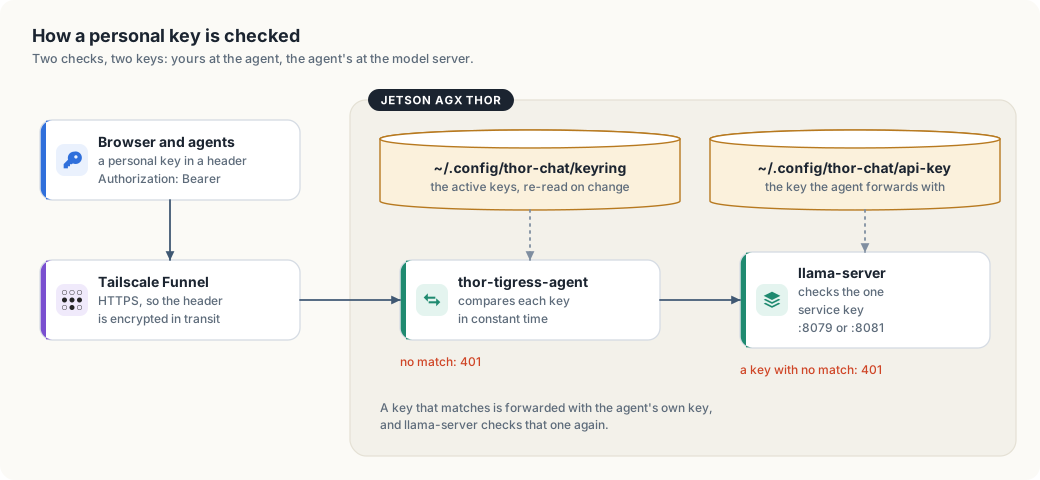
thor-tigress-serve keyring-initwrites the encrypted keyring~/.config/thor-chat/keyringand a random passphrase file~/.config/thor-chat/keyring-passphrase, both mode 600. A person’s key is 24 random bytes from the operating system, printed once as 48 hex characters.thor-tigress-agentreads the keyring with the passphrase when it starts and re-reads it whenever the file changes; llama-server keeps reading the one service key in~/.config/thor-chat/api-key(--api-key-file).- Visitors paste their personal key on the invite screen; the page keeps it in
the browser’s local storage for that address and sends
Authorization: Bearer <key>with every/v1/request. Agents send the same header from a key file or an environment variable; Claude Code may sendx-api-key: <key>instead, whichthor-tigress-agenttreats the same. - Funnel carries the request over HTTPS, so the header is encrypted until it reaches the Thor.
thor-tigress-agentcompares the header against every active key in the keyring, in constant time, and against the operator’s single key. For any path under/v1/that matches nothing it answers401and stops. The page,/health, the About page, the art andPOST /requestneed no key.- A matching request is passed to llama-server on
127.0.0.1:8079with the agent’s own service key, and llama-server checks that again. Personal keys never reach llama-server at all.
Why Access-Control-Allow-Origin: * is safe here
Every response from thor-tigress-agent lets any site read it, so pages and
tools hosted elsewhere can call the API. Browsers only attach credentials they hold on
their own, such as cookies, and this server uses none. The key travels in a
header that a page must set itself, so a site can only call the model with a
key it already has. A leaked key is the risk; CORS doesn’t add one.
The keys
Three different things are called “a key” here; keeping them apart makes the rest of the chapter easier.
| Key | Where it lives | Who sees it |
|---|---|---|
| a personal key | in the encrypted keyring, and in that person’s browser or agent | that person, and the operator |
| the passphrase | ~/.config/thor-chat/keyring-passphrase (mode 600), or the THOR_KEYRING_PASSPHRASE variable | the agent and the operator |
| the service key | ~/.config/thor-chat/api-key (mode 600) | only the agent and llama-server |
- A personal key is a password. Don’t put it in chats, repositories or
screenshots. If it leaks, end that one person:
thor-tigress-serve keyring revoke EMAIL. - Everyone at once is one command.
thor-tigress-serve keyring revoke-allstops every active key. No restart: the agent re-reads the file. - The passphrase opens the whole registry. Rotating it means making a new keyring and approving people again; treat it like the root key it is.
- Anyone with a key can keep the GPU busy. There are no per-person limits yet. Four replies run at once; a fifth waits.
Keep it that way
- Update llama.cpp and Tailscale now and then. The remaining risk is a bug in a program that runs as your user.
- Prefer private (
tailscale serve) for people you know. Public (funnel) lets anyone with the link see the page and try keys. - Read the logs after sharing widely.
thor-tigress-serve logson the Thor shows the requests, including each refused one.
What to do when the key leaks, when someone abuses the chat, or when the public name has to change, step by step, and the list of known gaps: chapter “Operations: recovery and hardening”.
What is next
Per-person keys closed the biggest gap. What is left:
| Now | Next |
|---|---|
| no limits per person | a daily token allowance per person, and a fair queue for the four slots |
| no rate limit on the invite form | a limit on POST /request, the one route that costs an Argon2id run |
| the passphrase is fixed | an easy way to rotate it without rebuilding the registry |
| no record of who used what | usage counted per person, beside the record that already says who may |
No GitHub sign-in and no OAuth: the point of the invite screen is that a person gives a name and an email, an operator approves by hand, and no third party is involved.