
Operations: recovery and hardening
This chapter is the runbook for the public Thor Tigress Cub: what is public, where every setting lives, what starts at boot, what to do when something leaks or breaks, and the gaps that are known and not yet closed. It changes no code; each fix it describes is a set of commands or clicks.
This chapter covers
- which names and addresses are public, and why that is not the protection
- every file, service and record that makes the chat work, and how to change each
- what happens when the Thor boots, and how to check it
- step-by-step recovery: a leaked key, abuse, a new Tailscale address, DNS changes, a dead service
- the known gaps, each with its risk and the fix not yet made
What is public, and what protects the Thor
| Item | Public? | Since | Why |
|---|---|---|---|
voltforge.tech | yes | when bought | domains are public by design |
arpanpathak.taildb9a39.ts.net | yes | 2026-10-05 07:15 UTC | Funnel’s HTTPS certificate for it is in the public Certificate Transparency logs, which list every certificate ever issued |
the same name in this book, the README, about.html, the voltforge.tech repository | yes | 2026-10-05 | written there on purpose, so people can use the API |
| the personal keys | no | in the encrypted keyring on the Thor, and in each person’s own browser or agent | |
| the keyring passphrase | no | ~/.config/thor-chat/keyring-passphrase (mode 600) on the Thor, and in the agent’s memory | |
| the service key | no | ~/.config/thor-chat/api-key (mode 600) on the Thor and on the machines you work from | |
| the home IP address | no | the .ts.net name resolves to Tailscale’s Funnel relays, never to the home connection |
Check the certificate record yourself:
curl -s "https://api.certspotter.com/v1/issuances?domain=arpanpathak.taildb9a39.ts.net&expand=dns_names"
It lists the certificate issued on 2026-10-05 at 07:15 UTC. Every Funnel address is public this way the moment Funnel is turned on, so keeping the name out of documents would not hide it. The key is the protection, plus the fact that only port 8080 is reachable and only a fixed set of paths answers (chapter “Security”).
What the public name does allow: anyone can load the page, see the invite
screen, call /health, and try keys. A new name helps against a flood of
unwanted traffic; it does nothing for a leaked key, which works on any name.
Everything that makes it work
On the Thor
| What | Where | Change it with |
|---|---|---|
| keyring: who may chat, one key each | ~/.config/thor-chat/keyring, mode 600; its passphrase in keyring-passphrase | thor-tigress-serve keyring requests, approve EMAIL, revoke EMAIL, revoke-all; no restart |
| service key (agent ↔ llama-server) | ~/.config/thor-chat/api-key, mode 600 | thor-tigress-serve key, then restart both services |
service settings (MODEL, USERS, CONTEXT, MODELS_MAX, MIN_FREE_GB, ports) | ~/.config/thor-chat/env; empty now, so defaults apply | edit, then thor-tigress-serve install |
| the model command | ~/.local/bin/thor-tigress-serve → jetson-thor/model-serving/thor-tigress-serve | written by thor-tigress-serve install |
| llama-server service | ~/.config/systemd/user/thor-chat.service → jetson-thor/model-serving/thor-tigress-serve run | written by thor-tigress-serve install |
| page and API service | ~/.config/systemd/user/thor-tigress-agent.service → jetson-thor/model-serving/thor-tigress-serve agent | written by thor-tigress-serve install |
| web search service | ~/.config/systemd/user/searxng.service, settings ~/.config/searxng/settings.yml | edit, then systemctl --user restart searxng |
thor-tigress-agent binary | ~/.cargo/bin/thor-tigress-agent | cargo install --path crates/thor-tigress-agent --locked |
| llama-server binary | ~/.local/src/llama.cpp/build/bin/llama-server (built from commit 8216c84, 2026-10-05) | pull and rebuild llama.cpp |
| the model | ~/models/gguf/Nemotron-3-Nano-30B-A3B/NVIDIA-Nemotron-3-Nano-30B-A3B-Q8_0.gguf | MODEL= in the env file |
| other models | ~/models/gguf/<name>/*.gguf; Nemotron 3.5 Lightning (35.0 GB) is there, not loaded | thor-tigress-serve: load, unload; list-latest: download |
| the router’s model list | ~/.config/thor-chat/models.ini and models.local.ini | written by thor-tigress-serve; don’t edit |
| the page, About page, art | jetson-thor/web/ in this repository | edit in your clone; thor-sync copies it; no restart |
| user services at boot without a login | systemd “linger” for the user: Linger=yes | loginctl enable-linger |
| Tailscale | system service tailscaled (version 1.102.4) | sudo tailscale up … |
| Funnel | kept by tailscaled across reboots: / → http://127.0.0.1:8080 | sudo tailscale funnel --bg 8080 / … off |
On each machine you work from
Optional; what the guides in this book set up. Paths are the same on Linux and macOS.
| What | Where |
|---|---|
| copy of the key | ~/.config/thor-chat/api-key, mode 600 |
| SSH tunnel to the Thor (8079, 8888, 8080) | Linux: ~/.config/systemd/user/thor-model-tunnel.service; any OS: ssh -fN -L … (chapter “Local models”); uses 127.0.0.1, never the public name |
claude-thor, claude-thor-think | aliases in ~/.bashrc or ~/.zshrc |
| openbatrangs | ~/.cargo/bin/openbatrangs |
Domain and GitHub
| What | Where | Value now |
|---|---|---|
| nameservers | Namecheap → Domain List → Manage → Nameservers | Namecheap BasicDNS |
A records for @ | Namecheap → Advanced DNS | GitHub Pages: 185.199.108.153 … 185.199.111.153 |
CNAME for www | Namecheap → Advanced DNS | arpanpathak.github.io. |
TXT for email forwarding | Namecheap → Advanced DNS | v=spf1 include:spf.efwd.registrar-servers.com ~all (leave it) |
| forwarding page | repository arpanpathak/voltforge.tech: index.html, thor-tigress-cub.html, 404.html | sends to https://arpanpathak.taildb9a39.ts.net/ |
HTTPS for voltforge.tech | that repository → Settings → Pages | Let’s Encrypt, approved 2026-10-05, valid to 2027-01-04, renewed by GitHub; Enforce HTTPS on |
Where the Tailscale name is written
| Place | Occurrences | Update needed after a rename |
|---|---|---|
arpanpathak/voltforge.tech: the three HTML files | 3 per file | yes, or voltforge.tech sends people to a dead address |
jetson-thor/web/about.html | 3 | yes (agent examples) |
book/src/ch16-bring-your-own-agent.md | 7 | yes |
book/src/ch17-bring-your-own-domain.md | 12 | yes |
jetson-thor/README.md | 2 | yes |
invited people: agent configs, --openai-url, Claude Code aliases | unknown | they have to update |
| invited people’s browsers | key and history are stored per address | they paste the key again on the new address |
| git history of the platform repository | 7 commits | cannot be removed; harmless once the old name is dead |
jetson-thor/web/index.html, chat.css and chat.js (the chat itself) use
relative paths and never contain the name, so the chat needs no change.
Boot: what starts, in what order
tailscaled(system service) starts, joins the tailnet and restores Funnel forarpanpathak.taildb9a39.ts.net→127.0.0.1:8080.- Because of linger, the user’s systemd starts without anyone logging in:
thor-chat(llama-server, loads the Nano),searxng, andthor-tigress-agent(ordered afterthor-chat). - Each service restarts itself 5 seconds after a crash (
Restart=on-failure).
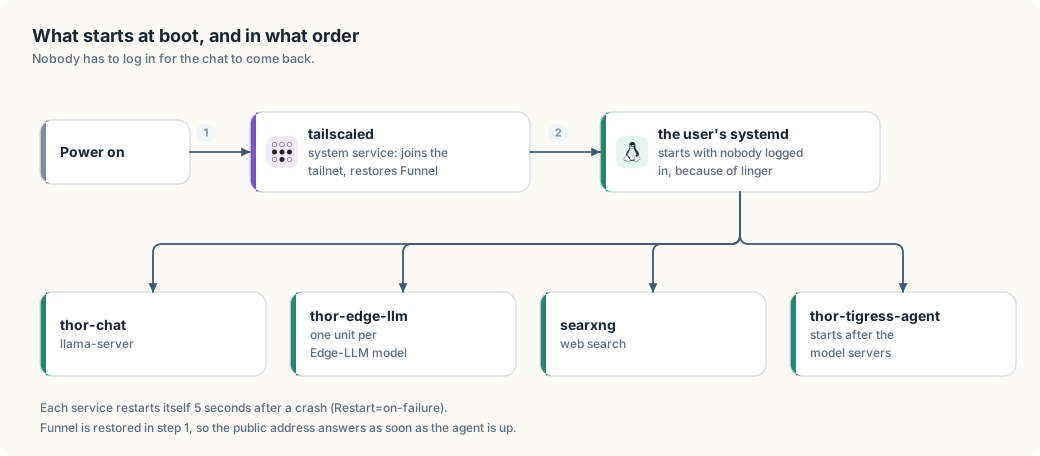
Measured: the last start of thor-chat (2026-10-05 05:17:55) loaded the model
and listened 6 seconds later, with the model file already in memory cache.
Not measured yet: the time from power-on to the first answer, when the
two model files (33 GB and 35 GB) have to come from disk. With both files in
the memory cache, a restart on 2026-10-06 had both models loaded in 32
seconds.
After a reboot, check from the Thor:
systemctl is-active tailscaled
systemctl --user is-active thor-chat thor-tigress-agent searxng
tailscale funnel status                              # Funnel on, / → 127.0.0.1:8080
curl -s 127.0.0.1:8080/health                         # {"status":"ok"}
curl -s https://arpanpathak.taildb9a39.ts.net/health  # the same, from outside
Runbook
The key leaked
Signs: someone uninvited is chatting, or a personal key was pasted somewhere public. Whose key it is decides the command.
ssh thor
thor-tigress-serve keyring keys          # who is active; the keys are masked
thor-tigress-serve keyring revoke KEY    # one leaked key: end that person
thor-tigress-serve keyring revoke-all    # every active key, at once
The agent re-reads the file when the keyring changes, so the next request is
refused: no restart, and a reply in progress is not cut off. The records stay,
so the people who should keep access are approved again with approve EMAIL,
and each is sent a new key.
If what leaked was the service key, the one the agent sends to llama-server, rotate it and restart both services:
thor-tigress-serve key
systemctl --user restart thor-chat thor-tigress-agent
cat ~/.config/thor-chat/api-key
Then copy the new service key to each machine you work from:
(umask 077; ssh thor cat .config/thor-chat/api-key > ~/.config/thor-chat/api-key).
Personal keys are unaffected by that rotation.
Abuse: stop everything now
ssh thor 'sudo tailscale funnel --bg 8080 off'
The public address stops answering within seconds; the Thor, the model and the
tailnet keep working, so your own devices still reach it over Tailscale or the SSH tunnel. To turn
it back on: sudo tailscale funnel --bg 8080. Rotate the key before turning it
back on if the abuse came from a key holder.
Move to a new Tailscale address
Use this when the name itself attracts unwanted traffic. It does not replace rotating the key.
1. Choose the new name. Either:
- New machine name (the part before the first dot): Tailscale admin console
→ Machines → the Thor → ⋯ → Edit machine name → untick
“Auto-generate from OS hostname” → type the new name → Update name.
The address becomes
<new-name>.taildb9a39.ts.net. - New tailnet name (the
taildb9a39part, for every device): admin console → DNS → Tailnet DNS name → Rename tailnet… → pick one of the offered names.
2. Bring Funnel up on the new name, on the Thor:
tailscale status --self --json | python3 -c "import sys,json;print(json.load(sys.stdin)['Self']['DNSName'])"
sudo tailscale funnel --bg 8080      # re-applies Funnel for the current name
tailscale funnel status
curl -s https://<new-address>/health
The first HTTPS request may take a few seconds while Tailscale gets the new certificate. The new name enters the public certificate logs at that moment.
3. Update every place that names it. On any machine with the two
repositories cloned (paths below assume ~/Projects):
OLD=arpanpathak.taildb9a39.ts.net
NEW=<new-address>

gh repo clone arpanpathak/voltforge.tech ~/Projects/voltforge.tech 2>/dev/null || git -C ~/Projects/voltforge.tech pull
cd ~/Projects/voltforge.tech
grep -rl "$OLD" --include='*.html' --include='*.md' . | xargs sed -i "s/$OLD/$NEW/g"
git commit -am "Forward to $NEW" && git push

cd ~/Projects/thor-thunder-tigress-platform
grep -rl "$OLD" book/src jetson-thor | xargs sed -i "s/$OLD/$NEW/g"
git commit -am "New Tailscale address" && git push
(On macOS, sed -i '' instead of sed -i.) GitHub Pages republishes the
forwarding page within a minute or two; the DNS at Namecheap does not
change, because voltforge.tech points at GitHub, not at the Thor. This is
the main benefit of the forwarding page.
4. Tell people. Their saved key and history belong to the old address;
on the new one they paste the key again. Agents need the new --openai-url
or ANTHROPIC_BASE_URL.
5. Check.
curl -s https://voltforge.tech/thor-tigress-cub | grep -o 'url=[^"]*'   # the new address
curl -s https://arpanpathak.taildb9a39.ts.net/health                      # old name: no answer
Change a DNS record
All records live at Namecheap → Domain List → Manage next to
voltforge.tech → Advanced DNS → Host Records.
- Edit: click the value, change it, click the green tick.
- Add: Add New Record, choose the type, fill Host and Value, green tick.
- Delete: the trash icon at the end of the row.
| To | Record |
|---|---|
| point the bare domain somewhere else | change the four A records for @ (an A record holds an IP address) |
point www somewhere else | change the CNAME for www (a CNAME holds another name, ending in a dot) |
add chat.voltforge.tech for another GitHub Pages site | CNAME, Host chat, Value arpanpathak.github.io., plus a CNAME file containing chat.voltforge.tech in that site’s repository |
| prove the domain to GitHub | TXT, Host _github-pages-challenge-arpanpathak, the value GitHub shows |
Records have a time to live of about 30 minutes, so old answers can linger that long. Check what the world sees, not your own machine’s cache:
curl -s "https://dns.google/resolve?name=voltforge.tech&type=A" | python3 -m json.tool | grep data
curl -s "https://dns.google/resolve?name=www.voltforge.tech&type=CNAME" | python3 -m json.tool | grep data
If the A records stop pointing at GitHub, GitHub Pages loses the
certificate for voltforge.tech and will request it again once they are
back.
A service is down
| Symptom | Check | Fix |
|---|---|---|
voltforge.tech loads, the Thor’s address doesn’t | curl https://arpanpathak.taildb9a39.ts.net/health | on the Thor: tailscale funnel status; sudo tailscale funnel --bg 8080 |
| the page loads, red dot | systemctl --user status thor-tigress-agent thor-chat | systemctl --user restart thor-chat thor-tigress-agent |
| replies never start | curl 127.0.0.1:8079/health on the Thor | journalctl --user -u thor-chat -n 50; memory: free -g |
| Web finds nothing | systemctl --user status searxng | systemctl --user restart searxng |
voltforge.tech itself fails | the DNS checks above; the repository’s Pages settings | see chapter “Bring your own domain”, “When a step fails” |
Keep it updated
| What | How | How often |
|---|---|---|
| Tailscale | sudo apt update && sudo apt upgrade tailscale | monthly |
| llama.cpp | cd ~/.local/src/llama.cpp && git pull && cmake --build build -j then restart thor-chat | monthly, or for a security fix |
| SearXNG | cd ~/.local/src/searxng && git pull, reinstall into its venv, restart | monthly |
| JetPack | NVIDIA’s release notes | per release |
Known gaps
Not fixed yet; each needs a decision or work.
| # | Gap | Risk | Now | Fix |
|---|---|---|---|---|
| 1 | fixed on 2026-10-07: thor-tigress-keyring keeps one key per person, and revoke / revoke-all take access back one at a time or all at once | |||
| 2 | No limits per person | one key holder can keep all four slots busy | none | per-person token allowance and a fair queue (planned server) |
| 3 | No record of who used what | abuse can’t be traced to a person | the keyring says who may, not who did; journalctl shows requests, not people | per-person accounting (planned server) |
| 4 | Domain not verified on GitHub | if the voltforge.tech repository or its Pages site is removed while DNS still points at GitHub, someone else could claim the domain on GitHub Pages | DNS points at GitHub; repository exists | add the TXT record from “Bring your own domain”, step 4 |
| 5 | The Tailscale name is written in five places | a rename needs the update in the runbook above | documented sed commands | one config value that the page, the About page and the forwarding page are built from |
| 6 | The service key shown in a chat earlier (2026-10-05) may still be the current api-key | it may be in that chat’s history, and the agent still accepts it as the operator key | not rotated | rotate the service key (“The key leaked”); personal keys are separate |
| 7 | No monitoring | nobody is told when the Thor or Funnel goes down | people notice | an external check of /health every few minutes that sends a message on failure |
| 8 | Cold-boot time not measured | unknown downtime after a power cut | reboot once, time power-on to /health | |
| 9 | Accounts behind the domain | whoever gets into the Namecheap or GitHub account can redirect visitors | depends on those accounts | two-factor authentication on both, checked |
| 10 | When the Thor is down, voltforge.tech still forwards | visitors land on a browser error instead of a message | the forwarding page checks /health first and shows “the Thor is offline” | |
| 11 | Updates are manual | old llama.cpp or Tailscale with known bugs | the table above | a monthly reminder, or unattended upgrades for Tailscale |
| 12 | fixed on 2026-10-06: thor-tigress-agent compares keys in constant time (config::same_secret) | |||
| 13 | The invite form (POST /request) is open and unmetered | anyone can fill the waiting list, and each request costs an Argon2id run | approval is by hand, so the list is the only damage | a rate limit on that one route |