
Model serving
2026-10-11. llama-server now runs with
--no-models-autoload: it loads a model at startup or whenloadasks, and no longer because a request named one. Everything else in this chapter is unchanged. The details are in chapter Coding tools on TensorRT Edge-LLM.
thor-tigress-serve manages the models on the Thor. It lists them, loads and
unloads a specific one, and finds and downloads the newest ones from
Hugging Face.
This chapter covers
- the commands
- trying a new model from Hugging Face, start to finish
- the checks that keep the chat from running out of memory
- settings, and changing the default model
- what runs underneath
- the memory budget, measured, and models worth trying
- what goes wrong and how to tell
The commands
On the Thor (ssh thor):
| Command | What it does |
|---|---|
thor-tigress-serve list | the models on this Thor, each with a key |
thor-tigress-serve list-latest | the newest chat models on Hugging Face that fit, each with a key |
thor-tigress-serve load KEY|NAME | load a model from list |
thor-tigress-serve unload KEY|NAME | unload it |
thor-tigress-serve download KEY|REPO | download a model from list-latest |
NAME is the model’s id, as list shows it without the spacing (for
example NVIDIA-Nemotron-3.5-Lightning-30B-A3B-Q8_0). REPO is the Hugging
Face repository (for example unsloth/LFM2.5-VL-3B-GGUF).
$ thor-tigress-serve list

Thor: 59.3 GB free of 122.8 GB · keeps 8 GB free · at most 2 models loaded

  key  model                                          state                 size
  1    Nemotron 3 Nano 30B A3B · Q8_0                 loaded             33.6 GB  default (nemotron)
  2    Nemotron 3.5 Lightning 30B A3B · Q8_0          on disk            35.0 GB
  3    Qwen3.6 27B · Q4_K_M                           on disk            16.8 GB
  4    Qwen3.6 35B A3B NVFP4                          loaded             23.4 GB  TensorRT Edge-LLM · :8081
Key 4 runs on TensorRT Edge-LLM instead of llama.cpp (chapter “TensorRT
Edge-LLM”). load and unload start and stop its service, with the same
memory check.
| State | Meaning | Command |
|---|---|---|
loaded | in memory; the web chat’s picker offers it | unload |
on disk | a GGUF file under ~/models/gguf/, not in memory, not offered by the chat | load |
on Hugging Face | shown by list-latest; not downloaded yet | download |
The default model (the Nano) is always key 1. Every GGUF under
~/models/gguf/ shows up without any setup, so Nemotron 3.5 Lightning is
thor-tigress-serve load 2. It was unloaded on 2026-10-06 because its
answers were disappointing.
Keys follow the list, so a key can change when a model is loaded or added. Names don’t change.
Try a new model, start to finish
This is the run of 2026-10-06 with the smallest model in list-latest.
The model was deleted afterwards.
1. See what is new. list-latest lists the newest chat models from the
unsloth and ggml-org GGUF collections on Hugging Face:
$ thor-tigress-serve list-latest
asking Hugging Face for the newest models…
  key  model                                          state                 size
  1    Clef · Q8_0                                    on Hugging Face    28.7 GB  2026-10-02 · apache-2.0 · ggml-org/Clef-GGUF
  2    Clef Flash · Q8_0                              on Hugging Face     9.7 GB  2026-10-02 · apache-2.0 · ggml-org/Clef-Flash-GGUF
  …
  9    LFM2.5 VL 3B · Q8_0                            on Hugging Face     2.9 GB  2026-08-12 · other · unsloth/LFM2.5-VL-3B-GGUF
Each line shows the date the GGUF was published, the licence and the repository. The list is filtered:
- Chat models only. Embedding, image and video models are left out.
- Architectures this llama.cpp can run. They are read from
~/.local/src/llama.cpp/src/llama-arch.cpp. - Models that fit the Thor alone. Anything bigger is left out.
- One quant per model. The best of Q8_0, Q6_K, Q5_K_M, Q4_K_M and MXFP4 that fits in the memory free right now; if none fits, the smallest. A model that fits only without the Nano says “fits only after unloading the default”.
The list is saved to ~/.cache/thor-tigress-serve/latest.json, so the keys
in download refer to the last list-latest.
2. Download. The file goes to ~/models/gguf/LFM2.5-VL-3B/. An
interrupted download resumes when you run the same command again. The Thor
downloads at about 69 MB/s.
$ thor-tigress-serve download 9
downloading LFM2.5-VL-3B-Q8_0.gguf into /home/arpanpathak/models/gguf/LFM2.5-VL-3B
downloaded 2.9 GB; see thor-tigress-serve list, then load it
3. Load. It is now on disk:
$ thor-tigress-serve load LFM2.5-VL-3B-Q8_0
loaded in 2 s; sending one token to commit its memory
ready: 54.6 GB free
The web chat’s picker offers it from now on, and so does the API under its id. A reply through the agent ran at 70 tok/s.
4. Unload. It leaves memory and the chat’s list, and is on disk again:
$ thor-tigress-serve unload 2
unloaded: 4.6 GB freed, 59.2 GB free
off the chat page's list; still on disk
5. Delete it when you are done with it: rm -r ~/models/gguf/LFM2.5-VL-3B.
The checks
Running out of memory takes the whole chat down: the kernel stops
thor-chat, and every model with it. So load checks before and while it
loads:
| Check | When | Measured on 2026-10-06 |
|---|---|---|
no more than MODELS_MAX loaded | before | “not loaded: 1 loaded already, the most at once is 1 (MODELS_MAX); unload one first” |
file size + 2 GB fits while keeping MIN_FREE_GB free | before | with MIN_FREE_GB=200: “not loaded: needs about 5 GB, only 0 GB can be used while keeping 200 GB free” |
free memory stays above MIN_FREE_GB | while loading, every second | undoes the load |
| the same, while the model writes one token | after loading | undoes the load |
The last check exists because the Thor commits memory when it is first used. A model can look loaded with memory to spare and still run out on its first reply.
The first check matters because llama-server, when asked to load one model
too many, silently unloads the one used least recently. That can be the
Nano, everyone’s default. thor-tigress-serve refuses instead.
Unloading the default asks first:
$ thor-tigress-serve unload 1
This is the default model: the chat stops answering until it is loaded again. Unload? [y/N]
Without a terminal to answer, the answer is no.
These checks can’t catch everything. A model given a long context can still grow past the limit later, when a long conversation fills it. Models loaded from disk get one reply at a time and 64K tokens of context for that reason.
Settings
In ~/.config/thor-chat/env, one KEY=value per line. The file is empty
on the Thor today, so the defaults apply.
| Setting | Default | What it does |
|---|---|---|
MODEL | ~/models/gguf/Nemotron-3-Nano-30B-A3B/NVIDIA-Nemotron-3-Nano-30B-A3B-Q8_0.gguf | the default model, always key 1, loaded at start, also called nemotron and nemotron-think |
USERS | 4 | the default model’s replies at once |
CONTEXT | 1,048,576 | the default model’s tokens per reply |
MODELS_MAX | 2 | models in memory at once |
MIN_FREE_GB | 8 | memory load keeps free |
EDGE_MODEL | none; on the Thor ~/models/edge-llm/Qwen3.6-35B-A3B-NVFP4 | a checkpoint folder served by TensorRT Edge-LLM; its folder name is the model id |
EDGE_PORT, EDGE_CONTEXT | 8081, 32768 | its server’s port and tokens per reply |
PORT, MODEL_PORT, SEARCH_PORT | 8080, 8079, 8888 | the page and API, llama-server, SearXNG |
A change to MODEL, USERS, CONTEXT or MODELS_MAX takes effect when
thor-chat restarts. That cuts off every reply being written, so wait until
nobody is mid-reply:
K=$(cat ~/.config/thor-chat/api-key)
until [ "$(curl -s "127.0.0.1:8079/slots?model=nemotron" -H "Authorization: Bearer $K" |
           python3 -c "import sys,json;print(sum(s['is_processing'] for s in json.load(sys.stdin)))")" = 0 ]; do sleep 2; done
systemctl --user restart thor-chat
To make another model the default, point MODEL at its file and restart.
The aliases nemotron and nemotron-think follow MODEL, so Claude Code
and OpenCode keep working; they get the new model under the old name.
The other commands
| Command | What it does |
|---|---|
thor-tigress-serve install | writes the services (thor-chat, thor-tigress-agent, and thor-edge-llm when EDGE_MODEL is set), starts them at boot, and puts thor-tigress-serve in ~/.local/bin |
thor-tigress-serve uninstall | stops and removes both services |
thor-tigress-serve key | writes a new access key; restart the services to use it |
thor-tigress-serve logs | follows both logs |
The services run thor-tigress-serve run and thor-tigress-serve agent;
you don’t run those by hand. On a fresh Thor, the first install is run from
the repository: jetson-thor/model-serving/thor-tigress-serve install.
What runs
| Part | What it is |
|---|---|
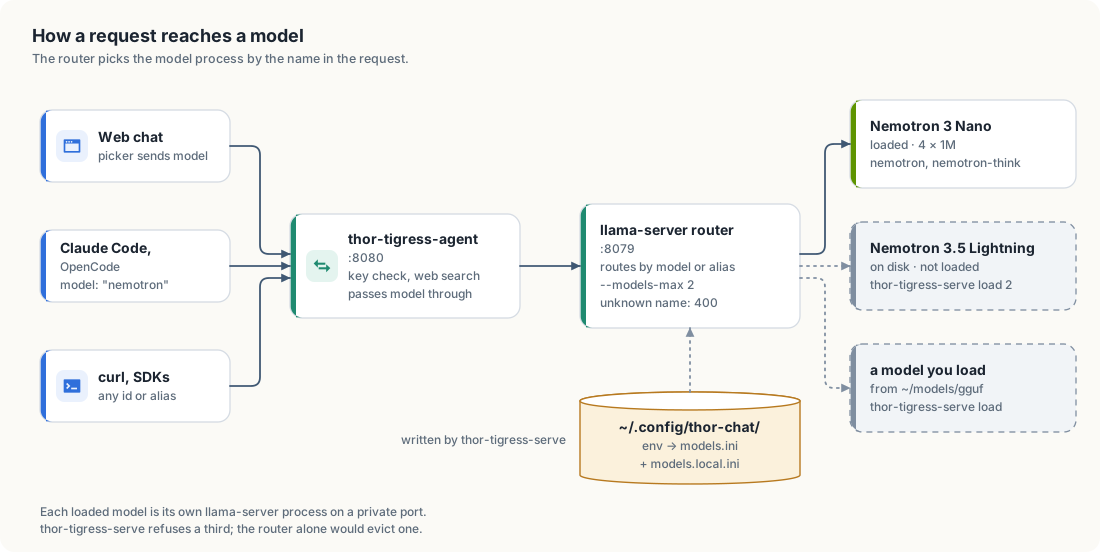
thor-chat | systemd user service: thor-tigress-serve run, llama-server in router mode on 127.0.0.1:8079 |
| one llama-server per loaded model | started by the router on a private port |
thor-edge-llm | systemd user service: thor-tigress-serve edge, TensorRT Edge-LLM’s server on 127.0.0.1:8081, capped at 48 GB |
thor-tigress-agent | systemd user service: thor-tigress-serve agent, the page, key check, web search and API on :8080; passes model through unchanged |
~/.config/thor-chat/models.ini | the router’s list of models; written by thor-tigress-serve, don’t edit it |
~/.config/thor-chat/models.local.ini | the models loaded from disk; written by load, emptied by unload |
jetson-thor/model-serving/thor-tigress-serve | the command: one Python file, standard library only |
The router’s rules, from llama.cpp’s source
(tools/server/server-models.cpp, commit 8216c84):
- Names. Every request names a model by id or alias. A missing name gets
400 model name is missing from the request. An unknown one gets400 model 'x' not found. - Autoload. A request for a listed model that isn’t loaded loads it.
- Limit. Past
--models-max, it unloads the least recently used model. - Reload.
GET /models?reload=1re-readsmodels.ini. A running model whose section is unchanged keeps running.
The memory budget
| Part | Size | How we know |
|---|---|---|
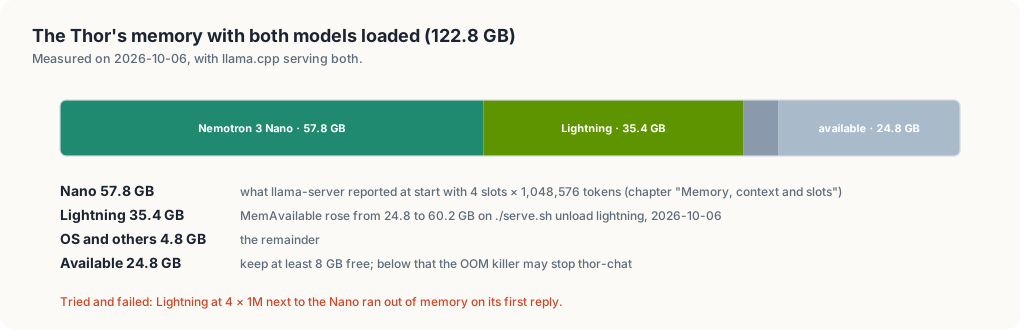
| Nemotron 3 Nano, 4 × 1,048,576 | 57.8 GB | llama-server’s own report at start (chapter “Memory, context and slots”) |
| Nemotron 3.5 Lightning, 1 × 262,144 | 35.4 GB | free memory before and after unloading it |
| OS, agent, SearXNG | 4.8 GB | the remainder |
| free with the Nano alone | about 59 to 60 GB | the list’s header |
A process’s own size (RSS) is no use here: the CPU and GPU share one
memory, and RSS leaves out the GPU buffers. The Nano’s process shows 2.3 GB
while it costs 57.8 GB. What a model costs is the change in free memory when
it loads, which load and unload print.
Estimate a model before downloading it
memory ≈ file size + context + about 2 GB
What context costs per token depends on the architecture:
- Hybrid Mamba models (Nemotron 3 Nano, Lightning, Nemotron 3 Super) keep a full key/value cache for a few attention layers only. A million tokens costs a few GB per slot, which is why the Nano holds 4 × 1M.
- Models with mostly sliding-window or linear attention (gpt-oss, the
qwen35architecture, whose llama.cpp code loads gated delta net layers, and Gemma 4) are cheap per token on most layers. - Dense models with full attention on every layer (Devstral Small 2) can cost more for the context than for the weights at long context.
Estimate its speed
Generating one token reads every active weight once, and the Thor reads memory at 273 GB/s. The Nano reads about 3.4 GB per token (3.2B active × about 1.06 bytes at Q8_0) and makes 53.5 tok/s, about two thirds of the 273 / 3.4 ≈ 80 limit. So:
tok/s ≈ 180 / (active parameters in billions × bytes per parameter)
bytes per parameter: Q8_0 ≈ 1.06, Q6_K ≈ 0.82, Q4_K_M ≈ 0.60, MXFP4 ≈ 0.53, IQ2 ≈ 0.30
This is an estimate calibrated on one model. A dense 27B model at Q8_0 reads 29 GB per token, so about 6 tok/s. That’s why the fast models below are mixtures of experts with few active parameters.
Models worth trying
As of 2026-10-06. Sizes come from Hugging Face’s file listings (unsloth GGUFs
unless noted), and every architecture was found in the Thor’s llama.cpp.
Speeds are estimates from the formula above; only the Nemotrons were
measured. “Fits”: A next to the Nano with 16 GB to spare, B next to
the Nano (about 50 GB), C alone. list-latest shows what is new since.
About 30B total, about 3B active
| Model | Total / active | Context | Licence | Quant, size | Fits | tok/s |
|---|---|---|---|---|---|---|
| Nemotron 3 Nano (the default) | 30B / 3B | 1M | NVIDIA Nemotron Open Model License | Q8_0, 33.6 GB | loaded | 53.5 measured |
| Nemotron 3.5 Lightning (on disk) | 30B / 3B | 1M | OpenMDW-1.1 | Q8_0, 35.0 GB | B | 52.5 measured |
| Qwen3.6-35B-A3B | 34.7B / 3B | 256K | Apache-2.0 | Q8_0, 36.9 GB; Q4_K_XL, 22.4 GB | B | 55 (Q8_0) |
| gpt-oss-20b (OpenAI; ggml-org GGUF) | 20.9B / 3.6B | 128K | Apache-2.0 | MXFP4, 12.1 GB | A | 90 |
Dense, 12B to 27B: strong per parameter, slow here
| Model | Params | Context | Licence | Quant, size | Fits | tok/s |
|---|---|---|---|---|---|---|
| Qwen3.8-27B | 27.3B | 256K | Apache-2.0 | Q8_0, 29.0 GB; Q4_K_M, 16.5 GB | B | 6 (Q8_0), 11 (Q4_K_M) |
| Devstral Small 2 (Mistral) | 23.6B | 384K | Apache-2.0 | Q8_0, 25.1 GB; Q4_K_M, 14.3 GB | B; Q4_K_M: A | 7 (Q8_0), 13 (Q4_K_M) |
| Gemma 4 12B | 11.9B | 256K | Apache-2.0 | Q8_0, 13.1 GB | A | 14 |
Large mixtures of experts: alone, or next to the Nano at low quants
| Model | Total / active | Context | Licence | Quant, size | Fits | tok/s |
|---|---|---|---|---|---|---|
| Qwen3-Coder-Next | 80B / 3B | 256K | Apache-2.0 | Q4_K_M, 48.5 GB; Q8_0, 84.8 GB | Q4_K_M: B, barely; Q8_0: C | 100 (Q4_K_M), 55 (Q8_0) |
| gpt-oss-120b (OpenAI; ggml-org GGUF) | 116.8B / 5.1B | 128K | Apache-2.0 | MXFP4, 63.4 GB | C | 65 |
| Mistral Small 4 | 119B / 6B | 1M | Apache-2.0 | Q4_K_M, 73.8 GB | C | 50 |
| Nemotron 3 Super | 120.7B / 12B | 1M | NVIDIA Nemotron Open Model License | Q4_K_M, 82.5 GB | C | 25 |
| Qwen3.8-Flash-Next | 125B / 6B (+51B n-gram embedding) | 256K | Qwen Community 1.0 | UD-Q2_K_XL, 78.9 GB | C | 65; 2-bit loses quality |
| DeepSeek-V4-Flash-0731 | 284B / not stated in the GGUF card | 1M | MIT | UD-IQ1_M, 86.9 GB | C | not estimated; 1-bit loses a lot |
| GLM-5.3-Flash | 320B / 18B | 1M | MIT | UD-IQ1_M, 97.6 GB | C, barely | 33; 1-bit loses a lot |
Too big for 128 GB at any quant
| Model | Total | Smallest GGUF |
|---|---|---|
| GLM-5.3 | 754B | UD-IQ1_M, 228.5 GB |
| Kimi K3 | 2.78T | UD-IQ1_M, 648.9 GB |
The models in list-latest are the ones unsloth and ggml-org publish. A
model from another repository can be tried by putting its GGUF under
~/models/gguf/<name>/; it then shows as on disk.
Benchmark claims come from the model makers and from roundups such as Thunder Compute’s October 2026 list and vdf.ai’s local coding comparison. Nothing here was measured on our tasks.
A newer llama.cpp
list-latest leaves out models whose architecture this llama.cpp doesn’t
know. To get them, rebuild it. This wasn’t run while writing this chapter,
and it rebuilds the binary every model uses:
cd ~/.local/src/llama.cpp
git pull
cmake --build build --config Release -j 14 --target llama-server
Then restart thor-chat with the wait-for-idle loop above, and update the
commit in chapter “Operations”.
What goes wrong
| You see | Cause | Do |
|---|---|---|
400 model name is missing from the request | a client sends no model | send nemotron or an id from the list |
400 model 'x' not found | a name that is no id or alias, or a model that is only on disk | load it first |
failed to load; see: journalctl … | bad file, unknown architecture, or out of memory | journalctl --user -u thor-chat -n 50 |
thor-chat … oom-kill in the journal | memory ran out; the router and all models restart | load fewer or smaller models |
| the first reply from a model takes 15 to 30 s | someone asked for a listed model that wasn’t loaded, so it loaded first | normal |
the model server said: … | thor-chat isn’t running or is restarting | systemctl --user status thor-chat |