Keys, and the cryptography under them
The chat used to run on one shared key. Everyone pasted the same string, and the only way to remove one person was to change the key for everybody. This chapter is about the replacement: an encrypted registry, one key per person, and the four cryptographic ideas it stands on.
This chapter covers
- why one shared key was replaced, and what the registry looks like
- Argon2id: why a passphrase is stretched into a key
- XChaCha20-Poly1305: encryption that also notices a change
- the habits that matter as much as the algorithms: a fresh nonce, a constant-time compare, wiping memory, writing the file whole
- what this protects, and the four things it does not
Why not one key
A shared key has two problems. It cannot be taken back from one person: ending one person’s access ends everyone’s. And it says nothing about who is who, so there is no list to check and no record to keep.
The replacement is a keyring: one encrypted file, ~/.config/thor-chat/ keyring, holding a record per person. Each record has a name, an email, a
status and a key. The chat server keeps the active keys in memory and lets in a
request that carries one of them.
The file
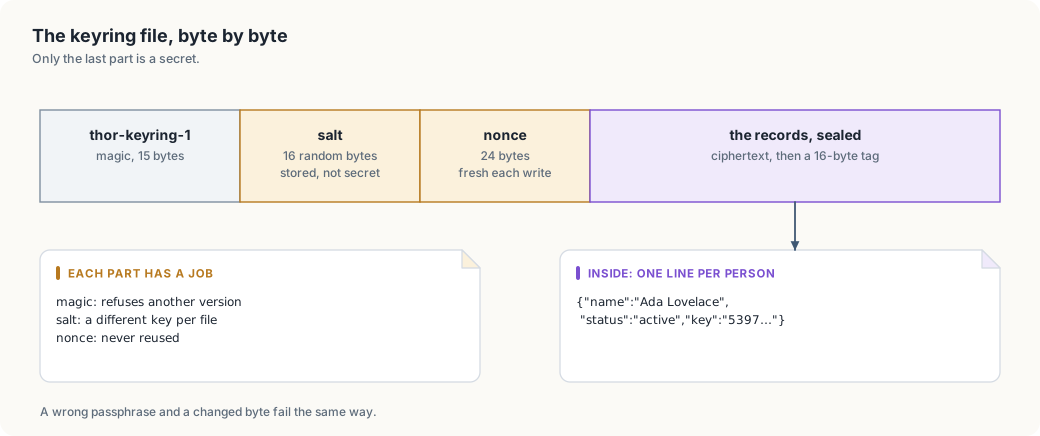
The first three parts are plain and short. The magic line names the format and its version, so a file from a later version is refused rather than misread. The salt is random and public. The nonce is random and public. Everything private is inside the last part, which is unreadable without the passphrase.
From a passphrase to a key
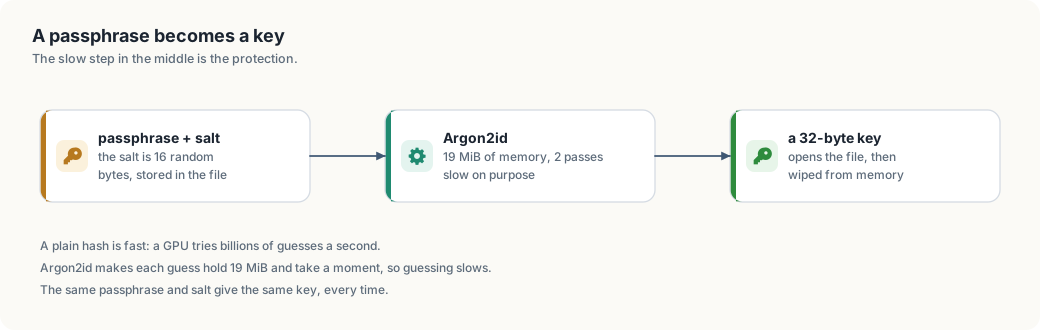
Encryption needs a key of an exact size, and people give passphrases. Turning one into the other is the job of a key derivation function, KDF. The one here is Argon2id, the winner of the 2015 Password Hashing Competition and the current default in most toolchains.
Why not just a hash
A hash such as SHA-256 is built to be fast. That is right for checking a file, and wrong for a passphrase. A password draws from a small space: a human picks a few thousand words, while a key draws from 2^256 values. An attacker who has the file can guess passphrases and check each guess with the same fast hash, billions of times a second on a graphics card.
Argon2id makes each guess expensive in two ways at once:
- Time: it is deliberately slow, and the number of passes is a parameter.
- Memory: it fills megabytes of memory and walks through them. A GPU has thousands of threads but little memory per thread, so it cannot run as many guesses in parallel.
The cost multiplies against the attacker, and barely matters against you: a human waits a moment once, at the keyboard.
The salt
The salt is 16 random bytes stored in the file. It does two jobs:
- Two files do not share a key. The same passphrase on two keyrings gives two different keys.
- Precomputed tables do not apply. An attacker cannot prepare answers for common passphrases in advance; each new salt forces the work to be redone.
The salt stays public, and it only has to be unique.
The parameters here
| Setting | Value | Effect |
|---|---|---|
| memory | 19,456 KiB (19 MiB) | the size of the work area; raises the cost of parallelism |
| passes | 2 | how many times that area is walked |
| lanes | 1 | one thread of work; the agent’s writes are rare, so this keeps it simple |
| output | 32 bytes | the key XChaCha20-Poly1305 takes |
These are the Argon2id defaults in the RustCrypto crate, and a reasonable
starting point; they make no claim to be optimal. Raising memory is the usual
first move; the parameters live in
crates/thor-tigress-keyring/src/crypto.rs as named
constants, so a change is one line and its consequences are visible.
Sealing, and noticing a change
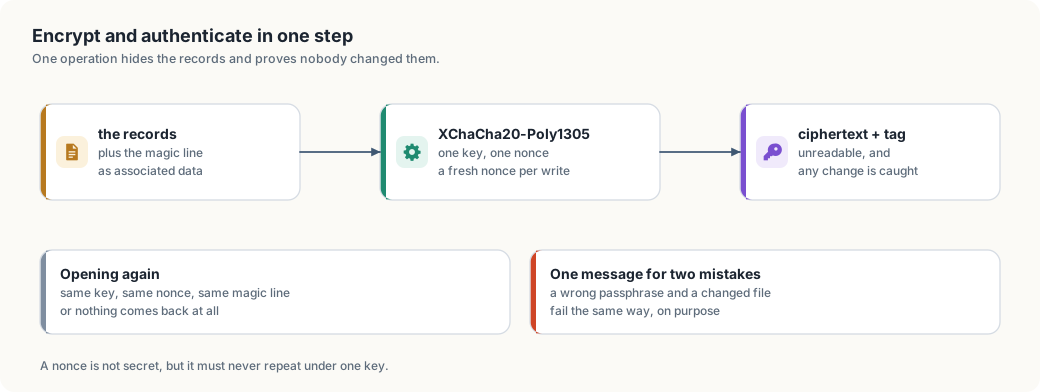
The file is encrypted with XChaCha20-Poly1305. The long name is worth unpacking because each part earns its place.
- ChaCha20 is a stream cipher: it turns a key and a nonce into a stream of bytes, and XORs them with the message. It is fast in software, which matters on the Thor’s ARM cores.
- Poly1305 is a message authentication code. It computes a short tag over the ciphertext.
- AEAD means authenticated encryption with associated data: one operation gives confidentiality (nobody can read it) and integrity (nobody can change it without the tag failing).
A nonce is a one-time number
A nonce is not secret, but it must never repeat under the same key. If the same key and the same nonce encrypt two messages, XORing the two ciphertexts cancels the stream and exposes both plaintexts. The keyring draws a fresh random 24-byte nonce on every write. At 24 random bytes, a repeat is not something to plan around.
The associated data
The magic line is passed as associated data: it is authenticated but not encrypted, so it stays readable while any change to it is caught. This binds the format to the ciphertext. A file with the right key but a wrong or later version fails, instead of being read as if it were this version.
One message for two mistakes
A wrong passphrase and a changed file both fail the same tag check, and the tool says the same thing for both:
wrong passphrase, or the file was changed
That is on purpose. Telling the two apart would tell an attacker which guess produced a valid file.
The keys themselves
A person’s key is 24 random bytes, written as 48 lowercase hex characters,
made by the operating system’s random source. It is the same shape as the
single key thor-tigress-serve key makes, so the tools line up.
Two habits protect keys while they are in use:
- Compare in constant time.
key == expectedstops at the first differing byte, and the time it takes leaks how long a shared prefix was. The server compares every byte and ORs the differences, so the time depends on the length alone. - Wipe when done. The derived key and the passphrase sit in memory while the command runs. Both are wrapped in a type that overwrites them on drop, so a crash dump or a swapped page is less likely to hold them.
Neither is visible in normal use. Both are the kind of detail that decides whether an attack is theoretical or practical.
Writing the file safely
Every change follows the same three steps:
- Seal the whole file with a fresh nonce.
- Write a temporary file next to the real one, with permissions that let
only the owner read it (
600). - Rename it over the old one. A rename is atomic: a reader sees either the old file or the new one, never half of each.
So a crash while approving someone leaves the previous keyring whole. The cost is that the whole file is rewritten on every change, which suits a registry of hundreds of people; millions of events would outgrow it.
The life of a key
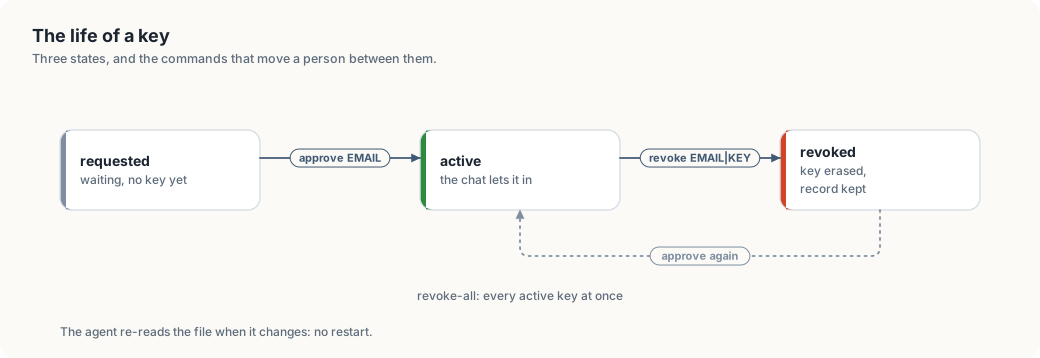
| Command | What it does |
|---|---|
request NAME EMAIL | records someone as waiting; asking twice changes nothing |
approve EMAIL | mints a key, marks the person active, prints the key once |
revoke EMAIL|KEY | erases the key, keeps the record |
revoke-all | erases every active key at once |
keys | lists everyone; keys are shown as 53976da2… |
show EMAIL | prints one person’s key in full |
The chat server holds the active keys in memory and re-reads the file when its timestamp changes. A revoke takes effect on the next request: no restart, and no reply in progress is cut off.
What this does not protect
The honest list, in the order it matters.
- The machine. Whoever has the Thor’s user account can read the running server’s memory, and can read the passphrase file if the services were set up with one. Encryption protects a copy of the file that is carried away, not the machine it lives on.
- A weak passphrase. Argon2id raises the cost of each guess; it cannot rescue a passphrase made of one word. Use several.
- Old copies. There is no forward secrecy here. A backup of the file and the passphrase open every record that was in it when the copy was taken. Rotating the passphrase means making a new keyring.
- The registration form. It accepts a name and an email from anyone, and each request makes the server do Argon2 work. It can be spammed, and the work can be used to keep the CPU busy. Approval is by hand, so spam reaches the waiting list and nothing else. A rate limit on that one route is the obvious next hardening step.
The code, and its dependencies
The registry is one small crate, crates/thor-tigress-keyring:
| File | Contents |
|---|---|
crypto.rs | Argon2id, the seal and the open, the sizes and parameters |
store.rs | the records, the file format, the atomic write |
cli.rs | the commands, the passphrase sources |
error.rs | the one error type |
It uses four crates from RustCrypto, named here
because a reader should not have to guess where the cryptography comes from:
argon2, chacha20poly1305, getrandom and zeroize. Everything those
crates do is audited, widely used and pure Rust, so the book can explain the
bytes rather than pointing at a black box.
The chat server’s half is in crates/thor-tigress-agent/src/config.rs, in the
People type: it opens the keyring, keeps the active keys, reloads on change,
and records what the invite form posts.